E-commerce Search Demo
AI Assisted Filters
Parameters
Query:
Category filters: All
AI Assist: ON
Page: 1
Products
Time taken: 2 Max score: 1000.000 Total hits: 100 Full time: 0.0 s
Showing 1-10 of 100 products
 B01M4L94ME Availability: Currently unavailable Score: 1000.000 Category: Electronics Rating: 2.7 Votes: 7 Find similar productsAVACON Lightning to HDMI VGA, USB USB-C to HDMI VGA UHD 4K EZCAST Adapter for iPhone, iPad, iMac,MacBook,Windows, Android Phone. Support Model Android devices, Samsung, Huawei, HTC, LG, Vivo, xiaomi iOS devices, iPhone, iPad MacOS device, iMac, MacBook Air, MacBook Pro, Mac Mini Windows devices, laptop or computer Support Input Cord Female USB cord, the plugin USB cord could be from USB-C to USB, Lighting to USB, Micro USB to USB, USB to USB. How to use iOS device, iPhone, iPad, just connect your iPhone or iPad to the device by original Apple Cable or MFI Certificated cable and then turn on the hotspot and AirPlay . Android device, MacOS or Windows device, please download the EZcast from http://www.iezcast.com/os_download.php?l=en, or just search EZcast on Google Play, App store. After connect this device with USB cable, turn on the EZcast, you could see the content on the HDTV or the monitor. You could get more info from instruction in the package or text us. | 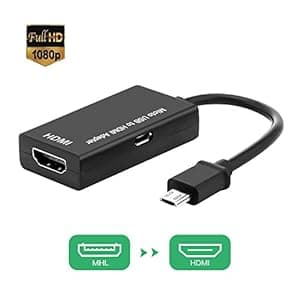 B01CJRB8B6 Availability: Currently unavailable Score: 7.752 Category: Electronics Rating: 3.3 Votes: 71 Find similar productsMHL to HDMI HDTV Adapter, Micro USB to HDMI Cable for Android Smart Phones, Tablets with MHL Function. . |
 B07F2W7846 Availability: Currently unavailable Score: 7.692 Category: Electronics Rating: 3.2 Votes: 17 Find similar productsUSB C to HDMI, Jmday Abuy USB Type C to HDMI Adapter Cable for Apple MacBook/iMAC, Samsung Galaxy S10/S9/Note 9, Google ChromeBook, Surface book 2 and More. USB 3.1 Type C to HDMI Adapter The USB 3.1 Type C to HDMI Adapter lets you connect a USB Type C device to the HDMI port of a TV or projector to display video and audio. Ultra-portable The ultra slim and lightweight adapter is the perfect accessory for your MacBook and other devices with USB-C port, fitting easily into your bag. Compatible Devices(not a full list): Laptops: - MacBook Pro 15inch & 13inch, 2018 / 2017 / 2016 - MacBook, 2017 / 2016 / 2015 - iMac/iMac Pro, 2017 - Dell XPS 15 / 13 - Surface Book 2 - ChromeBook Pixel - HP Spectre X360 / EliteBook Folio G1 - Lenovo Yoga 910 / 920 - Acer V15 Nitro - Asus ZenBook UX390UAK Smartphones: - Samsung Galaxy S10 / S10 Plus, S9 / S9 Plus, S8 / S8 Plus, Note 8 / Note9 - Huawei P20 / P20 Pro, Mate 20/ Mate 20 pro, Mate 10 / Mate 10 pro - LG G5 - Lumia 950/950 XL(Only support 1080p@60Hz) Tablets: - iPad Pro 11'' / iPad Pro 12.9'', 2018 Important Notes: - DisplayPort Alternate Mode support is required to connect a display. - ASMedia USB 3.1 controllers do not support Alt Mode video at this time. - 4K resolution requires a 4K capable computer and display. | 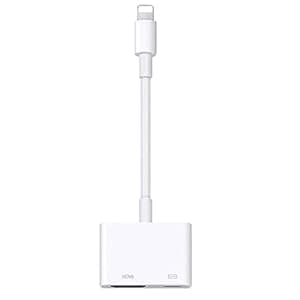 B08KY45RCS Price: $10.99 Score: 7.634 Category: Electronics Rating: 3.1 Votes: 291 Find similar products[Apple MFi Certified] Lightning to HDMI,1080P Lightning to Digital Audio AV Adapter, HDMI Sync Screen Connector Compatible with iPhone 11/11 Pro/XS/XR/X/8, iPad Pro Mini on HD TV Projector Monitor. High Quality to 1080P HD The Digital HDMI Adapter supports mirroring what is displayed on your device screen, including images, movies, games and more to your HDMI equipped TV, display, projector or other compatible display in resolutions up to Full High Def (1080P), Providing ultra-clear visual feast in daily life and work. Plug and play, Easy to Use No additional APP or Personal Hot spot or WIFI needed, No need to adjust the Mirror of Phone/Pad, just insert each interface to corresponding device, click the Trust button when connecting and wait a few seconds to connect automatically, easy and quick to install, saving your much time. Please Note: 5V/1A USB Charging cable MUST be plugged before use. Strong Compatibility Great and cheaper way than buying a smart TV for viewing your Phone/Pad with this affordable and high-quality adapter. This adapter is compatible with varieties of devices, such as iPhone XR/XS/XS Max/iPhone 8/8 Plus/7/iPhone 7 Plus, iPhone 6s / iPhone 6s Plus, iPad Air/mini/Pro, Pod touch(5th Generation), Support iOS 13/12/11 System. Apps Supported This Phone to HDMI connector supports mirror videos from Apps, such as YouTube, Quickflix, Hulu Plus, IDMB, Family On TV, ABC, NBC, FOX, Microsoft Office and more videos downloaded and saved on your iOS Devices for stream. But Please note that it DOESN’T work with Apps which have HDCP video copyrights protection, such as Netflix, Prime video, Amazon video, HBO go, HULU and Honda motor. You can get 30-day money back guarantee,18-month limited product warranty. How to Use: Step 1: Insert the HDMI cable into the 5V/2A USB AC Adapter (Recommend original cable) Step 2: HDMI Port: connect to your TV or big screen via HDMI cable. Step 3: Connection: connect into your Phone, Pad, Pod. Step 4: Please click the Trust and wait 5 seconds to synchronize the phone screen with the TV. |
 B07PD2NPNH Availability: Currently unavailable Score: 7.634 Category: Electronics Rating: 5 Votes: 1 Find similar productsAdapter for iPhone to HDMI Rafikatayw16. Adapter for iPhone to HDMI Rocka33 gy16. | 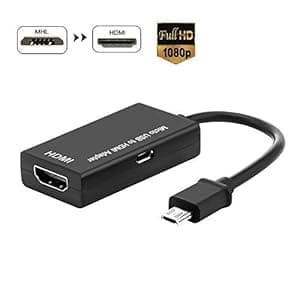 B07K77SQXR Availability: Currently unavailable Score: 7.576 Category: Electronics Rating: 3.1 Votes: 88 Find similar productsMicro USB to HDMI Adapter, MHL to HDMI HDTV Converter Cable for Android Samsung Smart Phone & Tablet, Support 1080P High Resolution. . |
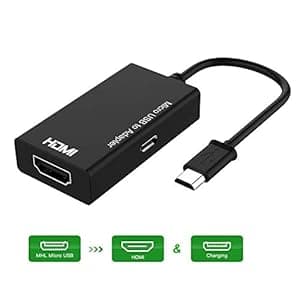 B07TBYC83J Availability: Currently unavailable Score: 7.519 Category: Electronics Rating: 3.2 Votes: 45 Find similar productsMHL to HDMI Adapter for Android Phone, Micro USB to HDMI Video Converter, Support Mirror The Display, HD 1080P Video & Audio Output. Feature: - Input: 5-pin Micro USB (MHL) Male - Output: HDMI Female - Power Charging: Micro USB Female; Could charge your phone while using User Guide: 1. Plug the Micro USB(MHL) cable to your devices directly 2. Plug the HDMI cable to your TV and switch the TV to HDMI channel 3. Plug the USB cable to power adapter (at lease 5V 1A) 4. Reboot your devices after whole connection finished Warm Tips: 1. Please reboot your phone after whole connection finished 2. Please connect the power port to power this adapter (>5V 1A) while using. 3. Please make sure your devices are MHL supported, you could check out your device was compatible or not on: http://www.mhltech.org/devices.aspx. |  B015K5JTSS Availability: Currently unavailable Score: 7.463 Category: Electronics Rating: 5 Votes: 2 Find similar productsZHISHAN Gold Plated Active Micro HDMI to VGA Adapter Male to Female 1080P. . |
 B07VVHW5YX Availability: Currently unavailable Score: 7.463 Category: Electronics Rating: 3.9 Votes: 154 Find similar productsMHL to HDMI,DRLSS MHL to HDMI Cable Compatible with iPhone iPad Android Phones, 3.3ft 1080P HD Digital AV Adapter for iPhone XS/X/XR/8/7/6 Plus iPad Samsung Huawei Sony to TV/Monitor. How to Hook up with iPhone or Android phones: Q: How to connect for IOS system? - Plug and Play, Easy to use ! 1. Please use your phone data cable to Make sure the three ends of the hdmi adapter was connected. 2. When three ends are plugged well, Click trust on your iphone and it will sync successfully a few seconds later. Q: How to connect for Android phones with micro usb or type c ports? There are 3 methods, you are free to choose anyone of them. First make sure three ends of the MHL HDMI cable plugged. Option 1: Please take out the phone, go to the Phone settings >Turn on the Developer option>Turn on the USB debugging. Phones contents will sync with big screen. Option 2: Download the Ezcast App on phones (You could scan the QR code on Manual book to download the APP) , Open it and turn on the USB Network Share. It will be okay. Option 3. Just log in to your own Google Home APP to easy connect. Warm Tips: It's not compatible with the app that requires video license copyright (HDCP), like Netflix/ iTunes/ HBO Go/ Hulu Plus/ Honda Motor. You can watch the downloaded videos by these videos apps. With Regards to Phone data cable, for IOS system, Please use the MFi-certified lightning cable. For Android phones, please use the phone USB charging cable with data transfer function. Our manual book provides very detailed pics and words instructions step by step for your reference. |  B0C7HFJR2K Price: $19.99 Score: 7.407 Category: Electronics Rating: 4.7 Votes: 125 Find similar productsYEHUA 2-in-1 Lightning to HDMI Adapter for iPhone & Android, USB C to HDMI Cable, Type C to HDMI Cord, Sync Screen Converter for iPad to TV/Projector/Monitor. . |