E-commerce Search Demo
AI Assisted Filters
Parameters
Query:
Category filters: All
AI Assist: ON
Page: 1
Products
Time taken: 4 Max score: 1000.000 Total hits: 100 Full time: 0.0 s
Showing 1-10 of 100 products
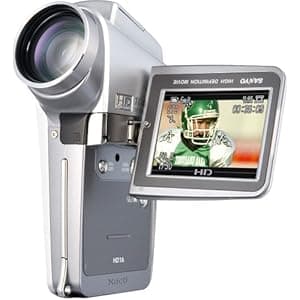 B000GT4BCI Availability: Currently unavailable Score: 1000.000 Category: Electronics Rating: 3.3 Votes: 38 Find similar productsSanyo Xacti HD1A 5.1MP MPEG4 High-Definition Camcorder with 10x Optical Zoom (Discontinued by Manufacturer). Product Description Sanyo Vpc-Hd1a High Definition Camcorder From the Manufacturer Manufacturer Description The Sanyo VPC-HD1a Xacti digital media camera with 10x optical zoom is a high-definition compact digital media device that combines the functionality of a digital camera and a digital camcorder. Different than a standard digital camera that shoots short video clips, the VPC-HD1a offers advanced, next-generation video performance and high-quality stills in one small, lightweight camera. This powerful little device is designed to record both 720-pixel high-definition video and snap 5.1-megapixel digital still images, all of which are handily stored to a standard SD flash memory card. The high-precision LSI (large-scale integration) for image processing is the real muscle behind the Xacti HD1a's ability to record high-definition video. This powerful high-definition engine processes a massive number of calculations in a short period of time and enables the HD1a's high-definition 720p processing, real-time MPEG-4 compression, and noise reduction. Xacti VPC-HD1a Highlights 1280 x 720 progressive HD video scanning Thanks to highly efficient MPEG-4 technology, the HD1a is able to create high-definition 720p (1280 x 720 pixels) videos at 30 frames per second. That’s up to three times more pixels than standard conventional video cameras . These are richly detailed images that will display beautifully on any big screen TV. Advanced MPEG-4 technology The HD1a features Sanyo's proprietary high-definition engine to execute a vast number of calculations in a short period of time. This high-definition engine enables the Xacti HD1a's advanced image processing functions such as real-time MPEG-4 compression, noise reduction and high-definition processing. Recording in the global multimedia standard MPEG-4 delivers exceptional video clarity and detail in an unbelievably portable configuration. What's more, because MPEG-4 is exceptionally efficient in the way it records digital information, higher quality videos and stills can be saved in smaller files. Super-fast 9Mbs frame rate The Sanyo HD1a high-definition digital media camera features an accelerated frame rate in the HD mode that is more than four times faster than earlier digital cameras. Transmitting data at 9 megabits per seconds ensures that camera and subject motion are smooth and natural, without the image lag or distortion that might occur in slower-responding systems. Super-fast 9Mbs frame rate The Sanyo HD1a high-definition digital media camera features an accelerated frame rate in the HD mode that is more than four times faster than earlier digital cameras. Transmitting data at 9 megabits per seconds ensures that camera and subject motion are smooth and natural, without the image lag or distortion that might occur in slower-responding systems. 2.2-inch LCD screen The HD1a features an incredibly clear 2.2-inch, Sanyo-developed Liquid Crystal Display (LCD) with 210,000 total pixels. The display flips out from the camera and rotates up to 285 degrees on an axis that allows you to take great video or still images from otherwise-difficult-to-view positions. 5.36-megapixel CCD image sensor Inside the HD1a high-definition digital media camera is an advanced 5.36-megapixel (total) CCD image sensor to capture high-definition videos (at a very smooth and natural 30 fps!), with full-range stereo sound. Using a 2GB SD memory card (optional) the HD1a can record over 42 minutes of high-definition video, up to two hours of standard-definition video or up to 1190 five-megapixel digital still images. Record to standard SD memory cards The HD1a can record up to 21 minutes of 720p high-definition video per gigabyte on a standard SD card. Alternately, the camera allows you to record in Standard Definition (640 x 480 resolution) for up to one hour per gigabyte. If you're looking to shoot home videos of the kids carving pumpkins or a dance recital, you can easily store hours of video footage using the standard definition setting. If recording in high definition is your goal, then change the settings and get 720p high definition video. Switching between HD and SD modes Switching from standard definition to high definition is a breeze; you simply press the HD/Norm button located on the side of the camera body. Additionally, in the menu options, you can choose from six different video resolution modes (and six different resolution levels for your still photos!), depending on how your images will be used. Record specifically for your personal media player The HD1a has a new recording mode designed specifically to capture video destined for the iPod video or other MPEG4 capable media players. Shooting in the new Web-SHQ mode, you videos will be captured at 320 x 240 pixels at 30 frames-per-second – perfect for some of the most popular personal media players available. In-camera editing and playback With the Sanyo Xacti HD1a’s 9-image display function, users can quickly search for specific images or videos. And, with the slideshow feature, images can be played back continuously. The HD1a can also edit clips. Clips can be cut in user-selected points and spliced, all from the camera itself. Unwanted images can be easily deleted, freeing up memory card capacity. Manually adjust and monitor your settings Versatile manual mode enables advanced-control shooting The following settings can be manually adjusted according to the shooting situation: Manual focus adjustment (22 settings); aperture adjustment (5 stops); exposure compensation (1.8 EV, 0.3 EV steps); shutter speed (16 settings); ND filter On/Off; and image-quality adjustment (for sharpness and color saturation). 16:9 still shooting With the new 3.8M / 16:9 shooting mode, you can display both your stills and videos on your full 16:9 television screen. Capture still and high-definition movie images simultaneously The Xacti HD1a enables simultaneous shooting of 5.1-megapixel still images and HD (1280 x 720-pixel) movie clips, with a simple press of the shutter button during the shooting of a movie clip. Users will never need to miss another precious photo opportunity. (Depending on the mode used to take still images, simultaneous video clip shooting may be interrupted. While shooting video clips, using the digital image stabilizer may change the angle of view for still images.) High-quality digital stereo recording The Xacti HD1a's 48 kHz, 16-bit, 2-channel sound for AAC-LC (MPEG-4 Audio) provides a sense of reality to match the realism of those impressive high-definition movies. And not only is it able to reduce noise caused by wind during shooting, the Xacti HD1a also features a dedicated terminal to which an external microphone can be attached. Built-in image stabilization High-definition can't hide shaky or erratic camera shaking. That's why Sanyo's HD1a comes with a sophisticated image stabilizer. Using a proprietary Sanyo algorithm, the HD1a automatically compensates for distracting up-and-down or side-to-side camera movement, keeping your subject steady and easy to follow. It accurately distinguishes between unintentional camera shake and deliberate camera movement. This handy feature operates in both wide-angle and telephoto modes, giving every shot a solid, professional-looking feel. Sleek, ergonomic design On or off, the HD1a is a true work of art. Ergonomically designed to fit comfortably in the palm of your hand, all video and still functions can be easily accessed with the thumb of the hand used to hold the camera. Aside from making everything much simpler and easier to use, this 'one thumb' interface lets you enjoy-and be a part of-each precious moment you record. Highly-efficient 10x optical zoom The HD1a digital media camera features a highly efficient 10x optical zoom with a bright maximum aperture of f/3.5. Consisting of nine groups and twelve total lenses with a built-in neutral density filter, the HD1a's lens provides a fantastic field-of-view with a 38-380 mm range (35 mm equivalent). Combined with the 10x digital zoom, the HD1a provides up to 100x zooming capability. The docking station makes the HD1A easy to connect and charge Convenient docking station One of the more frustrating aspects of working with any digital media camera is juggling all the wires and connections necessary when you want to use it with external components for viewing or to download files. Sanyo's HD1a streamlines the whole process with an innovative docking station that provides an instant USB/AV (component, composite or S-video) connection to a TV or PC. The HD1a even recharges its internal battery when nested in the docking station. Easy connection to TV, VCR, DVD recorder or computer The Xacti HD1a enables easy playback of recorded high-definition images directly on a TV screen. Connect the HD1a to a VCR or DVD Recorder to back-up copies of recorded content. Still images and video clips on the Xacti HD1a are played back continuously and in chronological order. Along with MPEG-4 digital recording, the Xacti HD1a offers convenient connection to a PC. With simple drag-and-drop operation, it's easy to save recorded video clips and still images onto a computer's hard disk for emailing, editing or archiving. The HD1a also comes with a remote controller to operate the camera at a distance during playback. Super-fast start up Reduce your chance of missing the moment. The Xacti HD1a high-definition media camera is designed for super fast start-up and shooting. With the tapeless design, the HD1a eliminates the need to queue up a tape deck allowing the HD1a to begin shooting in as little as 1.7 seconds! When the HD1a is powered on, closing the LCD display puts the HD1a in standby mode. Simply open the display and the HD1a automatically powers up and can begin immediately recording in as little as 1.7 seconds. | 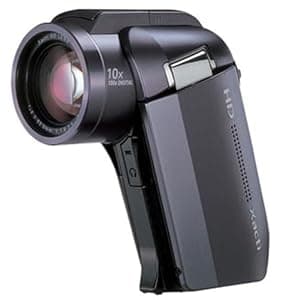 B001AO10YU Availability: Currently unavailable Score: 20.833 Category: Electronics Rating: 3.9 Votes: 70 Find similar productsSanyo Xacti HD1010 4MP MPEG4 High Definition 1080i/1080p Camcorder with 10x Optical Zoom (Discontinued by Manufacturer). From the Manufacturer From the Manufacturer Summary The Sanyo HD1010 Xacti digital media camera with 10x optical zoom is a high-definition compact digital media device that combines both the functionality of a digital camera and a digital camcorder. The HD1010 offers advanced, next-generation video performance and high-quality stills in one small, lightweight camera. This powerful little device is designed to record either 1080P (30fps) or 1080i (60fps) high-definition video and 4-megapixel digital still images, all of which are handily stored to a convenient SD or SDHC memory card. Sanyo Xacti HD1010 Highlights 1080P (30fps) Incorporating the latest high-definition CMOS sensor, the Sanyo Xacti HD1010 camcorder captures either 1920x1080 (1080P) high-definition video at 30 frames-per-second or 1920x1080 (1080i) high-definition video at 60 fields-per-second. Designed to record the rich and vibrant colors of real life, the HD1010 also captures the subtle tones to provide the natural-looking result. The HD1010’s CMOS sensor provides the responsiveness needed to capture fast moving subjects and Sanyo’s noise reduction technology helps obtain the cleanest signal from each pixel. The HD1010 records to the latest in MPEG-4 standard MPEG-4 AVC/H.264, delivering exceptional video clarity and detail while maintaining the smallest file size possible. 10x optical HD lens At the front of the HD1010 is a commanding 10x all-glass HD lens. The HD1010’s fast f/1.8 lens is capable of allowing almost four times more light through to assist in lower light venues. Consisting of eight groups and eleven total lenses with a built-in neutral density filter, the HD1010's lens provides a fantastic field-of-view with a 38-380 mm range (35 mm equivalent). Combined with the 10x digital zoom, the HD1010 provides up to 100x total zooming capability. Large 2.7-inch wide screen display The Xacti HD1010 features a large 2.7-inch widescreen Liquid Crystal Display (LCD). The display flips out from the camera and rotates up to 285 degrees on an axis that allows you to take great video or still images from otherwise-difficult-to-view positions, especially useful when shooting in large crowds or in small rooms. 4-megapixel still photos The Xacti HD1010 enables simultaneous shooting of 4-megapixel still images and HD (1920 x 1080 pixel) movie clips, with a simple press of the shutter button during the shooting of a movie clip. Users will never need to miss another precious photo opportunity. (Depending on the mode used to take still images, simultaneous video clip shooting may be interrupted. While shooting video clips, using the digital image stabilizer may change the angle of view for still images.) Recognize up to 12 faces Face Detection/Chaser Technology The latest in digital still photography -- Face Detection and Face Chaser technology actually monitor the subject’s face and adjust brightness and focus to incredibly clear photos. This technology can be used to recognize up to 12 faces in both video and still photos on Sanyo’s HD1010. HDMI high-definition output It’s easy to share your high-definition movies on your HD television with the HD1010. Using the HDMI (High-Definition Multimedia Interface) terminal built into the base station, just one cable (cable not included) connects your camcorder to your TV for a totally digital output. HDMI carries both the video and audio signals in digital form for the highest quality playback. Convenient SD/SDHC memory card The Sanyo Xacti HD1010 records high-definition and photos directly to a standard SD or SDHC Memory Card. In fact, the HD1010 is capable of recording up to 1 hour and 27 minutes 1080P (30fps) video on a single 8GB SDHC card or 1 hour and 14 minutes of 1080i (60fps) high-definition video on a single 8GB SDHC card (card sold separately). The HD1010 is compatible with SD Memory Cards up to a 32GB. The SD memory card’s compact size (0.94W x 1.26H x 0.08D inches) and weight (about 2 grams) makes it ideal for the compact size of the HD1010. The minimal power requirements of the SD card also contribute to longer recording and playback times. When connected to the computer via the USB cable, the HD1000 acts as a standard card reader. Transferring images and videos to your computer has never been easier. Image stabilization High-definition can't hide shaky or erratic camera shaking. That's why Sanyo's HD1010 comes with a sophisticated image stabilizer for both stills and video. Using a proprietary Sanyo algorithm, the HD1010 compensates for distracting up-and-down or side-to-side camera movement during video shooting, keeping your subject steady and easy to follow. It accurately distinguishes between unintentional camera shake and deliberate camera movement. This handy feature operates in both wide-angle and telephoto modes, giving every shot a solid, professional-looking feel. Sequential photo shoots up to 7 frames per second Shoot pictures like the pros with up to 7 photos in a single second. The perfect solution for action photography. Random access Each video is recorded as an individual MPEG-4 and each still as a JPEG file. This allows you to review a specific image or video quickly and easily, without having to rewind or fast forward. Adjustable resolution modes Choose from eight different video resolution modes and eight different still photo resolution levels depending on how your images will be used. Easy camera to PC connection Sanyo's HD1010 streamlines the confusing and complicated component connection process with an innovative docking station. This doc provides an instant connectivity to HDMI -- (cable sold separately) -- component, composite or S-video connection to a TV, DVD player and computer. The HD1010 even recharges its internal battery when nested in the docking station. Robust sound recording Record 48 kHz, 16-bit, 2-channel sound for AAC-LC (MPEG-4 Audio). Incredible high quality audio is the perfect match for the stunning high-definition videos. The Xacti HD1010 also features a dedicated terminal to which an external microphone can be attached. Organization and in-camera editing With the Sanyo Xacti HD1010’s 9-image display function, users can quickly search for specific images or videos. And, with the slideshow feature, images can be played back continuously. The HD1010 allows users to edit clips right in the camera. Unwanted images can also be easily deleted, freeing up memory card capacity. Ergonomic design The Xacti series has become known for the small size and ergonomic design. The HD1010 features a comfortable angle designed to easily fit in the palm of the hand. The HD1010's design adapts a new 105-degree angle research proven to be less tiring to hold and shoot than typical camcorders. Easy-to-hold and easy-to-shoot, the HD1010 raises the bar in compact camcorder design. Super-fast startup With the tapeless design, the HD1010 eliminates the need to queue up a tape deck or get a DVD or hard drive spinning. When the HD1010 is powered on, closing the LCD display puts the HD1000 in standby mode. Simply open the display and the HD1000 automatically powers up and can begin immediately recording in as little as two seconds. Manual controls The HD1010 features versatile manual controls for advanced shooting. The following settings can be manually adjusted according to the shooting situation: Manual focus adjustment (16 settings); aperture adjustment (6 stops); exposure compensation (1.8 EV, 0.3 EV steps); shutter speed (13 settings); and image-quality adjustment (for sharpness and color saturation). Easy HD playback The Xacti HD1010 enables easy playback of recorded high-definition images directly on a TV screen. Connect the HD1010 to a VCR or DVD recorder to back-up copies of recorded content. Still images and video clips on the Xacti HD1010 are played back continuously and in chronological order. Along with MPEG-4 digital recording, the Xacti HD1010 offers convenient connection to a PC. With simple drag-and-drop operation, it's easy to save recorded video clips and still images onto a computer's hard disk for emailing, editing or archiving. The HD1010 also comes with a remote controller to operate the camera at a distance during playback. |
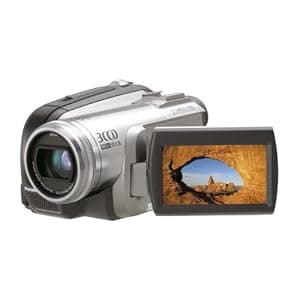 B000M4LXIW Price: $208.99 Score: 11.364 Category: Electronics Rating: 3.7 Votes: 79 Find similar productsPanasonic PV-GS320 3.1MP 3CCD MiniDV Camcorder with 10x Optical Image Stabilized Zoom (Discontinued by Manufacturer). Product Description SO) Panasonic PV-GS320 camcorder DISCONTIN From the Manufacturer If you want to enjoy shooting videos, enjoy viewing them and enjoy creating your own video collection, you'll love the Digital Palmcorder camcorder. This convenient camcorder also lets you add previous recordings to your video collection. PV-GS320 Highlights Advanced Imaging Technologies for Capturing Beautiful Videos Exceptional Leica-certified image quality with Leica Dicomar Lens Leica AG of Germany is the manufacturer of fine cameras and lenses favored by photographers everywhere. Drawing on Leica's renowned optical technology, this advanced lens captures clear, crisp, finely nuanced images with outstanding detail and contrast. Thanks to a multi-coating applied during the manufacturing process, the lens also minimizes flare and ghosts. Advanced Pure Color Engine The Advanced Pure Color Engine is a special image processing circuit for 3CCD camera systems. It processes the R, G and B signals from the three CCDs individually, so it gives both moving and still pictures exceptional quality. This innovative engine also achieves truly superb color reproduction for high-zoomed pictures. Take breathtaking stills with 3.1-megapixel still-picture recording The PV-GS320 records 3.1-megapixel still pictures. It captures all of the outstanding detail, color and sensitivity. Whether you take still pictures in 16:9 wide mode or 4:3 mode, you get beautiful images. You can print beautiful photos as well as view slide shows on a TV in any mode you like. So Easy to Use, Even Beginners Get Beautiful Results One-Touch Navigation for easy, intuitive setting and shooting With One-Touch Navigation, just press the center of the joystick to display an operating menu. The operations you use most often are right on the monitor, so it's easy to change settings or operate the camera without looking away from your subject. Mode dial Just turn the dial and you're ready to shoot or to view the images afterward. Just rotate the dial with your fingertip to select the icon that corresponds to the mode you want. Trilingual menu The menu can be displayed in any of the following three languages. You can switch it to view all menus in the language you prefer for easy, comfortable operation. The Joy of Creating Videos that Perfectly Capture a Scene Tele-Macro for sharp focusing, from a short distance Using the zoom at full magnification, you can shoot macro close-ups while maintaining a short distance from your subject. This makes it much easier to capture extreme close-ups without your body or camera casting a shadow on the subject and while keeping the background in soft focus. Soft Skin mode When this function detects skin tones, it softens the focus in that area. This has a skin beautifying effect, which makes wrinkles and lines appear less noticeable. When turned on, this function makes blemishes and moles look less conspicuous, while preserving resolution in areas of the picture outside of the skin. MagicPix for low lighting Leave the light off. MagicPix gives you images with color even in dim lighting (1 lux). Light is gentle and easy on the eyes, so you can snap shots of sleeping children without waking them up. More Convenient Shooting Functions Instant LCD/EVF saves battery life When you open the LCD, the power switches on. Shut it and the power goes off. Pull out the viewfinder and the power switches on. Store it and the power goes off. Instant LCD/EVF reduces the time required for operating the camera. Easy to see, even outdoors - Power LCD Simply press the Power LCD button and the LCD becomes brighter, making it easier to see outdoors or in other bright locations. Also, a new scanning technology allows the LCD to show diagonal lines more sharply. AGS (Auto Ground-Directional Standby) helps prevent wasted shots The O.I.S. linear motor system can detect when the camera is in an unusual shooting position, and when you've inadvertently left it on in recording mode. In these cases, the camera automatically stops recording, saving both battery power and disc or tape space. Easy Networking -- For More Fun When the Shooting's Done USB 2.0 (HS Mode) and Video Class Compatibility USB 2.0 compatibility lets you upload DV data to a PC at high-speed over a single USB cable. Video Class compatibility allows real-time transfer of DV moving picture data over the same USB cable. Video Class is a standard format that allows the real-time transfer of moving picture data over a USB cable. Comes with Software that Makes It Easy to Transfer and Edit Images The included editing software is just the tool you need to make polished, smartly fi nished productions. It lets you load images into your PC for easy editing, add special effects, and dub in a soundtrack - all from a single, easy-to-understand screen. Use an SD/SDHC Memory Card to transfer image easily SD/SDHC Memory Cards are the ideal recording and storage media for today's visual communication and networking. They make it easy to instantaneously transfer image data to a PC or printer. Web Camera Function With the camera connected via USB cable to a PC, start up Windows Messenger and the camera instantly turns into a web camera. Ideal for teleconferencing over the Internet, or for surveillance camera use. High-Speed Data Transfer to a DVD Recorder With DVD's high-speed data transfer, you can dub your recordings quickly and easily onto a DVD video recorder's hard disk drive. Enjoy sophisticated editing with the DVD recorder, or save your recordings onto DVD and create a collection of your own DVDs. | 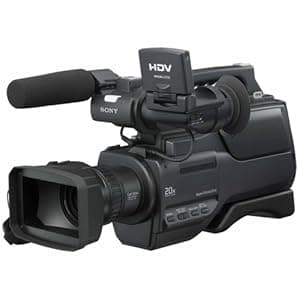 B0010T7J18 Price: $690 Score: 11.111 Category: Electronics Rating: 2.9 Votes: 46 Find similar productsSony HVR-HD1000U MiniDV 1080i High Definition Camcorder with 10x Optical Zoom (Discontinued by Manufacturer). Product Description The HVR-HD1000U was created to meet the growing demand from users who are looking for mobility and professional appearance. This camcorder features a shoulder-mount design and black matte body similar to that of professional camcorders; making it perfect for weddings, corporate communications, colleges, universities, and sporting events where appearance makes a difference. Premium design characteristics and high-definition HDV1080i recording are the main features of this new one-piece shoulder camcorder, ideal for working videographers on a budget. A built-in down-converter creates DV material, perfect for standard DVD productions. Plus, a special still photo mode is ideal for producing DVD cases and making wedding photo albums. Whether you are recording weddings and corporate communications or helping students make a documentary, the HVR-HD1000U is the best choice on the market today as an entry level professional camcorder. From the Manufacturer From the Manufacturer The HVR-HD1000U was created to meet the growing demand from users who are looking for mobility and professional appearance. This camcorder features a shoulder-mount design and black matte body similar to that of professional camcorders; making it perfect for weddings, corporate communications, colleges, universities, and sporting events where appearance makes a difference. Premium design characteristics and high-definition HDV1080i recording are the main features of this new one-piece shoulder camcorder, ideal for working videographers on a budget. A built-in down-converter creates DV material, perfect for standard DVD productions. Plus, a special still photo mode is ideal for producing DVD cases and making wedding photo albums. Whether you are recording weddings and corporate communications or helping students make a documentary, the HVR-HD1000U is the best choice on the market today as an entry level professional camcorder. Sony HVR-HD1000U Highlights High-quality Imaging System 1/2.9-inch Clear Vid CMOS Sensor The next generation of Sony imaging sensor, the ClearVid CMOS Sensor used in the HVR-HD1000U camcorder, is quite unique and different from current CMOS technology. The ClearVid CMOS Sensor uses a unique pixel layout rotated 45 degrees to provide high resolution and high sensitivity. This pixel layout technology is also used in higher end professional camcorders. The ClearVid CMOS Sensor, coupled with an Enhanced Imaging Processor (EIP), generates stunning images. Moreover, thanks to the CMOS technology, bright objects do not cause vertical smear. Carl Zeiss Vario-Sonner T* lens with optical 10x zoom The HVR-HD1000U camcorder can adapt to a wide range of shooting situations and features a Carl Zeiss Vario-Sonner T* lens with 10x optical zoom, as featured on higher end professional HDV camcorders. The T* lens coating suppresses unwanted reflections and faithfully reproduces colors for professional-looking results. Super SteadyShot (Optical) Image Stabilizer The Super SteadyShot (Optical) feature of the HVR-HD1000U is an image stabilizer using an active optical lens method that functions without any deterioration in image quality. The lens itself shifts vertically and horizontally to compensate for the polarized light axis in real time. Professional Design Shoulder-mount design The HVR-HD1000U is lightweight and easy to use even for beginners. It provides a professional camcorder shoulder-mount design that allows for easy balance and stable operation. Wide Clear Photo LCD plus Monitor on Viewfinder Unit Provides Easy Viewing A large, freely rotating 2.7-inch LCD screen is located on the top of the viewfinder unit to provide easy viewing when the HVR-HD1000U camcorder is in a low-level position or on a tripod. This also makes it easy for a director or client to see what the camera operator is shooting. The LCD uses a 211,200 dots widescreen Clear Photo LCD plus device that provides proper brightness and a high level of color reproduction. Ergonomically Designed Handle The ergonomically designed handle of the HVR-HD1000U camcorder contains a convenient record button and zoom control, essential for low position shooting. There are two cold shoes on the front and rear of the handle. You can attach two accessories like the HVL-LBP Battery Video Light and HVR-DR60 Hard Disk Recording Unit. Camera Control Ring A special camera control ring is located on the lens unit of the HVR-HD1000U camcorder. Any one of the following functions can be assigned to the ring for easy adjustment: Focus (default) Focus (default) Zoom Zoom Brightness Brightness Shutter Shutter Video: 1/4~1/10000 sec Video: 1/4~1/10000 sec Photo: 1/4~1/500 sec Photo: 1/4~1/500 sec AE Shift AE Shift WB Shift WB Shift Full Compatibility with your Current DV System The HVR-HD1000U offers benefits for SD productions, as well as HD. It is easy to use HDV recordings for your current DV editing work. The HVR-HD1000U has a down-conversion feature that outputs converted DV signals through the i.LINK connector to your current DV non-linear editing system, while retaining an HD master on the tape for future use. Furthermore, the HVR-HD1000U offers a DV recording mode (4:3 or 16:9), which can provide a recording time of approximately 120 minutes in LP mode. HDV - the Accessible HD Recording Format HD can be recorded on DigitalMaster professional tape as well as consumer MiniDV. video and television technology, as well as viewer preferences, are moving from standard definition (SD) to high definition (HD) - just like black and white television moved to color in the past. HD has almost twice the number of scanning lines available with SD. This means you can see much sharper detail and finer image quality when your work is viewed on an HD display monitor. The HVR-HD1000U adopts the HDV format for HD recording. The HDV format allows you to shoot approximately 63 minutes of HD video on a miniDV cassette tape. There are two standards of HDV format; One is HDV720p and the other is HDV1080i,which has 1,080 scanning lines and is used by most broadcasters already using HD. Sony has adopted the HDV1080i standard for all its HDV products. HVR-DR60 Brings HDV to IT Workflows The optional external HVR-DR60 hard disk recording unit gives you a hybrid operation,where video and audio are recorded simultaneously to hard disk drive (HDD) and tape. The HDV or DV images are recorded as movie files in the HDD for quick nonlinear editing, enabling the operator to archive the source tape as soon as the shoot is finished. Other Features Super NightShot The Super NightShot function of the HVR-HD1000U camcorder uses a built-in infrared light emitter that allows you to record an object in zero lux light levels. It also enables night-time monitoring and surveillance. Long Operating Time With infoLITHIUM L Series Battery The HVR-HD1000U camcorder uses standard infoLITHIUM L series batteries, like the DSR-PD170, HVR-Z1U, and HVR-V1U. With the NP-F970, a maximum operating time of approximately 10 hours can be achieved thanks to the power management system and low power consumption of the ClearVid CMOS sensor. Smooth Slow Rec The Smooth Slow Rec function of the HVR-HD1000U camcorder enables slow-motion playback by capturing images at four times faster than the normal field rate (240 fields/s). In this mode, quad-speed images are captured for three seconds, stored in the built-in buffer memory, and then recorded to tape (in either HDV or DV format) as slow-motion pictures lasting 12 seconds. Diverse Range of Photo-creation Functions While the HVR-HD1000U doesn’t contain all the features you’d find in higher end professional camcorders, such as DVCAM recording/playback, XLR audio connectors, and TC preset menu, it does boast a diverse range of photo-creation functions. These photo-creation functions are available at the touch of a button. You can store high-quality still images on Memory Stick Duo media, and then use them to design DVD cases,website content, news, etc. Workflow Using HDV Shooting and Photo Data Creation For working videographers starting out with a limited budget, the HVR-HD1000U camcorder provides flexibility and an amazing selection of features like HDV shooting and photo data creation. Even if you are still using SD for your projects, HD is the way of the future. Down-conversion allows you to shoot in HD to create a high-quality master tape and still use your existing DV nonlinear editing system and SD display monitor for playback and viewing. Photo Mode In Photo mode of the HVR-HD1000U camcorder, you can take 6.1-megapixel, 2848 x 2136-quality, 4:3-aspect images. Dual Rec You can take 4.6-megapixel (16:9-aspect) photos while you are shooting HDV video simply by pressing the photo button. Capturing from Recorded Video In case you missed the perfect timing for your still photo while videotaping, you can capture and save still frames from recorded video by just pressing the photo button of the HVR-HD1000U camcorder during playback. HDV footage will give you a 1.2-megapixel, 1440 x 810 pixel still image of that magic moment. |
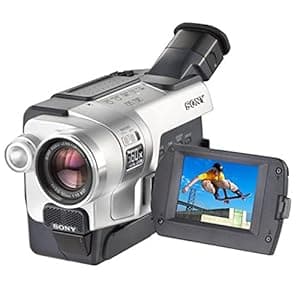 B000086G06 Price: $218 Score: 10.753 Category: Electronics Rating: 3.2 Votes: 34 Find similar productsSony CCDTRV118 Hi8 Camcorder with 2.5 LCD (Discontinued by Manufacturer). Product Description Now you won't have to let another important moment pass unrecorded. This Sony analog camcorder makes high-quality filming affordable. It has a 2-1/2 SwivelScreen LCD that makes recording and reviewing easy on the eyes, and a black and white viewfinder for enhanced video framing. It has a built-in light to brighten poorly lit areas, as well as a NightShot infrared system that captures images up to 10' away in total darkness. Camera connects directly to VCR for easy dubbing. End search advances tape to the last 5 seconds of a recorded scene to prevent recording over previous videos. Displays battery info without powering on the camera. InfoLithium battery is not subject to life-shortening memory effect and may be recharged at any time. Auto exposure modes include portrait, beach & ski, sports lesson, landscape, spotlight or sunset & moon. Picture effect modes include negative art, sepia, black & white, solarize, slim, stretch, pastel and mosaic. Fader effects include black, mosaic, black & white, bounce and stripe. Eight selectable preset titles or 2 customized with 22 characters. Features 20X optical/560X digital zoom, manual focusing, 1/6 CCD imager with 200K effective/320 gross pixels and video recording on affordable Hi8 and 8mm tapes with up to 400 lines of horizontal resolution and hi-fi sound. Comes with AC-L15 power adapter/in-camera charger, NP-FM30 InfoLithium rechargeable battery, mono A/V cable, shoulder strap and lens cap. No. CCDTRV118. 4Hx3-5/8Wx7-7/8L. Amazon.com Sony's compact, affordable CCD-TRV118 Handycam camcorder offers a great combination of Sony design, powerful features, and a low price. It features a 20x optical zoom, 560x digital zoom, a black-and-white viewfinder, and a 2.5-inch color swivel LCD (61,000 pixels). Optics 1/6-inch CCD with 320,000 gross pixels 1/6-inch CCD with 320,000 gross pixels 20X optical zoom 20X optical zoom 560x digital zoom 560x digital zoom f1.6-f2.4 f1.6-f2.4 Focal distance: 2.5-50mm Focal distance: 2.5-50mm Shutter speed: 1/60 to ¼,000 (AE Mode) More Features Now you can capture video even in total darkness. Sony's NightShot system uses infrared light to capture images invisible to the human eye. You can shoot subjects such as a sleeping baby at up to 10 feet away in total darkness. With the optional HVL-IRC NightShot light, you can even capture images from up to 100 feet away. Sony's Stamina power management system and InfoLithium battery give the TRV118 incredible operating time. To keep tabs on battery life, Sony's AccuPower meter displays the number of minutes remaining--right in the viewfinderHi8 Format In a world increasingly dominated by digital, Hi8 offers a refreshingly good format to shoot in. Despite the press that MiniDV, Digital8, and the new MicroMV have been getting, many people still prefer the tried and true Hi8. Hi8 offers the highest quality outside of digital, and is a good choice for everyday shooting. As long as you just want to document your family's life, and send videos to grandma, you aren't really giving anything up. Size, and Contents The TRV118 measures 3.63 by 4.00 by 7.88 inches and weighs 1 pound 12 ounces. This package includes the TRV118 camcorder, power adaptor/in-camera charger (AC-L15), InfoLithium rechargeable battery (NP-FM30), mono AV cable, lens cap, and shoulder strap. Shutter speed: 1/60 to ¼,000 (AE Mode) More Features Now you can capture video even in total darkness. Sony's NightShot system uses infrared light to capture images invisible to the human eye. You can shoot subjects such as a sleeping baby at up to 10 feet away in total darkness. With the optional HVL-IRC NightShot light, you can even capture images from up to 100 feet away. Sony's Stamina power management system and InfoLithium battery give the TRV118 incredible operating time. To keep tabs on battery life, Sony's AccuPower meter displays the number of minutes remaining--right in the viewfinder Hi8 Format In a world increasingly dominated by digital, Hi8 offers a refreshingly good format to shoot in. Despite the press that MiniDV, Digital8, and the new MicroMV have been getting, many people still prefer the tried and true Hi8. Hi8 offers the highest quality outside of digital, and is a good choice for everyday shooting. As long as you just want to document your family's life, and send videos to grandma, you aren't really giving anything up. Size, and Contents The TRV118 measures 3.63 by 4.00 by 7.88 inches and weighs 1 pound 12 ounces. This package includes the TRV118 camcorder, power adaptor/in-camera charger (AC-L15), InfoLithium rechargeable battery (NP-FM30), mono AV cable, lens cap, and shoulder strap. |  B00008OLBN Price: $299.99 Score: 10.526 Category: Electronics Rating: 2.5 Votes: 6 Find similar productsPanasonic SVAV20 MPEG4 eWear Digital Camcorder/Still Camera (Silver) (Discontinued by Manufacturer). Amazon.com The stylish Panasonic e-wear SVAV20 (Silver) combines a digital video recorder, digital still camera, digital audio player (with new SD-Jukebox software), and a digital voice recorder into one ultra-compact package. This palm-sized camcorder features a user-friendly interface and improved video resolution over its predecessor, the SVAV10. The new user-friendly interface makes recording easy, without having to scroll through menus. The SVAV20 features enhanced picture quality with an MPEG4 frame rate (15 frames per second) for video and 640 x 480 resolution for JPEG still images. A swiveling 2-inch LCD screen and two record buttons allow you to shoot comfortably with the unit in either the horizontal or vertical position. A new 2x digital zoom helps bring subjects into closer view. The SVAV20 includes a built-in flash for taking digital still pictures in low-light situations. A built-in USB interface makes it easy to transfer music from a PC to an SD Memory Card for playback, while the included SD Jukebox software provides a simple way to catalog and save numerous digital music files in a single database on a PC. The SVAV20 is compatible with the MP3 and AAC formats. A built-in speaker lets users listen to any recorded audio. Other features include: 32 MB Secure Digital memory card 32 MB Secure Digital memory card Weighs just 3.25 ounces Weighs just 3.25 ounces 2-inch LCD screen 2-inch LCD screen Software includes SD Jukebox 3.0 and SD MovieStage 2.0 Software includes SD Jukebox 3.0 and SD MovieStage 2.0 Compatibility with Windows 98SE, Me, 2000, and XP Compatibility with Windows 98SE, Me, 2000, and XP Packaged with AC adapter, USB cable, handstrap, earphones, and rechargeable battery Packaged with AC adapter, USB cable, handstrap, earphones, and rechargeable battery. |
 B007P5L6GA Availability: Currently unavailable Score: 10.417 Category: Electronics Rating: 4.5 Votes: 3 Find similar productsSony HDRPJ710V High Definition Handycam 24.1 MP Camcorder with 10x Optical Zoom, 32 GB Embedded Memory and Built-in Projector (2012 Model). Equipped with a built-in projector, the one-of-a-kind Sony HDR-PJ710V High Definition Handycam Camcorder (Black) shoots 1920 x 1080 Full HD 60p/24p video, takes 24.1 megapixel still images, and can also project your home movies onto a 100 diagonal projection screen. It features 32GB of embedded flash memory, which provides up to eleven hours of seamless, continuous recording. Plus, the camcorder is equipped with a back-illuminated Exmor CMOS sensor that's ideal for low-light situations. Sony has outfitted the HDR-PJ710V with a 26mm wide angle Carl Zeiss Vario-Sonnar T Lens that supports 10x optical zoom and 17x extended zoom. There's also a 3.0 Xtra Fine LCD touch panel display (921K) with TruBlack technology and a 270° turning angle. The display has a 90° operating angle as well, which affords convenient recording, playback and projection from almost any angle. | 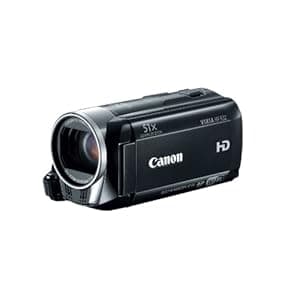 B006UMMPBY Availability: Currently unavailable Score: 10.000 Category: Electronics Rating: 3.3 Votes: 21 Find similar productsCanon VIXIA HF M500 Full HD 10x Image Stabilized Camcorder with Dual SDXC Card Slots and 3.0 Touch LCD. From the Manufacturer Superb Imaging Revved with Intense Zooming Power Experience the compact, easy-to-use camcorder that has 32GB of internal memory to record up to 12 hours of breathtaking Full HD video while offering impressive zooming power and exciting new creative options. Superb imaging is ensured with a new, more sensitive Canon 3.28 Megapixel Full HD CMOS Image Sensor and Canon’s exclusive DIGIC DV III Image Processor. Video is steady and clear even at the large end of the 51x Advanced Zoom, thanks to SuperRange Optical Image Stabilization and Intelligent IS. The VIXIA HF R32 is equipped with flexible features to suit your shooting and sharing needs, and a new interface makes the large Flat Touch Panel LCD simpler than ever. Record in AVCHD or MP4 format to the internal flash drive or to a removable SD/SDHC/SDXC memory card. Use the built-in Wi-Fi™ to upload video directly to YouTube™, Facebook™, your own home computer, or a DLNA™-compatible TV. And with Cinema-Look Filters and Touch Decoration, you can be sure that your videos express yourself like never before. Mega Zooming, Steady Shooting Genuine Canon HD Video Lens with 51x Advanced Zoom You won’t miss any of the action when shooting video with the VIXIA HF HR32 camcorder. The camcorder’s wide-angle area has been expanded to 33.9mm (35mm equivalent), making complex scenes easier to shoot and adding more image to all your footage. Like every Canon camcorder, the VIXIA HF HR32 is equipped with a Genuine Canon HD Video Lens. Canon’s high definition video lenses use aspherical lens technology to achieve low chromatic aberration with high resolution while maintaining compact dimensions. Super spectra coating technology lowers flare and ghosting. The big news is the camcorder’s impressive 51x Advanced Zoom. Long-range shooting allows you to create videos with dynamic variety, and is less likely to disrupt the action you’re shooting. It’s perfect for formal ceremonies, animals in the wild, candid family videos and more. Advanced Zoom, available in manual mode, has been achieved with more efficient use of the effective imaging area. It takes the camcorder’s telephoto power all the way to 1,729mm (35mm equivalent) for extraordinary flexibility in shooting. SuperRange Optical Image Stabilization High definition video demands effective image stabilization, and the VIXIA HF R32’s super powerful zoom makes the need for image stabilization even more critical. Canon developed its sophisticated SuperRange Optical Image Stabilizer to do the job easily and automatically, providing continuous adjustment throughout the entire zoom range to correct a broad range of motion. Extra compensation is applied at wide-angle focal lengths to eliminate the unwanted shaking that is common when walking. The system corrects camera shake instantly, so even when you’re shooting handheld video at the long end of the zoom, the image is sharp, steady and smooth. Naturally Beautiful Image Quality 3.28 Megapixel Full HD CMOS Sensor The VIXIA HF R32 camcorder is equipped with a 3.28 Megapixel Full HD CMOS Image Sensor for true 1920 x 1080 resolution. Canon’s advanced, high-resolution HD CMOS Image Sensor has been improved for the VIXIA HF R32, with extra sensitivity that delivers beautifully lifelike Full HD Video with natural color, even in low light. Original on-chip noise reduction brings bright clarity to every frame. Video is rich, clear and amazingly detailed anywhere you view it, even when played back on a large HDTV. DIGIC DV III Image Processor DIGIC DV III is specifically engineered to optimize the imaging performance of the camcorder’s HD CMOS Image Sensor. Images exhibit beautiful clarity with minimal noise. Gradation is richly rendered from highlight to shadow. Performance in low-light situations is superb, with natural detail and color. The advanced processing speed of DIGIC DV III powers many of the camcorder’s cutting-edge technologies as well, giving you more creative freedom than ever before. Recording Options Mean You’ll Never Miss a Minute of Great Video Record to Internal Flash Drive or SD Memory Card The camcorder’s internal 32GB Flash Drive holds up to 12 hours of crisp, high-definition video safely and securely. With no moving parts, flash memory technology is perfectly able to withstand camcorder jolts or drops. You can also record to a removable SD memory card, making it easy to share your video with friends and family. Conveniently sized and readily available, SD cards give you up to 64GB (24 hours) of recording capacity for a combined capacity of 96GB or 36 hours. For added flexibility, you can even back up your video directly to an external hard drive by using the optional UA-100 USB Adapter. VIXIA RECORDING TIME CHART AVCHD Recording Mode 1920 x 1080 Recording 1440 x 1080 Recording Memory Capacity MXP Approx. 24 Mbps* FXP Approx. 17 Mbps* XP+ Approx. 12 Mbps* SP Approx. 7 Mbps* LP Approx. 5 Mbps 4 GB 20 minutes 30 minutes 40 minutes 1 hour 10 minutes 1 hour 30 minutes 6 GB 30 minutes 45 minutes 1 hour 5 minutes 1 hour 45 minutes 2 hour 15 minutes 8 GB 40 minutes 1 hour 1 hour 25 minutes 2 hours 20 minutes 3 hours 12 GB 1 hour 5 minutes 1 hour 30 minutes 2 hours 10 minutes 3 hours 35 minutes 4 hours 35 minutes 16 GB 1 hour 25 minutes 2 hours 5 minutes 2 hours 50 minutes 4 hours 45 minutes 6 hours 5 minutes 32 GB 2 hours 55 minutes 4 hours 10 minutes 5 hours 45 minutes 9 hours 35 minutes 12 hours 15 minutes 64 GB 5 hours 55 minutes 8 hours 20 minutes 11 hours 30 minutes 19 hours 10 minutes 24 hours 30 minutes * When recording has continued for 12 hours, it will automatically stop and then start automatically. MP4 1280 X 720 Recording **The maximum video recording time with the MP4 format is 30 minutes, and the maximum file size is 4GB, and when either of these conditions is met, recording will stop automatically. 9 Mbps** 4 Mbps** 4 GB 55 minutes 2 hours 5 minutes 6 GB 1 hours 25 minutes 3 hours 10 minutes 8 GB 1 hours 55 minutes 4 hours 10 minutes 12 GB 2 hours 50 minutes 6 hours 20 minutes 16 GB 3 hours 50 minutes 8 hours 25 minutes 32 GB 7 hours 40 minutes 16 hours 55 minutes 64 GB 15 hours 25 minutes 33 hours 55 minutes SDXC Compatibility In addition to SD memory cards, the VIXIA HF R32 camcorder is compatible with super-high capacity Secure Digital Expanded Capacity (SDXC) cards. The same convenient size as a standard SD card, an SDXC card can hold up to 2,048 GB, and provides ultra-fast data transfer. It’s an excellent option for family reunions, vacations and any time you know you’ll require extra memory. Relay Recording With Relay Recording, you never have to worry about whether you’re reaching maximum capacity on the camcorder’s internal flash drive. When the internal drive is full, the system automatically switches recording over to the SD memory card. This reassuring backup system means you’ll never miss capturing an important scene again. Choose the Recording Format to Fit the Situation Record in AVCHD or MP4 Format The VIXIA HF R32 camcorder gives you the flexibility of dual codec recording, allowing you to record in AVCHD or MP4 format, so you can pick the format that best suits your needs. AVCHD’s higher bit-rate and finer resolution will yield the highest quality video for viewing on an HDTV or archiving to Blu-ray™. And for use with today’s most typical video applications, the camcorder lets you record in MP4 format, too. MP4 format produces files you can share right away – with no need for conversion. Video is immediately available to upload to social networking sites like Facebook™ or YouTube™, or view on an iPhone™, iPad™ or iPod Touch™. Shoot It, Send It, See It – Wi-Fi™ Makes It Easy! Built-in Wi-Fi Built-in Wi-Fi™ opens up a world of new possibilities, giving you the connectivity and immediacy you expect today. The VIXIA HF R32 camcorder is a sharing device, ready to send your video wherever you like: delight faraway relatives with video of a wedding seconds after it took place; share video of your travels as they happen; post event-documenting videos online more. If you’re in an Internet hotspot, you can post video to YouTube™, Facebook™, and other sharing sites. The free Canon iOS Movie Upload app lets you upload video from the VIXIA HF R32 camcorder to your iPhone™, iPad™ or iPod Touch™ virtually anywhere. And when you send video to your smartphone or tablet, you’ll find it conveniently filed where your other videos are stored. Shoot video in your living room, and save it to the PC in your home office over your home network. Wireless setup with the VIXIA HF R32 is as quick and easy as it is with your other devices, and you can register and store up to three networks for immediate retrieval any time. WHEN OUT File Format Application/OS/Language etc. AVCHD MP4 MPEG2 (SD) JPEG Application OS Language Memo Connect to iPhone 4, iPhone 4S/ iPad, iPad2/ iPod touch 4th Generation Pixela Movie iOS 4.0 English & Japanese Free download form View on Wireless Device NO (Only Thumbnails) YES NO (Only Thumbnails) YES Upload (ver. 1.0) 4.3 & iOS 5 Apple App Store Wirelessly Save to Devices NO YES NO YES Wireless Upload to YouTube NO YES YES NO Wireless Upload to Facebook YES YES YES YES AT HOME File Format Application/OS/Language etc. AVCHD MP4 MPEG2 (SD) JPEG Application OS Language Connect using Application Disc (Network Utility) VideoBrowser (ver. 2.0) Network Utility Windows 7, Windows Vista & Windows XP 17 Languages Wireless Download to PC YES YES YES YES Wireless Upload to YouTube YES (converts to WMV) YES (converts to WMV) YES NO Wireless Upload to Facebook YES (converts to WMV) YES (converts to WMV) YES YES Connect to DLNA-certified TV AVCHD playback is supported by TV Watch Video Wirelessly YES (Supported by TV) NO YES NO DLNA™ Compliance DLNA, the Digital Living Network Alliance, is a standard designed to increase connectivity between consumer devices of all types and brands. The VIXIA HF R32 camcorder is DLNA-compliant, and now so are many HDTVs. That means that you can use your home network to access the video stored in your camcorder with the remote control of a DLNA-compliant TV. Even if your HDTV is not DLNA-compliant, the devices connected to it (including game consoles and Blu-ray™ players) may be, which will allow you to take advantage of this feature. Secure Storage Without a PC Connect Directly to External Drives When it comes to saving your memories, the VIXIA HF R32 camcorder offers plenty of flexibility. In addition to traditional file storage methods, you can connect the camcorder directly to an external hard disk drive by using the optional UA-100 USB adapter to store video files safely and securely without a computer, an economical option for high-capacity storage on vacations or other trips. Using a USB connection, you can even play video on a TV via the camcorder. Manufacturer Series Model Capacity Western Digital WD Elements Desktop WDBAAU0010HBK 1TB My Book Essential WDBAAF0020HBK 2TB Seagate FreeAgent Series STAC1000100 1TB Expansion External Drives ST30500EXA101-RK 500GB Steady Shooting in Any Situation Intelligent IS Intelligent IS makes it easy to shoot clear, sharply focused video, even in situations that typically cause camera shake. The Intelligent IS system analyzes the shooting situation for you, then automatically switches to the image stabilization method best able to produce sharp, steady video. Four IS systems cover the gamut of shooting situations. Dynamic IS corrects minor movement and the shaking caused by walking while shooting. Macro IS delivers perfectly steady close-up shots. Powered IS comes into play when you’re using the camcorder’s powerful zoom, correcting shake that can occur in telephoto shots. Tripod Mode stops IS when the camcorder is stationary. 3.0-inch Flat Touch Panel LCD Big and bright, the VIXIA HF R32’s 3.0-inch Flat Touch Panel LCD provides super intuitive control that feels instantly familiar. With a touch, you can shift focus immediately to any subject. Exposure for any area of the screen can be controlled with a touch as well. And with Touch & Track, you simply place your finger on a moving subject and the focus will follow that subject. “Pressable” buttons are also available for selecting settings and controlling camcorder operations on-screen. A new Home button on the camcorder takes you to the main LCD screen, where clear explanations of shooting modes and recording settings help you make informed choices for an exceptionally simple and enjoyable shooting experience. Automatically Beautiful Video Smart AUTO and Auto Tele Macro Smart AUTO lets you capture clear, bright, well-focused video while the camcorder takes care of all the details. The system recognizes 38 shooting situations based on numerous factors, then automatically chooses the optimal settings for the situation. When you shoot a nearby subject in telephoto zoom mode, Auto Tele Macro gives your video the high-end artistic effect of a well-focused subject against a beautifully blurred background. Fun, Creative Ideas Cinema-Look Filters Giving your videos more creativity is easy with new Cinema-Look Filters. Cinema Standard subdues brights and enhances darks for the feel of film. Vivid accentuates primary colors for a cheerful effect that’s perfect for kids’ birthday parties. Cool adds a bluish tint for a futuristic feel. Nostalgic recreates the look of 1970s TV shows. Sepia adds a distinctive fade and antique tint. Old Movies imparts the aged look of early cinema. Dynamic B&W creates dramatic high-contrast grayscale. Dream adds a magical look (soft-focus) for dream-like scenes. Memory produces a faded, misty look—great for flashback scenes. Cinema Standard Recreates the warm tones and muted highlights of classic film. Vivid Accentuates primary colors for a bright, cheerful look. Cool Adds a bluish tint for cool, futuristic-looking scenes. Nostalgic Recreates the look of old ‘70s TV programs. Sepia Applies a sepia tint for an antique, faded look. Old Movie Gives video the aged look of old cinema. Dramatic B&W Creates bold black-and-white movies with high contrast and grain. Touch Decoration Using the camcorder’s LCD screen and an included stylus, you can embellish your recorded video freehand: draw graphics, write words, it’s completely up to you! With a choice of 27 different frame graphics, clip art and animated effects, you can give your video a whole new dimension. New, easy-to-understand icons have been incorporated that make options for animated effects clear at a glance. Easy Steps to Better Videos Story Creator Creating a compelling video that truly documents an important event can be challenging, so the VIXIA HF R32 camcorder steps in to help with Story Creator. The feature is even easier to use than ever, so now even beginning videographers can cover an event with confidence. Before shooting, you’ll see a list of scenes you’ll want to be sure to catch for several different types of occasions. And now each scene selection includes specific shooting tips that help with scene structure and composition, including suggestions for wide-shots, close-ups, even recommendations for length of shots. After shooting, you can watch your video in coherent story order based on each scene’s theme, as opposed to the order in which each scene was shot. Sophisticated Shooting Modes 24p Cinema and 30p Progressive Modes The VIXIA HF R32 camcorder’s sophisticated shooting mode options offer superior creativity and functionality. 24p Cinema Mode gives your video a film-like feel, making it look as if it were shot at the same frame rate as movie film, with a frame capture rate of 24p recorded at 60i. The camcorder also gives you the option of recording in 30p Progressive Mode, which is ideal for clips you intend to post online. Flexibility Built Right In Microphone and Headphone Terminals The VIXIA HF R32 camcorder offers exceptional audio flexibility with microphone and headphone terminals. The microphone terminal allows you to capture professional-quality sound with an external microphone and manual audio level control ensures proper volume for any situation. In addition, you’ll find a dedicated headphone terminal, ideal for remote communication with the optional Wireless Microphone WM-V1 and other applications. What's in the Box? VIXIA HF R32 VIXIA HF R32 Battery Pack BP-709 Battery Pack BP-709 Compact Power Adapter CA-110 Compact Power Adapter CA-110 Stylus Pen Stylus Pen USB Cable IFC-300PCU/S USB Cable IFC-300PCU/S HDMI Cable HTC-100/S HDMI Cable HTC-100/S Bundled CD-ROMs: Bundled CD-ROMs: Pixela Video Browser / Network Utility Software Disc ImageBrowser EX / Image Mix / Music Data Disc Pixela Video Browser / Network Utility Software Disc Pixela Video Browser / Network Utility Software Disc ImageBrowser EX / Image Mix / ImageBrowser EX / Image Mix / Music Data Disc Music Data Disc. |
 B000RHXPRQ Availability: Currently unavailable Score: 10.000 Category: Electronics Rating: 3.6 Votes: 11 Find similar productsIsonic DV566 5MP Multifunction Pocket Digital Camcorder (Discontinued by Manufacturer). From recording video and audio to taking pictures, playing music or storing data, the Isonic Snapbox DV566 does it all.This sleek and stylish video camera is designed for maximum portability and simplicity for beginners on the go.Compact, lightweight and portable, the Isonic Snappbox Dv566 features a 8x digital zoom, 2 inch LCD display, 5 Megapixel CMOS ,12 Megapixel resolution (hardware enhanced)and an internal 32MB flash memory with external SD/MMC card slot that allows you to extend up to 1 GB additional storage. The camera records MPEG-4 movies and works as a camcorder, digital camera, MP3 player, mass storage device and voice recorder. It's perfect for birthdays, road trips, vacations or any occasion you want to remember. Includes Rechargeable Li-on Battery, remote control,case,earphones,software,cables,manual. |  B001PKV2H4 Availability: Currently unavailable Score: 10.000 Category: Electronics Rating: 4.5 Votes: 3 Find similar productsPanasonic HDC-SD20 HD Flash Camcorder (Black). Product Description HDC-SD20-K black SD high definition camcorder From the Manufacturer With the Panasonic HDC-SD20 HD Flash camcorder, a new high-performance Leica lens makes it possible to pack a powerful 16x zoom into a compact body. Because the zoom is optical, there's limited image degradation. With Panasonic's Advanced O.I.S. (Optical Image Stabilizer), you can catch dynamic shots with no blurring in both still and motion images. You can also enjoy a 5.1-channel surround sound system featuring Zoom Mic functions. The SD20 features a touch-screen that lets you operate a variety of functions intuitively without taking your eyes off of the subject on the LCD screen. And the AF Tracking has been added to the iA function which automatically judges the scene and makes the best possible settings, so the SD20 keeps the subject in focus even if the subject's face turns away from the camcorder. To view recorded images as quickly as possible, the SD20 features a new highlight playback function. This gives you a quick, easy way to view the most exciting scenes all together. The HD Writer AE 1.0 editing software also has a new function that lets you easily upload your video clips to the YouTube website. Pansonic SD20 Highlights High-Quality Picture and Sound 16x optical zoom 16x Optical Zoom The camcorder features a 16x optical zoom. You can zoom close to catch dynamic shots of distant objects. And because the zoom is optical, there's limited image degradation. A new high-performance Leica lens makes it possible to pack a powerful 16x zoom into a compact body. Also Panasonic's Advanced O.I.S. (Optical Image Stabilizer) helps prevent blurring – typically a big concern when shooting with a zoom. This combination of optical zoom and Advanced O.I.S. gives you the ability to take fantastic zoom shots. New Leica Dicomar Lens The SD20 also introduces a new high-performance Leica lens in which both resolution and contrast have been improved by refinements to our low-dispersion lens and aspherical lens. A multi-coating process applied to all lens surfaces helps suppress ghosts and flaring, so you get sharp, crisp images even in strong outdoor lighting. The superb rendering ability of this advanced camcorder lens makes it ideal for capturing expressive full-HD images. Multi-coated lens Advanced O.I.S. Panasonic's Advanced O.I.S. helps suppress the effects of hand-shake as you shoot, for both motion and still images. This system uses gyrosensors to detect even tiny amounts of hand-shake, then shifts a lens and adjusts the optical axis to compensate - all at an astounding 4,000 times per second. It also covers approximately 3 times the stabilization area of our previous SD9 model. Because the system is optical, there's minimal loss of image quality even when viewed on a large-screen TV. HD Crystal Engine We took the advanced imaging circuitry used in Panasonic professional equipment and adapted it for home use. The result is the HD Crystal Engine, a high-speed processing unit that handles huge volumes of data and virtually doubles the dynamic range. This advanced imaging engine helps prevent blown highlights and blocked shadows, so the images you capture on video look just the way they do in real life. Digital Cinema Color with VIERA This mode automatically switches the camcorder to the optimum setting for the Digital Cinema Color of the VIERA plasma TV series. Colors recorded in this mode look richer than those recorded using the conventional Panasonic standard. For example, the subtle shades of red and gold in flowers, and the greens of leafy trees are remarkably true to life. 5.1-channel Surround Sound System and Zoom Mic The SD20 is equipped with three electret condenser microphones. The center mic helps capture the sound source and distance accurately, so you get a more 3-dimensional effect than you get with conventional systems, which capture all sounds from the front. You get a realistic sound space that's a perfect match with the true-to-life HD images. Soft Skin Mode When this function detects skin tones, it softens the focus in that area. This has a skin beautifying effect, which makes wrinkles and lines appear less noticeable. When turned on, this function makes blemishes and moles look less conspicuous, while preserving resolution in areas of the picture outside of the skin. Tele Macro Using the zoom at full magnification, you can shoot macro close-ups while maintaining a distance of 50 cm from your subject. This makes it much easier to capture extreme close-ups without your body or camera casting a shadow on the subject and while keeping the background in soft focus. Shooting Functions Touch Screen Operation Control settings are made by simply touching the LCD screen. Operation is intuitive and easy, and the large letters are easy to read. Shooting and viewing are simple and stress-free - even for beginners. iA (Intelligent Auto) Sometimes a scene is backlit or too dark, or it's difficult to get a good focus on the subject. Adjusting the settings every time is not only a hassle, it can be very tricky. That's where iA comes in. This powerful function senses the shooting conditions and automatically makes the settings and activates functions that will deliver optimal results. With both motion and still images, iA lets you forget about bothersome settings and makes it easy to capture beautiful, well-focused images. Subject Detection: AF/AE Tracking Touch the LCD screen to indicate the subject, such as a person or an animal, that you want to focus on, and let AF/ AE Tracking do the rest. The camera locks on the subject and follows it around, keeping it in sharp focus and properly exposed. It keeps tracking even if the subject turns to the side. This advanced function makes it easy to get a continually clear, beautiful shot of the subject in the scene you care most about. Face Detection AE/AF This mode captures faces beautifully. Face Detection automatically senses the ambient lighting and adjusts the exposure accordingly, so faces are bright and easy to see. The focus also prioritizes the faces, and skin tones are smoothed. Faces in the center of the frame serve as the reference for adjustments, but the function can detect up to 15 faces in all. Shake Detection: Advanced O.I.S. When hand-shake is detected while shooting, the Advanced O.I.S. system is automatically activated to compensate for blurring and produce beautiful recorded images. Because the system is optical, there's only minimal loss of image quality even when viewed on a large-screen TV. Light Detection: Intelligent Contrast Control By detecting the intensity of the ambient light and adjusting the exposure accordingly, Intelligent Contrast Control prevents blown highlights and blocked shadows. This helps render natural-looking, highly nuanced images with proper contrast. Scene Detection: Intelligent Scene Selector The shooting conditions are detected, and the optimal Scene mode is automatically selected. Even if the subject should change, there's no need to manually redo the settings, so you can concentrate entirely on your shot. 1.9-second Quick Power-on Switch the power on and the camcorder is in standby mode in just 1.9 seconds, ready to shoot when you are. This fast startup also helps reduce battery consumption. 0.6-Sec Quick Start Use Quick Start mode. You simply flip open the LCD and you're ready to shoot in just 0.6 second. When Eco mode is also used, the power turns off whenever the camcorder has not been operated for 5 minutes. This reduces wasted power consumption, and enables a longer battery life. Pre-rec Function This clever function records three seconds of images even before you actually begin shooting. The images are held temporarily in the camcorder's internal memory, before recording onto the SDHC/SD Memory Card begins. This helps ensure that you won't miss the start of a moment you want to record, such as when an event begins all of a sudden. For example, if you're waiting to snap a shot of a jumping dolphin, you can press the REC button after you've made sure that the dolphin has cleared the surface of the water. The camcorder will record the entire scene, from the instant of the dolphin's jump until it disappears again into the sea. Anti-ground Shooting The O.I.S. linear motor system can detect when the camera is in an unusual shooting position - such as when you've inadvertently left it on in recording mode. In these cases, the camera automatically stops recording, saving both battery power and media storage space. 50fps High Speed Burst Shooting This function lets the camcorder snap up to 50 consecutive still images in a second, or up to 180 consecutive shots in 3.6 seconds. You can use it to analyze a golf swing, tennis stroke or other motion. You also can use it to get good shots of subjects in fast motion. Just fire off a number of shots without stopping, then keep the best ones and delete the rest. Auto Power LCD The LCD brightness can be adjusted manually to suit the surroundings. In Auto mode, the LCD brightness is adjusted automatically in 16 smooth steps depending on the surroundings. In darker rooms it adjusts to a lower brightness, making it easier to frame the shot. Outside, it adjusts to almost twice the brightness for easy viewing even on sunny days. Focus Assist This function enlarges the center of the image, making it easier for you to get a clear, sharp shot when focusing manually. Focus Assist in action Composition Guide Lines With wide LCD monitors, it's hard to keep images perfectly level. The SD20 solves this by displaying horizontal and vertical Composition Guide Lines that make it easy to keep the subject straight and level. Highlight and Time Frame Index The index function has been enhanced with the addition of a new feature that divides each recorded scene into a number of smaller scenes, and displays thumbnails for each. This makes it much easier to find a particular part of a scene without having to fast-forward. Highlight Index The camera automatically selects and displays the most exciting scenes. It determines the level of importance of each scene based on zooming and panning, and whether there are faces and cheers. This gives you an easy, convenient way to view all the highlights together. Highlight Index The camera automatically selects and displays the most exciting scenes. It determines the level of importance of each scene based on zooming and panning, and whether there are faces and cheers. This gives you an easy, convenient way to view all the highlights together. Time Frame Index This mode divides each recorded clip into 3-second, 6-second, 12-second, 1-minute and 5-minute intervals, and displays them. This is convenient when you want to find a specific scene within a long clip. Wide Viewing Angle The LCD has a highly detailed, 230,400-pixel display and a viewing angle of 170°, both vertically and horizontally. Images are clear and bright even when viewed from an angle, so everyone can gather around the LCD to enjoy on-the-spot recordings. The wide viewing angle is also great for taking high- or low-angle shots. Auto Light When the camera determines that the ambient lighting is insufficient, it automatically switches the light on. This illuminates your subject for shooting. The LED (light emitting diode) has low power consumption, a long service life, and the safety of a low operating temperature. Color Night View Leave the light off. Color Night View gives you images with color even in dim lighting (1x). Light from the LCD is gentle and easy on the eyes, so you can snap shots of sleeping children without waking them up. World Time Handy for travellers, this function makes it easy to set the camcorder time when you cross time zones and again when you return home. Simply select your destination from the displayed map, and the camcorder is automatically set for that time zone. The time for two different places can be set--such as home and destination--and you can switch between the times by simply pressing a button. Auto Lens Cover When the power is turned on, the lens cover automatically opens. When the power goes off, the lens cover closes. You don't have to keep removing and replacing a lens cap - or worry about losing it. Playback & Networking Highlight Playback Select the days of the recordings you want to see, and this innovative function automatically selects the most exciting scenes, arranges them, and plays them, backed by music. It decides how exciting a scene is based on zooming, panning, and scene changes, and whether there are faces and cheers. This gives you a quick, easy way to view the most exciting scenes all together. It's a great way to look back over exciting memories that you have recorded. Intelligent Selection Playback This playback function makes recordings more enjoyable to view. It automatically skips over any shots that have serious errors, such as hand swing, fast panning, out-of-focus images or shots of the ground taken when the user forgot to turn the camcorder off. You see only the good, error-free shots. Easy Connecting, Easy ViewingVIERA Link Just connect your camcorder to an HDTV and you're ready for high-definition viewing. If your TV is HDMI compatible, a single HDMI mini cable (optional) is all you need. When using a VIERA TV, you can also operate the camcorder with the VIERA remote control for even easier viewing. SD Networking Simply take the SDHC/SD Memory Card from your camcorder and slip it into the card slot on your Panasonic VIERA or Blu-ray Disc Player, and you're ready to view full-HD images recorded in the AVCHD format. Using a DVD Burner to Create and Play Back a DVD The SD20's USB Host function lets you connect directly to a DVD burner via a USB cable. You can then copy recordings from the SDHC/SD Memory Card to a DVD disc by simply pressing a button.The camcorder lets you select either the AVCHD or the DVD-Video (MPEG-2) format according to the playback environment. Select the AVCHD format for HD playback on a large-screen TV using a Blu-ray Disc player or DVD burner. Or choose the DVD-Video (MPEG-2) for easy playback using a DVD player. Included Software The HD Writer AE 1.0 software makes it easy to play or edit your recordings using a PC, and also to upload them to YouTube by following simple steps. After editing, you can copy the videos to a DVD disc in either the AVCHD or the DVD-Video (MPEG-2) format. Choose the one that best suits your playback equipment or how you intend to use your recordings. This easy-to-use software gives you more creative ways to enjoy the recordings you make. Time Frame Index This mode divides each recorded clip into 3-second, 6-second, 12-second, 1-minute and 5-minute intervals, and displays them. This is convenient when you want to find a specific scene within a long clip. Wide Viewing Angle The LCD has a highly detailed, 230,400-pixel display and a viewing angle of 170°, both vertically and horizontally. Images are clear and bright even when viewed from an angle, so everyone can gather around the LCD to enjoy on-the-spot recordings. The wide viewing angle is also great for taking high- or low-angle shots. Auto Light When the camera determines that the ambient lighting is insufficient, it automatically switches the light on. This illuminates your subject for shooting. The LED (light emitting diode) has low power consumption, a long service life, and the safety of a low operating temperature. Color Night View Leave the light off. Color Night View gives you images with color even in dim lighting (1x). Light from the LCD is gentle and easy on the eyes, so you can snap shots of sleeping children without waking them up. World Time Handy for travellers, this function makes it easy to set the camcorder time when you cross time zones and again when you return home. Simply select your destination from the displayed map, and the camcorder is automatically set for that time zone. The time for two different places can be set--such as home and destination--and you can switch between the times by simply pressing a button. Auto Lens Cover When the power is turned on, the lens cover automatically opens. When the power goes off, the lens cover closes. You don't have to keep removing and replacing a lens cap - or worry about losing it. Playback & Networking Highlight Playback Select the days of the recordings you want to see, and this innovative function automatically selects the most exciting scenes, arranges them, and plays them, backed by music. It decides how exciting a scene is based on zooming, panning, and scene changes, and whether there are faces and cheers. This gives you a quick, easy way to view the most exciting scenes all together. It's a great way to look back over exciting memories that you have recorded. Intelligent Selection Playback This playback function makes recordings more enjoyable to view. It automatically skips over any shots that have serious errors, such as hand swing, fast panning, out-of-focus images or shots of the ground taken when the user forgot to turn the camcorder off. You see only the good, error-free shots. Easy Connecting, Easy Viewing VIERA Link Just connect your camcorder to an HDTV and you're ready for high-definition viewing. If your TV is HDMI compatible, a single HDMI mini cable (optional) is all you need. When using a VIERA TV, you can also operate the camcorder with the VIERA remote control for even easier viewing. VIERA Link Just connect your camcorder to an HDTV and you're ready for high-definition viewing. If your TV is HDMI compatible, a single HDMI mini cable (optional) is all you need. When using a VIERA TV, you can also operate the camcorder with the VIERA remote control for even easier viewing. SD Networking Simply take the SDHC/SD Memory Card from your camcorder and slip it into the card slot on your Panasonic VIERA or Blu-ray Disc Player, and you're ready to view full-HD images recorded in the AVCHD format. Using a DVD Burner to Create and Play Back a DVD The SD20's USB Host function lets you connect directly to a DVD burner via a USB cable. You can then copy recordings from the SDHC/SD Memory Card to a DVD disc by simply pressing a button.The camcorder lets you select either the AVCHD or the DVD-Video (MPEG-2) format according to the playback environment. Select the AVCHD format for HD playback on a large-screen TV using a Blu-ray Disc player or DVD burner. Or choose the DVD-Video (MPEG-2) for easy playback using a DVD player. Included Software The HD Writer AE 1.0 software makes it easy to play or edit your recordings using a PC, and also to upload them to YouTube by following simple steps. After editing, you can copy the videos to a DVD disc in either the AVCHD or the DVD-Video (MPEG-2) format. Choose the one that best suits your playback equipment or how you intend to use your recordings. This easy-to-use software gives you more creative ways to enjoy the recordings you make. SD Networking Simply take the SDHC/SD Memory Card from your camcorder and slip it into the card slot on your Panasonic VIERA or Blu-ray Disc Player, and you're ready to view full-HD images recorded in the AVCHD format. Using a DVD Burner to Create and Play Back a DVD The SD20's USB Host function lets you connect directly to a DVD burner via a USB cable. You can then copy recordings from the SDHC/SD Memory Card to a DVD disc by simply pressing a button.The camcorder lets you select either the AVCHD or the DVD-Video (MPEG-2) format according to the playback environment. Select the AVCHD format for HD playback on a large-screen TV using a Blu-ray Disc player or DVD burner. Or choose the DVD-Video (MPEG-2) for easy playback using a DVD player. Included Software The HD Writer AE 1.0 software makes it easy to play or edit your recordings using a PC, and also to upload them to YouTube by following simple steps. After editing, you can copy the videos to a DVD disc in either the AVCHD or the DVD-Video (MPEG-2) format. Choose the one that best suits your playback equipment or how you intend to use your recordings. This easy-to-use software gives you more creative ways to enjoy the recordings you make. |