E-commerce Search Demo
AI Assisted Filters
Parameters
Query:
Category filters: All
AI Assist: ON
Page: 1
Products
Time taken: 3 Max score: 1000.000 Total hits: 100 Full time: 0.0 s
Showing 1-10 of 100 products
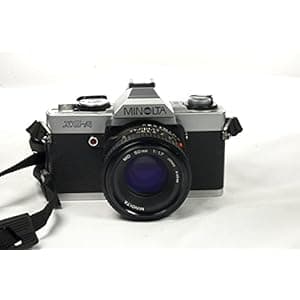 B004KU0JY8 Price: $169.99 Score: 1000.000 Category: Electronics Rating: 2.7 Votes: 2 Find similar productsMINOLTA XG-A SLR Camera. The Minolta XG series was launched together with the much more sophisticated Minolta XD series in 1977 as a budget line of small, lightweight and easy-to-use electronic SLR with an automatic exposure mode.You cannot purchase this camera anymore. As a first in the line-up of Minolta SLRs, these cameras were in need of a battery. They still used the outdated CdS metering system and had a competitive amazing shutter. In the aperture priority automatic mode, the electronically governed shutter provided stepless speeds from 1s to 1/1000s. The big news was the so-called Touch Switch: After powering the camera up via the main switch, it was in stand-by mode. By just slightly touching the release button, the photographer activated the electronics and the LEDs lit up for about 15 seconds. All XG bodies featured an ±2 EV exposure compensation. The XG series had a dedicated motor drive, the Winder G and the flagship of the series, the XG-M, could even be mounted on the 3.5-fps Motor Drive 1. Also a data back, the Data Back G was available. This series can be seen as the ancestor of the most successful of all manual Minolta SLRs, the famous Minolta X-700. |  B0771RLVZQ Price: $7.99 Score: 5.348 Category: Electronics Rating: 4.5 Votes: 48 Find similar products72MM Multi-Coated UV Protective Filter for Sony Cyber?Shot DSC-RX10 III, DSC-RX10 IV Digital Cameras. Why Do I Need a UV Filter In the days of film the value of placing a UV filter in front of your lens was never questioned. In addition to dampening the image-robbing effects of atmospheric ultraviolet radiation, UV filters also served to protect the front element of your lens from dust and moisture. They also repelled the inevitable smudges and scratches that over time compromise the effectiveness of the anti-reflective coatings that go into determining how well (or not so well) your pictures turn out. Fast-forward to the modern days of digital imaging and the big argument is: “do we still need UV filters?” The answer is an unqualified “Yes.” Despite the fact that digital imaging sensors are nowhere near as sensitive to UV radiation as film, the protective properties of a UV filter on your lens are still quite justified. Regardless of how the image is being recorded, the probability of dust, moisture, smudges and scratches finding their image-compromising way onto your front lens element is equally inevitable and troublesome. What Is UV (ultraviolet) Light? The visual spectrum—the light we see with our eyes—consists of the colors red, orange, yellow, green, blue, indigo and violet. Mix them together and you get “white” light. The electromagnetic wavelengths of light are measured in terms of nanometers (nm), with the visual spectrum residing in the 390 to 750nm portion of the electromagnetic bandwidth. Just below the red end of the visual spectrum is infrared (approx 750nm to 1mm) and ultraviolet light resides just above the blue end of the visual spectrum (approx 10nm to 390nm). While we cannot see UV light, it nonetheless impacts the visual quality of the pictures we take. About our filters Our Filters are manufactured from high-quality solid optical materials. Each individual filter is heat-treated to avoid any rare movement or distortion.As a lens protector, it should be left on at all times. |
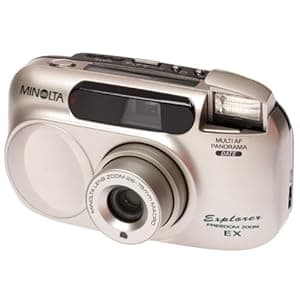 B00004S5H9 Availability: Currently unavailable Score: 4.975 Category: Electronics Rating: 3.7 Votes: 10 Find similar productsMinolta Freedom Explorer EX Panorama 28-75 Zoom Date 35mm Camera. Amazon.com This stylish pocket-sized capsule 35mm Minolta Freedom Explorer camera features a built-in wide-angle 28-75mm lens. Designed for both scenic shots and close-ups, the Minolta Freedom Explorer EX lets users select panorama mode and date imprinting at any time. Users may also choose between selectable exposure modes to ensure proper exposure for close-up, night portrait, or landscape/night view shots every time. This camera also offers precise, three-beam active infrared autofocus for sharp pictures. The built-in automatic flash system includes soft flash for close-ups, along with red-eye reduction, autoflash, flash fill, and cancel flash. Film advance and rewind are automatic and fuss free, and users can select continuous advance or midroll rewind. The Minolta Freedom Explorer EX also features a 10-second self-timer setting and wireless remote control release. Along with the camera, the kit includes a carrying case, strap, film, batteries, remote control, and a two-year warranty. | 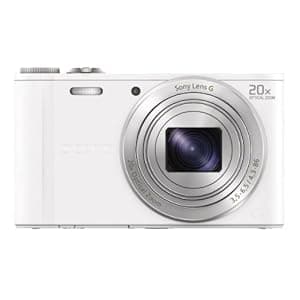 B00BG499JM Price: $233 Score: 4.902 Category: Electronics Rating: 4.2 Votes: 361 Find similar productsSony DSC-WX300/W 18 MP Digital Camera with 20x Optical Image Stabilized Zoom and 3-Inch LCD (White). Product Description Capture landscapes with one touch using Sweep Panorama, get that perfect portrait with Smile Shutter, snap wider scenes From the Manufacturer A+ DSCWX300 <!-- .body2 { font: 100%/1.4 Arial, Helvetica, sans-serif; font-size:12px; background: #42413C; margin: 0; padding: 0; color: #000; background-color: #FFFFFF; } /* ~~ this fixed width container surrounds all other elements ~~ */ .container2 { width: 960px; margin: 0 auto; /* the auto value on the sides, coupled with the width, centers the layout */ } /* ~~ This is the layout information. ~~ 1) Padding is only placed on the top and/or bottom of the div. The elements within this div have padding on their sides. This saves you from any box model math. Keep in mind, if you add any side padding or border to the div itself, it will be added to the width you define to create the *total* width. You may also choose to remove the padding on the element in the div and place a second div within it with no width and the padding necessary for your design. */ .content2 { padding: 10px 0; } /* ~~ miscellaneous float/clear classes ~~ */ .fltrt { /* this class can be used to float an element right in your page. The floated element must precede the element it should be next to on the page. */ float: right; margin-left: 0px; } .fltlft { /* this class can be used to float an element left in your page. The floated element must precede the element it should be next to on the page. */ float: left; margin-right: 0px; } .clearfloat { /* this class can be placed on a <br /> or empty div as the final element following the last floated div (within the #container) if the overflow:hidden on the .container is removed */ clear:both; height:0; font-size: 1px; line-height: 0px; } --> Bring the action ultra-close with a remarkable, 20x zoom ultra-compact camera. Plus, share pics and video easily to Facebook and more with wireless transfer to your smartphone or tablet. Easily shoot all day with battery to spare with up to 500 photos per charge. 20x optical zoomplus 40x Clear ImageDigital Zoom 18.2MP images and high speed AF even in low-light WiFi sharing to upload photos and videos Technology Get close with 20x zoom Zoom in super close for great sports, travel, and wildlife photos. The WX300 boasts 20x optical zoom plus 40x Clear Image Digital Zoom technology to bring you near enough to capture distant details. A powerful processor reduces graininess for crisper, higher-quality close-ups. Pixel Power With a 18.2-megapixel Exmor ® R CMOS sensor, capture high-resolution images that take full advantage of the camera's high quality Carl Zeiss ® lens. Advanced processing technology reduces noise and graininess for incredibly crisp, clear images - even in challenging low-light conditions. Share instantly with Wi-fi WiFi lets you quickly upload photos and videos to social media sites through your WiFi smartphone or tablet, back them up on a network-connected PC, or view them on your compatible large screen TV. Crisp, beautiful HD videos Record crystal-clear movies in high-resolution with HD 1080/60i AVCHD™ video capture 1 . Stunning, fast motion video with reduced distortion looks great when played back on your HDTV 2 . Notice a perfect photo op while shooting video? With dual record of stills and movies, you can shoot both at the same time. Big-time battery life Never miss the perfect shot due to a dead battery. The Cyber-shot WX300 camera features long-lasting, extended battery life so you can capture up to 500 photos on a single charge and shoot nearly all day without a worry. It's perfect for traveling or shooting photos while you're out and about. Say goodbye to blur Sony's Optical SteadyShot™ image stabilization with Active Mode gives you the freedom to shoot movies even while walking or running³. 2-way Active Mode corrects for both vertical and horizontal motion. Product description and full feature list Explore the full range of features and options below. Enhanced Superior Auto Enhanced Superior Auto supports scenes with dynamic motion to provide beautiful results even in dark situations. The result is clearer images with less blur. Capture the decisive moment with up to 10fps Capture full 18.2 megapixel resolution images at up to 10 frames per second, helping to ensure that the decisive moment is captured such as the soccer ball flying into the goal. In addition, a mechanical shutter helps reduce distortion when continuously shooting moving subjects. Creative shooting withPicture and Beauty effects Picture Effect adds a new level of expression to photos, making ordinary landscapes and portraits come to life by heightening mood and emphasizing certain attributes. Beauty Effects allows edits to skin tones, skin smoothing, shine removal, eye widening, and teeth whitening. Beauty Effects can be combined to further enhance the image. Intelligent Sweep Panorama™ mode-up to 360° Intelligent Sweep Panorama mode takes our Sweep Panorama function to the next level with the addition of motion compensation. Even when subjects are moving in the foreground of your landscape, these cameras can detect faces and moving subjects, intelligently stitching different widths together to minimize distortion. Simply press the shutter button and sweep the camera in the desired direction and the camera continuously shoots at a high speed, then seamlessly stitches the images together with automatic position adjustment to create one stunning panoramic image. Available in wide and up to 360° full circle, the camera can take a variety of panoramic shots. 1. Records in 29 minute segments 2. Requires HDTV and HDMI cable sold separately 3. Combined with electronic stabilization © 2013 Sony Electronics Inc. All rights reserved. Reproduction in whole or in part without written permission is prohibited. Sony, Cyber-shot, SteadyShot, Smile Shutter, Sweep Panorama, Exmor R and the Sony make.believe logo are trademarks of Sony. Microsoft, Windows, and Windows Vista are trademarks of Microsoft Corporation. Mac is a trademark of Apple, Inc. All other trademarks are trademarks of their respective owners. Features and specifications subject to change without notice. |
 B0002J6SFA Availability: Currently unavailable Score: 4.902 Category: Electronics Rating: 3.1 Votes: 34 Find similar productsKonica Minolta Dimage Z3 4MP Digital Camera with Anti Shake 12x Optical Zoom. From the Manufacturer From the Manufacturer Konica Minolta Photo Imaging U.S.A., Inc.'s new Dimage Z3 4.0 megapixel digital camera is the first Z-series camera to feature Konica Minolta proprietary Anti-Shake system. This new camera provides photographers with high-quality images and features a wide range of convenient and easy-to-use high-end functions. Further Advances in Rapid Autofocus (AF) with Predictive Focus Control See detailed views of the Z3's features: Front Back The Dimage Z3 incorporates an AF-dedicated ASIC to video AF system. Focusing takes a mere 0.15 seconds at wide angle and only 0.20 seconds at telephoto. And in Continuous AF, the Dimage Z3 includes Predictive Focus Control, which allows photographers to capture sharper images of moving subjects—like a child running at full speed. The Dimage Z3 also features a faster focusing lens drive that moves the focusing lens more than twice as fast as the previous Z-series model. Its Quick Speed Image Readout in AF function reads images from the CCD at a rate of 100 frames per second from when the shutter-release button is pressed partway until the image is brought into focus, giving contrast information in half the time of normal mode (50 frames per second). With Optimized AF Sequence, in Video AF the Dimage Z3 uses AF Sequence Control to simultaneously determine the focus drive direction and drive the lens to the position of maximum contrast through repeated focusing. This means that focusing operations start as soon as the shutter-release button is pressed partway. The Dimage Z3 also offers improved AF accuracy through several features. 5-point Area AF provides five focus areas that overlap horizontally and thus reduce AF failures that occur when subjects appear in between focus areas and cause a perspective conflict. A human subject sensor algorithm uses color information in an AF area to prioritize and focus on that area if it is more than 50% occupied by flesh tone. This reduces shots that erroneously focus on a background rather than on the person in the picture. CCD-Shift Anti-Shake Function The Konica Minolta Dimage Z3 is the first Z-series model to include Konica Minolta's Anti-Shake function. This gives photographers unprecedented control and accuracy when taking pictures in low light situations, as well as when fully-extending and hand-holding the camera's 12x optical zoom lens. The high-precision CCD-shift method employs the proprietary Smooth Impact Drive Mechanism (SIDM), in which angular velocity sensors detect the degree of shaking and move the CCD to compensate for and correct this. The SIDM enables compensation to minimize the effect of camera shake at 2-3 shutter speeds slower than on cameras without an Anti-Shake function (depending on conditions; equivalent to 2-3 exposure increments). The Dimage Z3 can correct shaking without increasing shutter speed and raising ISO sensitivity, factors which increase image noise. In addition, users won't see the deterioration in image quality usually associated with electronic anti-shake systems. The CCD-shift method doesn't require extra correction lenses like optical anti-shake systems, so the Dimage Z3's body is compact and lightweight. The Dimage Z3's anti-shake system is effective in correcting both the fine movement of pressing the shutter-release button and the larger and slower movements of the user's body. Incredible 48x Total Zoom Range Combining the camera's 12x optical zoom lens with the 4x digital zoom gives photographers a 48x total zoom, perfect for taking distance shots at sporting events or when capturing distant subjects. This incredible optical zoom lens delivers a focal range equivalent to a 35-420mm range on a 35mm camera lens. With the digital zoom, total zoom is equivalent to 35-1680mm (35mm equivalent). Konica Minolta GT APO Lens DiMAGE Z3 focuses in an astonishingly fast 0.15 seconds at wide angle and 0.20 seconds at telephoto for the fastest autofocus in this class. The Dimage Z3 employs a newly developed high-performance lens system that supports CCDs with 5 million effective pixels. The optical lens system consists of 13 elements in 10 groups and includes two AD (anomalous dispersion) glass lenses and two aspheric elements, a construction that adds up to sharp, high-quality images. Multi-coating on 14 lens surfaces ensures minimal flaring and ghosting in all zoom ranges. It employs a 5-vane iris diaphragm to beautifully reproduce a near-circular fading effect. 4-Megapixel CCD for Beautiful Prints The 4-megapixel, 1/2.5-inch CCD produces plenty of detail for creating high-quality enlargements as large as 10 x 14 inches at 150-dpi print resolution. In addition, the CCD's primary color filter offers high color fidelity. Superbly Detailed Images with CxProcess II Konica Minolta's CxProcess II image processing technology incorporates characteristics like smooth gradations, natural skin tones, and brilliantly clear colors for images that are more natural and lifelike. The Dimage Z3's 4 megapixels capture fine lines and intricate details for stunning digital images. High-quality Movies as Beautiful as TV or Video Camera Footage The Konica Minolta Dimage Z3 takes movies in VGA size (640x480) at 30 frames per second for smooth video with sound rivaling TV programs or video camera footage. Users can choose from three movie image sizes: 640x480 (Fine), 640x480 (Standard), or 320x240 (Standard). Thanks to the camera's Anti-Shake function, users can take telephoto movies that are smooth and clear. The XR (Extended Recording) Movie function lets users record longer movie clips onto the camera's SD memory card. With Night Movie, the Dimage Z3 can record in extreme low-light conditions thanks to a CCD that's four times more sensitive than conventional sensors. UHS (Ultra High Speed) Continuous Shooting The Dimage Z3 captures 15 images at 10 frames per second at UHS (Ultra High Speed) continuous shooting. Progressive Capture With the Dimage Z3 in Progressive Capture mode, images are saved automatically when users stop pressing the camera's shutter-release button. Progressive Capture means that the last several images in the sequence get saved: as many as 6 images (in Standard continuous advance) or 15 images (in UHS continuous advance). So when shooting fast-moving subjects, Progressive Capture ensures that they are recorded when and where the user wants them. These functions are handy for shooting sporting events or for recording and improving your form in personal sports training situations such as a golf swing. Real Motion LCD Monitor The Dimage Z3 features the Real Motion LCD monitor, which delivers crystal clear images to the user at 50 frames per second. Conventional monitors on digital cameras use a 30-frames-per-second display format that sometimes results in a less-than-smooth display. The 50-frames-per-second Real Motion monitor rate provides smooth action that brings images to life. Noise Reduction Noise Reduction enables exceptional night images by automatically preventing the blemishes and graininess associated with slow-shutter shots. PASM Exposure Control and Metering Modes The Dimage Z3 offers incredible control over exposure. There are four modes: Program, Aperture Priority, Shutter Priority, and Manual. Select manual exposure to enable 30-second time exposure capability. The Dimage Z3 has three metering modes: Multi-segment, Center-weighted, and Spot. Multi-segment metering uses 256 segments to determine exposure. Get as Near as 0.4 inches with Super Macro Photographers can shoot amazing close-ups in either Macro or Super Macro modes. In Super Macro mode, photographers can bring the lens as near as 0.4 inches from their subject. PictBridge-Compliant Forget all about complicated connections with a PC. Users can get fast, fun printouts directly from their camera by connecting the Dimage Z3 to a PictBridge -compliant printer. Users just check which images they want to print on the Dimage Z3's LCD monitor and then print out their favorites in no time at all. New Ergonomic Design The Dimage Z3's design is advanced yet familiar and easy-to-use. Despite its large 12x zoom range, it weighs just 11.8 ounces. It's also easy to carry and operate even for amateur photographers. The camera's ergonomic form makes it easy to hold and keep steady for those zoom shots. What's in the Box Neck strap NS-DG7000, lens cap LF-243, accessory shoe cap SC-1000, AV cable AVC-700, 16MB SD (Secure Digital) memory card, USB cable USB-2, Dimage Viewer CD-ROM, ArcSoft VideoImpression 2 CD-ROM (for Windows only), four AA alkaline batteries. |  B001B01PDO Availability: Currently unavailable Score: 4.854 Category: Electronics Rating: 5 Votes: 1 Find similar products3-Pack DSLR & SLR Cheatsheets. Pocket sized quick reference cards. Complete series for NIKON D40 D40x D50 D60 D70 D70s D80 D90 D100 D200 D300 D300s D700 D3000 D3100 D5000 D7000 D1 D1H D1X D2 D2H D2X D2Hs D2Xs D3 D3x D3s F100 F2 F3 F4 F5 F6 N50 N65 N75 N80 N8008 N90 N90s FM10 FM3a FM FE FE2 FA FG F4s. The Photo Buddy Quik Cards are an inexpensive way to get up to speed on techniques that will help you create stunning photos. These cards are a great reference for avid photographers -- just clip them in your camera bag for quick help when you're out shooting. The Quik Cards or cheatsheets small enough to be easily stored in your camera bag or clipped just about anywhere. Cards included in these sets: Quik Cards I: Metering and Exposure, Changing Exposure Settings, Lighting, Fill Flash, Landscape, Water, Flowers, Sunrises and Sunsets, Nighttime Photography, Fireworks, Portraits, High / Low Key. Quik Cards II: 3 Steps to Better Photos, Black & White Filters, Red Eye, Action Stopping, Intentional Blur, Sports, Effective Flash Range, Design Elements, Multiple Exposure, Macro, Wildlife. Quik Cards III: Children, Weddings, Still Life, Underwater, Travel, Stock, Lenses, Filters, Bracketing, RAW vs JPEG, Edit Print and Preserve. |
 1781452210 Price: $18.7 Score: 4.854 Category: Electronics Rating: 4.6 Votes: 90 Find similar productsCanon EOS Rebel T6s/760D & T6i/750D (Expanded Guides). About the Author David Taylor is an award-winning landscape and travel photographer whose work has taken him all over the world. | 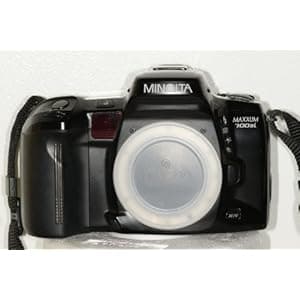 B000NW7472 Availability: Currently unavailable Score: 4.785 Category: Electronics Rating: 5 Votes: 2 Find similar productsMINOLTA DYNAX 700Si AUTOFOCUS SLR CAMERA. Sold with Sigma AF 28-70mm lense, 2.8-4 UC. Also comes with Customized function card. |
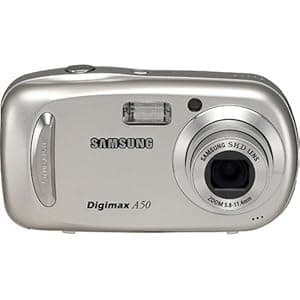 B000BBOSEW Availability: Currently unavailable Score: 4.739 Category: Electronics Rating: 4.6 Votes: 4 Find similar productsSamsung Digimax A50 5MP Digital Camera with 3x Optical Zoom. From the Manufacturer The Digimax A50 5-megapixel digital camera features a 3x optical zoom SHD lens. In addition to its optical zoom, the A50 also provides a 5x digital zoom, achieving a total zoom of 15x when used together. The camera also provides a 10x zoom during playback, which allows shooters to check the detail of their images. The Digimax A50 is equipped with a large 2.5-inch 200k pixel high-resolution LCD, that offers the best image quality for shooting and reviewing pictures. Can become an advanced user Pressing the shutter of a digital camera is not all of taking pictures or creating perfect images. The fact is applied to all digital cameras from professional users' to beginners'. According to light conditions, a flash should be used. According to your desired outcome, the shutter and aperture should be controlled. Thus, different pictures are taken in the same place with the use of flash, shutter, or aperture. For handling this problem, general digital cameras for beginners provide Scene modes. Basic information on each shooting situation is saved in the Digimax A50 and is applied when taking pictures. You can set a shooting mode very easily by using a button. The Digimax A50 provides 10 Scene modes (Night, Portrait, Children, Landscape, Close-up, Sunset, Dawn, Backlight, Fireworks, Beach and Snow) so that everyone can take pictures in various ways like professional users. Dark or bright In PROG mode, you can change the brightness of an image depending on the situation. Through the exposure compensation function, you can shoot images with different brightness as you want or under specific exposure conditions such as backlight, thus obtaining clearer images. Autoexposure bracketing function Frequent users of digital cameras may know the AEB function. The Autoexposure Bracketing (AEB) function is suitable for situations when optimal exposure is difficult to achieve. You can take a picture with normal exposure, darker picture, and brighter picture, simultaneously. Under the situation where shooting is difficult with normal exposure settings, you can take pictures by selecting the brightness of an image through this function. Various special effects making shooting more fun The Digimax A50 provides special effects beyond typical shooting methods so that you can spend more exciting time shooting and viewing images. The special effects include color Effect and Photo Frame. Through the color Effect function, you can express images in black and white, sepia, blue, red, green, or film color. Through the Photo Frame function, you can add frame-like borders (this camera supports 9 types of frames) to a still image. Thus, you can have more fun viewing and shooting images. Natural looking colors The Digimax A50 provides White Balance functions (Daylight, Cloudy, Fluorescent, Tungsten, and Custom) so that you can achieve more natural-looking color reproduction under any light conditions. Additionally, RGB enables you to control colors in any way you want. Sharp and clear movies in VGA For clearer sharper movies, the Digimax A50 uses a high compression, high quality movie clip format, and movie clips are supported in VGA (640 x 480) at 30 frames per second. With VGA (640 x 480), you can play a movie clip on your TV without any image quality degradation, and enjoy it on a large screen of a computer, whose size is twice as large as the existing screen. Because this digital camera supports up to 30 frames per second, you can view a smooth movie with natural looking colors. You can record voice and movies for as long as the available recording time in the memory allows. In addition, you can extract desired frames from the recorded movie. The above features make this digital camera a perfect substitute for a camcorder. Exciting movie shooting function In terms of existing movie recording functions, users have difficulty editing recorded movies. The Digimax A50 implements part of editing functions of a computer and the successive recording function developed through Samsung's own technology that enables you to temporarily stop during unwanted scenes and resume recording the movie. Using this function, you can record your favorite scenes into a movie clip without having to create multiple movie clips. Those implementations enable users to use recording movie functions easily and conveniently. No more camera shake The Digimax A50 provides a camera shake prevention function to avoid camera shake during movie recording. This function detects camera shake automatically and traces the target subject when recording a movie. With the movie function making this digital camera a perfect substitute for a small digital camcorder, the Digimax A50 is very useful for taking pictures of family events or your normal life. Movie editing without a computer The Digimax A50 implements part of the editing function only available in a computer. You can select and cut the desired part from the recorded movie and save it by creating a new file so that you can use this camera more conveniently when editing a movie clip. You may want to save desired scenes while recording a movie with a digital camera. The Digimax A50 reflects the requirement so that you can capture a scene from the movie clip. When you don't take pictures while recording a movie, you can extract desired frames from the recorded movie. Small pocket-sized body with stable grip Various and complex digital camera functions make regular users who are not familiar with various camera functions uncomfortable when using a camera. The Digimax A50 provides convenient function and setting buttons that can be used simply and easily with just one hand. In addition, this small pocket sized body enables you to firmly grip the digital camera. Thus, you can easily operate camera buttons in any situation. Vivid images with large 2.5-inch TFT LCD The Digimax A50 improves the Graphic User Interface, and all menus are written using Korean letters to select menus easily and quickly. The arrangement of buttons, such as the Mode dial for selecting a shooting mode and the 5-function button for selecting functions, is user-friendly so that you can operate them easily. In addition, the 256 color menu setting screen satisfies you visually. The interface has been enhanced, focusing on very easy access to the operating buttons and frequently-used functions so that you can use a variety of digital camera functions easily and quickly. You can also employ the exposure compensation, white balance, and ISO functions by using the operation button on the back of this camera Built-in memory The Digimax A50 provides a built-in 11 MB memory so that you can take and save pictures without a memory card. In addition, this camera provides the Copy to Copy function that enables you to send images saved in an internal memory to an external memory. Thus, you will not be embarrassed if you do not have a memory card for the digital camera while taking pictures during travel or family events. Image edit function Editing is the most important function of a digital camera. You can correct or modify an image by running an editing program, but it is expensive and takes a long time to learn how to use and become familiar with it. So, for the sake of user convenience, this function is incorporated into the Digimax A50. The function enables a slide show of pictures taken, resolution changes, a trimming function, image rotation, and picture protection so that you can use the camera more conveniently. In addition, the function enables you to check information about the picture immediately. Myset function This function is very convenient if you frequently change shooting settings such as resolution, image quality, sensitivity, and white balance, according to the situation. After setting shooting values, use this function. You can use the saved information without a separate operation. Save shooting values as Myset 1, 2, and 3 and use the function conveniently depending on the situation. Double self-timer function This function is very useful when you take self-portraits or group pictures. Typically, one of the inconvenient points of the existing Self-Timer function is that when you do not want an image taken, you should set 10 seconds, arrange and set people again. However, you can solve this problem with the Digimax A50 through the double self-timer function provided. A picture will be taken after about 10 sec. and 2 sec. later a second picture will be taken. Thus, even if you do not take a desired image, you can conveniently obtain a desired image in the second shooting. PictBridge (Direct Printing System) You can use a USB cable to connect the Digimax A50 to a printer without a PC, and select paper types and sizes supported by the printer from a menu in the camera. Through the camera's LCD, you can check the printer's progress status. PictBridge is completely compatible with DPOF so that you can also use the existing output format (DPOF) according to the printer type. Voice recording and voice memo The Digimax A50 can be used as a digital voice recorder, and you can record voice for up to one hour. Additionally, you can add your voiceover to a stored still image for up to 10 seconds. Therefore you can use your digital camera in a variety of different ways. What's in the Box: Digital camera, user manual, product warranty, camera strap, software CD, USB cable, two AA batteries. | 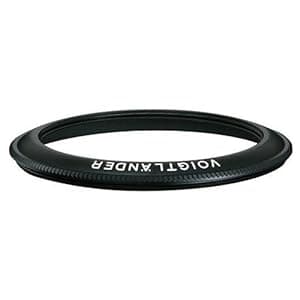 B000PKFNDE Availability: Currently unavailable Score: 4.739 Category: Electronics Rating: 2.9 Votes: 4 Find similar productsVoigtlander Bessa R4M Camera with No Lens and 0.52 Viewfinder - Black. The Voigtlander R4M and R4A are production 35mm rangefinder cameras that are made with built in parallax projected framelines for 21, 25, 28, 35, and 50mm lenses. A tremendous feature for rangefinder lovers who have been longing for a Rangefinder with built in 21 and 25 framelines. This opens up a new world of convenient possibilities for the RF user, just frame and focus directly from the built-in viewfinder and you wont have to carry and keep track of 21 and 25 accessory viewfinders. The R4M is above all else small, and light, really an unobtrusive cameras that is ideal for handheld lowlight conditions, and was designed specifically for the wide-angle shooter. It features a mechanical shutter that works without batteries (without metering, when used without batteries). It has a simple LED metering display along the bottom of the viewfinder, that displayes exposure information in .5 EV values. The metering display is the same as the R3M. It has an exceptionally bright viewfinder, as well as a quiet shutter. The R4M is offered only in classic black paint finish, like the R2M or R3M. |