E-commerce Search Demo
AI Assisted Filters
Parameters
Query:
Category filters: All
AI Assist: ON
Page: 1
Products
Time taken: 3 Max score: 1000.000 Total hits: 100 Full time: 0.0 s
Showing 1-10 of 100 products
 B01M6CKJXC Availability: Currently unavailable Score: 1000.000 Category: Electronics Rating: 4.2 Votes: 568 Find similar productsAeotec Range Extender 6, Z-Wave Plus repeater. You use Z-Wave to manage your smart home. You use Range Extender 6 to keep Z-Wave reliable. Aeotec's Range Extender 6 works seamlessly to amplify and repeat weak Z-Wave and Z-Wave Plus signals. Simply plug it into a power socket, connect it to your Z-Wave network, and it automatically starts improving any poor Z-Wave signals that are in range. As it's custom desgined as a wireless signal booster, Range Extender 6 performs better than other Z-Wave devices that offer simply repeating; it amplifies the signal too. Designed to use Z-Wave Plus, unlike previous editions Range Extender 6 can work with advanced Z-Wave features such as encryption and security devices such as door locks while remaining compatible with older versions of Z-Wave. It repeats signals 250% faster than other signal repeaters and can repeat Z-Wave signals up to 492 feet away when unobstructed. Range Extender 6 is compatible with all certified Z-Wave gateways including Samsung SmartThings, Fibaro, and Mios Vera. | 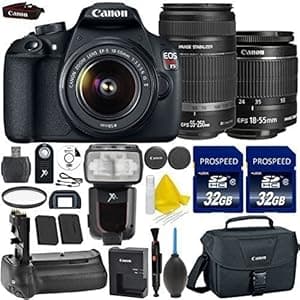 B016YUGWWO Availability: Currently unavailable Score: 7.299 Category: Electronics Rating: 5 Votes: 5 Find similar productsGALAWAY 1200Mbps WiFi Range Extender 2.4GHz and 5GHz Signal Extenders Internet Booster 360 Degree Wifi Booster Signal Amplifier with 4 Antennas. Color: white With the GALAWAY Dual-Band WiFi Range Extender (G1200), you can easily eliminate dead zones and expand the range of your existing wireless router and take advantage of Wireless-AC performance. Features: Complies with IEEE 802.11 ac/a/b/g/n standardsDual Band connections for lag-free HD vedio streaming and gaming Maximum WLAN security with WPA2, WPA Provides one 10/100Mbps Auto-Negotiation Ethernet LAN Port Provides one 10/100Mbps Auto-Negotiation Ethernet WAN/LAN port Frequently Asked Questions: Q1. How do I reset the device or restore the device to factory default setting? A. Put the power button to on and the Mode Selector in Repeater side, plug the extender into a socket. While the power LED and WiFi signal indicator comes up, use the sim card removable needle (including in the package) to press the reset button for 3-6 seconds, then wait for several seconds, all the LED lights turn on monetarily, then you can configure the extender again. Q2. Why is no internet of the extended network after the extender is successfully set up? A1. You may have entered your router WiFi password incorrectly as the WiFi key during the installation, please reset the extender and go through the configuration again. A2. Make sure that your router encryption algorithm is WPA at least. A3. The distance between the router and extender is too far, please adjust the extender to the ideal location. Q3. How can I change the encryption algorithm to WPA?A. Use a wireless device to connect to your router WiFi, then open a browser in this device, enter your router's ip address in the address bar of the browser Click Wireless Settings and Wireless Encryption Click Secure Mode and you will see WPA Package List: 1 x 1200Mbps WiFi Range Extender 1 x RJ-45 Networking Cable 1 x User Manual. |
 B00SSSCAZE Price: $39.99 Score: 7.246 Category: Electronics Rating: 4 Votes: 353 Find similar productsLinksys N600 Pro Dual-Band WiFi Range Extender. Linksys' N600 PRO Wi-Fi Range Extender (RE4100W) eliminates dead spots in your home by increasing the router's Wi-Fi signal and extending coverage up to 7,500 Sq. Ft. The RE4100W features Cross-Band Technology, which receives information on one band and transmits on another, resulting in a stronger, more consistent signal throughout your home. Range extender easily connects to your current network. No need to modify router settings! Using any mobile device, Spot Finder Technology shows you where to place range extender for optimal performance. Follow prompts for quick and easy setup. With Wi-Fi Audio you can connect a stereo system or speakers to range extender and instantly stream music from your smart device or computer. | 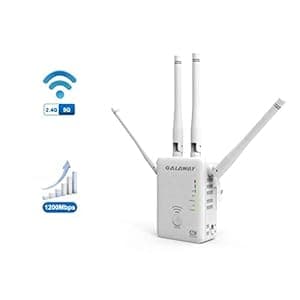 B01L91P68O Availability: Currently unavailable Score: 7.092 Category: Electronics Rating: 5 Votes: 3 Find similar productsGALAWAY 1200Mbps WiFi Range Extender 2.4GHz and 5GHz Signal Extenders Internet Booster 360 Degree WiFi Booster Signal Amplifier with 4 Antennas. Color: white With the GALAWAY Dual-Band WiFi Range Extender (G1200), you can easily eliminate dead zones and expand the range of your existing wireless router and take advantage of Wireless-AC performance. Features: Complies with IEEE 802.11 ac/a/b/g/n standardsDual Band connections for lag-free HD vedio streaming and gaming Maximum WLAN security with WPA2, WPA Provides one 10/100Mbps Auto-Negotiation Ethernet LAN Port Provides one 10/100Mbps Auto-Negotiation Ethernet WAN/LAN port Frequently Asked Questions: Q1. How do I reset the device or restore the device to factory default setting? A. Put the power button to on and the Mode Selector in Repeater side, plug the extender into a socket. While the power LED and WiFi signal indicator comes up, use the sim card removable needle (including in the package) to press the reset button for 3-6 seconds, then wait for several seconds, all the LED lights turn on monetarily, then you can configure the extender again. Q2. Why is no internet of the extended network after the extender is successfully set up? A1. You may have entered your router WiFi password incorrectly as the WiFi key during the installation, please reset the extender and go through the configuration again. A2. Make sure that your router encryption algorithm is WPA at least. A3. The distance between the router and extender is too far, please adjust the extender to the ideal location. Q3. How can I change the encryption algorithm to WPA?A. Use a wireless device to connect to your router WiFi, then open a browser in this device, enter your router's ip address in the address bar of the browser Click Wireless Settings and Wireless Encryption Click Secure Mode and you will see WPA Package List: 1 x 1200Mbps WiFi Range Extender 1 x RJ-45 Networking Cable 1 x User Manual. |
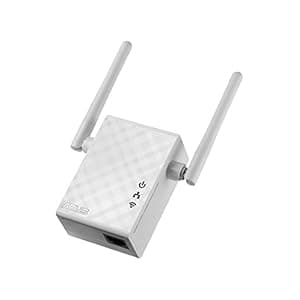 B015405V86 Availability: Currently unavailable Score: 6.944 Category: Electronics Rating: 2.8 Votes: 4 Find similar productsASUS Network RP-N12 Wireless N300 Range Extender/Access Point/Media Bridge Retail. External Antenna Enhances Wi-fi Signal Coverage And Boosts Your Wi-fi Everywhere Quick And Secure Setup Via A Press Of The Wps Button Smart Led Signal Indicator Helps You Find The Best Location For Optimum Wi-fi Performance Roaming Assist Helps You To Get A Stable Connection Everywhere In The Home Or Office Fill Your Home With Wi-fi The Rp-n12 Wireless Range Extender Has Powerful External Mimo Antennas That Help To Eliminate Signal Dead Zones And Improve The Coverage Of Any Existing Wireless Router. It Works As A Repeater, Which Means It Can Extend Wireless Networking To Every Corner Of The Home - Even To Those Difficult, Hard-to-reach Spots. This Ensures Reliable High-speed Internet Coverage Everywhere For Devices Such As Notebooks, Tablets, Smartphones, Game Consoles And Smart Tvs. One-press Setup And Worry-free Connectivity Rp-n12 Wireless Range Extender Installation Doesn't Require A Cd Or Even A Mouse And Keyboard. Simply Press The Wps Button And Setup Is Complete. Optimized Performance Is Assured For A Seamless And Smooth Internet Experience. For Advanced Settings, You Can Connect Rp-n12 To A Pc Via An Ethernet Cable And Access The Web-based Configuration Menu Directly, With No Disc Or App Needed. You Can Even Set It Up Wirelessly From A Tablet Or Smartphone. Find The Best Location For Rp-n12 With The Signal Indicator For Best Results, Rp-n12 Needs To Be Within Range Of A Stable Router Signal, And Should Be Placed Between The Router And The Location Where You Need Better Wireless Coverage. Rp-n12 Works Best When It Is Receiving A Strong Wireless Signal From The Router - You Can Check This By Using The Signal Strength Indicator On The Front Panel. 3-in-1 Range Extender, Access Point And Media Bridge Modes Rp-n12 Has Two More Convenient Modes To Make It Even More Flexible. As Well As A Range Extender, It Can Also Work As A Wireless Access Point (ap) Or As A Media Bridge. In Ap Mode, It Can Be Connected To Any Wired Lan - For Example, A Hotel's Internet Conn. | 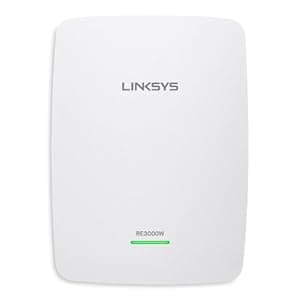 B00KMXUOUQ Availability: Currently unavailable Score: 6.944 Category: Electronics Rating: 4 Votes: 434 Find similar productsLinksys RE3000W N300 Wi-Fi Range Extender (RE3000W). Extend the range of your home Wi-Fi signal and eliminate dead spots using the Linksys N300 Wi-Fi Range Extender (RE3000W). The RE3000W can be plugged into a standard wall outlet to bring wireless Internet connectivity to the far reaches of your home, with a range of up to 5,000 square feet. An Ethernet port allows you to establish a wired connection to a desktop or laptop computer or another Internet-capable device. The extender eliminates dead spots and works with virtually any Wi-Fi router. View larger . The RE3000W brings wireless Internet connectivity to the far reaches of your home with a range of up to 5,000 square feet. View larger . Universally Compatible with Internet Routers The RE3000W is compatible with virtually any Wi-Fi router or gateway. Simply connect it to your current wireless network to enjoy Internet access on all your devices, from anywhere in your home. Eliminate Dead Spots and Increase Wi-Fi Range up to 5,000 Square Feet With the Linksys N300 Wi-Fi Range Extender (RE3000W), you can easily expand the range of your existing wireless Internet router. The device features a single wireless band of 2.4 GHz and can deliver data transfer speeds of up to N300 Mbps to extend your Wi-Fi. Simply plug the device into a standard wall outlet where you need Internet connectivity--say, an upstairs bedroom or office or another remote area of your home. The RE3000W repeats the signal from the router and redistributes it to reduce wireless dead spots. Ethernet Port for Wired Connection In addition to wireless connectivity, the RE3000W features a Fast Ethernet port, allowing you to establish a fast, secure wired connection to a desktop or laptop computer or virtually any other Internet-enabled device. Quick and Easy Installation Setup 1. Connect the power cable. 2. Plug in the range extender midway between your router and the area without Wi-Fi. 3. Wait for a solid light on the cover of the range extender. Then, on a computer, phone, or tablet, connect to the Wi-Fi network Linksys Extender Setup. 4. Set up using the web browser (follow steps in Quick Installation Guide) System Requirements This product requires a wireless router or access point, as well as a Wi-Fi-enabled computer that has an Ethernet port and that runs the Microsoft Windows XP SP3, Windows Vista SP1 or later, Windows 7, or Windows 8 operating system or the Mac OS X Leopard 10.5.8 or later, Snow Leopard 10.6.1 or later, Lion 10.7 or later, or Mountain Lion 10.8 or later operating system. What's in the Box Linksys N300 Wi-Fi Range Extender (RE3000W), power cord, power connector cover, Ethernet cable, and quick installation guide. N300 Wi-Fi Range Extender (RE3000W) At a Glance: Single wireless band of 2.4 GHz for fast data transfer speeds Single wireless band of 2.4 GHz for fast data transfer speeds Wi-Fi range of up to 5,000 square feet Wi-Fi range of up to 5,000 square feet Ethernet port to create a wired connection Ethernet port to create a wired connection Compatible with virtually any Wi-Fi router Compatible with virtually any Wi-Fi router An Ethernet port allows you to establish a wired connection to a desktop or laptop computer. View larger . |
 B00030EZIK Availability: Currently unavailable Score: 6.944 Category: Electronics Rating: 4 Votes: 1 Find similar productsLinksys-Cisco Linksys Wireless-G Range Expander WRE54G - Repeater (WRE54G-CA). . |  B0B5RNTW5C Availability: Currently unavailable Score: 6.803 Category: Electronics Rating: 3.1 Votes: 71 Find similar productsHomeSweety WiFi Extender, Wireless Signal Repeater Booster Up to 6000 sq.ft and 25 Devices, Range Long Amplifier with Ethernet Port, Access Point, 1-Tap Setup, Alexa Compatible N300 (Black). WiFi Extender, Wireless Signal Repeater Booster Up to 6000 sq.ft and 25 Devices, WiFi Range Extender, Long Range Amplifier with Ethernet Port, Access Point, 1-Tap Setup, Alexa Compatible N300. |
 B004X9HK16 Availability: Currently unavailable Score: 6.667 Category: Electronics Rating: 5 Votes: 2 Find similar productsGALAWAY WiFi Extender WiFi Repeater 2.4GHz WiFi Signal Amplifier with External Antennas and Ethernet Port for High WiFi Coverage (W18). . |  B0BGWJ6G5Z Price: $69.99 Score: 6.623 Category: Electronics Rating: 4.3 Votes: 8651 Find similar productsTP-Link AC1900 WiFi Extender (RE550), Covers Up to 2800 Sq.ft and 35 Devices, 1900Mbps Dual Band Wireless Repeater, Internet Booster, Gigabit Ethernet Port. Boost Whole Home Wi-Fi with Your Existing Router A single router has limited Wi-Fi coverage and always causes Wi-Fi dead zones. RE550 wirelessly connects to your existing router and expands its Wi-Fi signal into areas it can’t reach on its own. Enjoy your stable network experience wherever you are at home. Faster Dual Band Wi-Fi up to 1900 Mbps RE550 delivers dual band (2.4 GHz and 5 GHz) to transmit Wi-Fi signals, doubling the performance of each band. It enables you to keep more devices connected at the same time with its 600 Mbps 2.4 GHz and 1300 Mbps 5 GHz dual bands. Use the 2.4 GHz band to send email and browse the web and the 5 GHz band for gaming and HD streaming. Wi-Fi keeps Strongest for Unlimited Moving With TP-Link OneMesh Technology, it’s easy to form a wifi network with a single Wi-Fi name for seamless whole home coverage. Just connect RE550 to a OneMesh router. Always enjoy the strongest Wi-Fi when you’re walking around with no need to search around for a stable connection. Adaptive Path Selection: Keeps Itself Working at Top Speed Adaptive Path Selection keeps your network running at optimal speeds by automatically choosing the fastest connection path to the router. Always keep your devices fast and stable—ideal for network environments crowded with many devices and applications. High Speed Mode: Maximized Speed with Dedicated Backhaul Uses one dedicated Wi-Fi band as backhaul and another dedicated Wi-Fi band as an access point to maximize the bandwidth on the extended Wi-Fi. Built-In Access Point Mode RE550 is more than a wireless range extender. Simply plug an Ethernet cable into its Ethernet port and easily turn your wired internet connection into a 3×3 MIMO dual band wireless access point. Control at Your Fingertips Set up and manage your Wi-Fi through the TP-Link Tether app from your smartphone (Android, iOS), including TP-Link routers and range extenders. |