E-commerce Search Demo
AI Assisted Filters
Parameters
Query:
Category filters: All
AI Assist: ON
Page: 1
Products
Time taken: 3 Max score: 1000.000 Total hits: 100 Full time: 0.0 s
Showing 1-10 of 100 products
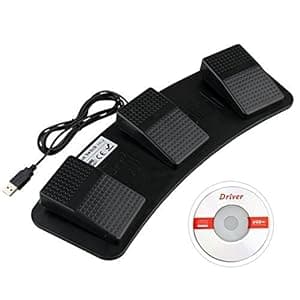 B0732Q7XL5 Availability: Currently unavailable Score: 1000.000 Category: Electronics Rating: 3.3 Votes: 5 Find similar productsYobangSecurity PC USB Game Foot Control Keyboard Action Three 3 Triple Switch Pedal HID Free Drive for Game Keyboard Mouse PC Laptop. Feature: 1. Made of plastic. 3 pedals. More setting function. 2. USB foot switch can bear weight of more than 100kg. Solidly-built and durable enough for use. 3. Simulate any key on keyboard, combination key, mouse and character string. Easy to use and convenient. Application: various intelligent control game, instrument control, factory testing, piano keyboard test, hospital image scanning, etc. Name: USB foot switch Type: FS3-F Color: Black Material: Plastic Switch mode: Plastic triple foot switch Size: about 376 x 121 x 43 mm Package size: about 410 x 160 x 51 mm Length of the USB cable: 192cm Package weight: 546g Description: The USB foot switch is an auxiliary equipment that connects with computer. By using special software to specify any key or combination key, you can control the key with foot switch. When you are inconvenient or too busy, you can achieve the function of manual keyboard operation or simulating mouse with foot switch. HID USB Plastic foot switch. Convenient to use. A computer can connect with several foot switches. The system support: Provide defined software as Windows key. After setup, it can be applied to: Dos/Win 2000/Win XP/Win Vista/Win 7/Linux/MAC. Package included: 1 x Plastic USB Foot Control Keyboard+Mouse Action Three-Switch Pedal HID. |  B08QYTMQYH Availability: Currently unavailable Score: 9.709 Category: Electronics Rating: 3.5 Votes: 2 Find similar productsPCsensor, USB Foot Pedal Single Switch One Key Customized Computer Keyboard Action Controller, Black. The USB foot switch can be used to control your computer by foot. It is used in playing games, factory testing, controlling instruments, helping the disabled and so on. You can use it by hands or feet for efficiency. It is equivalent to a standard HID USB keyboard and mouse , but it is customizable by using the setting software, which can define your foot switch as any keys, key combinations or mouse, No other software is required. Software install and set instructions 1) Access to our website pcsensor, Download FootSwitch_V6.9.7.exe or newest software. 2) Plug the FS1_P footswitch into the USB port of the computer and run software FootSwitch_V6.9.7.exe. (3)Select the corresponding function setting windows. (4)Setting completed and Click Save button. When you want to modify the function of the pedal, you can use the following software to do it. The keyvalue will save in the device,then you don't need to run the software during the using. NOTE:If you want to use the foot pedal on MacOS or Linux System,you need to finish the setting on Windows first. Multiple foot pedals can be connected to a single computer. You can use different key definition software according to your Windows system. |
 B008MU0TBU Availability: Currently unavailable Score: 9.709 Category: Electronics Rating: 3.9 Votes: 61 Find similar productsPC USB Foot Switch Keyboard Pedal. Foot switch is connected to the USB port of a computer auxiliary equipment, specifying any key or combination of dedicated software, which can be controlled by a foot of the key. When the hand is inconvenient or too busy, you can reach the keyboard manually operated by a foot switch or simulate mouse buttons. Can be widely used in a variety of intelligent control of the game, instrument control, factory test, etc., especially for people with disabilities. Use this foot switch to replace any keyboard shortcuts or key combinations such as Ctrl+C, Ctrl+V, Ctrl+Alt+Delete to control your computer easily and quickly. It can be used for playing games, factory testing, instrument controlling, etc. Description: Use USB foot switch to control your computer with any of your feet It is equivalent to a standard HID USB keyboard Pre-program key or key combintions functions on the foot pedal by software Allow to connect more than one switch to your computer by USB ports, you can achieve multi key shortcuts function Compatible with Dos / Windows 2000 / XP / Vista/Win 7, MAC, Linux Dimension (L x W x H): Approx. 4 x 2.5 x 1.5 inch / 10 x 6 x 4 cm Cable Length: Approx. 67 inch / 170 cm Material: Plastic Note: Please take note that this item can be used in DOS, MAC, and Linux. But first we need to set the key assignments in the Windows system, set the keys you need to use, then you can use this item in Linux system. Our hardware is supported the OS systems mentioned above, but the software is not compatible. How to set up? Operate the CD driver firstly, if you just need one key shortcut, just enter the key such as Enter, Ctrl If you need two keys combinations, just enter the two keys such as Ctrl+C Package Includes: 1 x USB foot switch 1 x CD driver. | 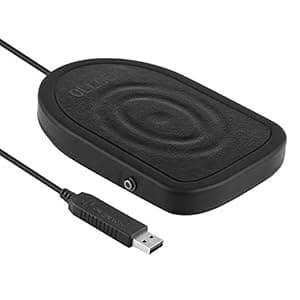 B07WST4Q6T Price: $25.99 Score: 7.813 Category: Electronics Rating: 4.1 Votes: 67 Find similar productsOLLGEN Metal USB Single Foot Control Action Switch Pedal Free Driver HID for Keyboard Mouse Game PC Laptop (Black). . |
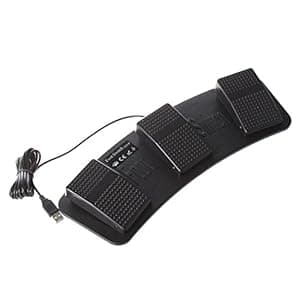 B00L313TUI Availability: Currently unavailable Score: 6.803 Category: Electronics Rating: 3.7 Votes: 79 Find similar productsTOOGOO(R) FS3-P USB Triple Foot Switch Pedal Control Keyboard Mouse PC Game Plastic. . |  B00095NBBQ Availability: Currently unavailable Score: 6.494 Category: Electronics Rating: 3 Votes: 12 Find similar productsSavant Elite Dual USB Foot Pedal (FS20A- Discontinued). For users who require the utmost in productivity and comfort, the Savant Elite Triple Action Foot Switch is the answer. While factory programmed for mouse button emulation, it can be easily reprogrammed on a Windows PC to perform any keyboard action or key combination. Through extensive user testing, proper spacing and orientation of each pedal was determined to maximize comfort and productivity. Furthermore, the outer pedals may be adjusted inward to accommodate smaller feet. Features: Activate Mouse Clicks: All Savant Elite foot switches come pre-programmed to activate right and left mouse clicks. For many users the pain associated with mousing is from the action of clicking, not from moving the mouse. The Savant Elite resolves this problem by relocating the clicking action to the user's feet. Program Any Key Action: Reprogram the foot switch to activate any key action(s). Perfect for offloading work from an overused finger or hand. Some of the more commonly used key actions are Shift, Tab, Enter, Backspace and Delete. Create Macros: Macros are a great productivity tool for generating commonly used phrases, or combinations of key actions and modifiers. With a memory pool of 1200 characters per device the Savant Elite will support even the most demanding of tasks. Specifications: Factory configured to perform mouse button action. Pedals are front-hinged and rounded for easy triggering, made from black, glass-reinforced nylon Three pedals (outer two are adjustable) Low profile design, combined with heavy steel base prevents unit from accidentally moving on the floor. |
 B00VQYIM68 Availability: Currently unavailable Score: 6.494 Category: Electronics Rating: 4.6 Votes: 26 Find similar productsUSB HID Programmable Foot Switch w/2M Cable. Delcom Programmable USB Foot Switch. This device can be programmed to emulate key codes, mouse buttons and joystick buttons. Supports all Major operating systems (32 and 64 bit). Multiply footswitches can be used at the same time. Uses the systems USB HID driver, no drivers to load. Includes 2 Meter USB Cable. Enclosure: ABS Plastic, Dimensions: 3 by 3. Weight: 0.35lbs Download the Delcom Setup Utility to program the device, link below. http://www.delcomproducts.com/productdetails.asp?ProductNum=890672. | 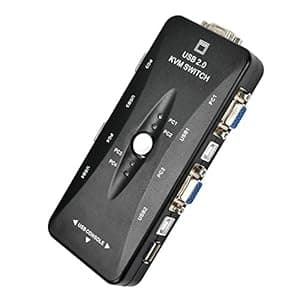 B07PMNQ8GW Availability: Currently unavailable Score: 6.211 Category: Electronics Rating: 3.9 Votes: 5 Find similar productsUSB KVM Switch Box 4 Port VGA Video Sharing Adapter 4 in 1 Out Manual Switche for Computer, PC, Laptop, Desktop, Monitor, Printer, Keyboard, Mouse Control. The KVM switch can operate multiple host servers through a group of monitors, keyboards and mice, thus saving the display, keyboard, mouse and other devices, saving valuable space and eliminating the need to run the front runners In the era of modern information management, KVM has played an increasingly important role and has been widely used in the teaching, design of banking, telecommunications, securities, military command, and so on. Companies, schools, Internet cafes and other host control areas. KVM switches are typically used by one or more administrators to manage multiple computers or an environment where users must operate two or more computers, including network operations centers, information centers, server rooms, software development, Test labs, service centers, departmental LANs, and desktops install multiple computers simultaneously. Product Features: 1: 4-port manual KVM switch with mini pocket design, light and easy to use 2: USB2.0 port 3: Support Microsoft smart mouse, Logitech network mouse and so on 3: Support DOS, Win95 / 98 / 98SE / 2000 / ME / XP/ 7/ 8/10, WinNT, Netware, Unix, Linux 4: support for hot-swappable, do not need to turn off the KVM switch and the computer can plug in or unplug the connected computer 5: excellent picture quality, resolution up to 1920 * 1440, bandwidth: 250MHz 6: no software control, you can select the host computer to be operated by the button 7: there is automatic monitoring function for monitoring the host running 8: LED for monitoring status 9: A beep sounds when the port is switched Purchase Notes: This product does not bring their own power cord, you need to purchase the power of the line need to be purchased separately, (a host needs to connect a power cord, then two hosts need to connect two power lines and so on) Power port USB male (B type) that is common printer data cable!. |
 B07TD8FFVD Availability: Currently unavailable Score: 5.988 Category: Electronics Rating: 4.6 Votes: 3 Find similar productsWayJaneDTP 5PCS 1x4 Matrix Array 4 Key Membrane Switch Keypad Keyboard 4 Keys. 100% Brand new and good quality1*4 Matrix membrane switch with FPC circuitSingle chip microcomputer extended keyboardPrecise and professional made, stable performance Pad Size: 68*20mm Total Length: 107mm Package Included:5 x 1x4 Key Matrix Membrane Switch Control Panel Slim Keyboard Keypad. | 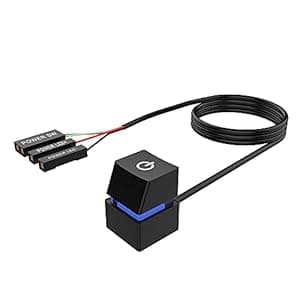 B09CZCJYSL Price: $11.98 Score: 5.848 Category: Electronics Rating: 4.5 Votes: 237 Find similar productsDesktop Computer Power Switch,LITROK External Remote Start PC Motherboard Power On Off Switch Button Extension Cable. Product description: Desktop switch weight: about 1OZ(28g) Switch extension cable length: 78.7(200cm) Switch case color: black Case Material: ABS Switch case size: 0.78*0.78*1.18 (20*20*30mm) Connection terminals: POWER SW,POWER LED+,POWER LED- Installation guide: A. Find a suitable hole from the back of the chassis and lead the connecting cable of the desktop switch into the chassis. B1. No longer use the original power on key, only use the external extension power on key. a. Change the jumpers one by one,do not install led + and led - in reverse direction. b. After checking that all terminals are connected correctly, confirm that the start button and led functions are normal. B2. The original power on button and the external power on button all need to be able to work normally. a. Change POWER LED+ and POWER LED- one by one, and do not install led + and led - in reverse direction. b. Find the POWER SW jumper on the motherboard,remove the original terminal,connect the splitter's female teminal to the main board, and then connect the original power SW terminal and the external power SW terminal to the other end of the splitter. c. Confirm that the start button and led functions are normal. C. If you don't need the LED colorful effect, you can choose not to connect the two POWER LED terminals. D. Bind and fix the connecting wire with the attached cable tie. E. After confirming the position of the external switch,then use the attached invisible double-sided adhesive pad to fix the switch. Reminder: Please make sure that this desktop switch is suitable for your desktop computer,avoid unnecessary troubles such as damaging the chassis. Package Include: Desktop Switch: 1 pcs Spare splitter wire: 1 pcs (for power SW) Double-sided adhesive pad: 2 pcs Cable tie:2 pcs. |