E-commerce Search Demo
AI Assisted Filters
Parameters
Query:
Category filters: All
AI Assist: ON
Page: 1
Products
Time taken: 2 Max score: 1000.000 Total hits: 100 Full time: 0.0 s
Showing 1-10 of 100 products
 B077T89CS5 Availability: Currently unavailable Score: 1000.000 Category: Electronics Rating: 4.1 Votes: 269 Find similar productsmyCharge PowerGear Sound Protective Portable Charging Case for Wireless Earbuds Headphones | Custom Tray Compatible with Powerbeats & Removable for Other Brands | 1400 mAh / 1A Output. Keep your earbuds charged day and night with the PowerGear Sound. Simply plug in your earbuds to the USB port and place inside the charging case. The charging case will protect your earbuds. Never workout or travel with dead headphones again! Ensure your earbuds are always charged with the super portable PowerGear Sound that's perfect for charging, protecting and storing your earbuds. And that's not all, PowerGear Sound comes complete with a removable tray that fits powerbeats perfectly. | 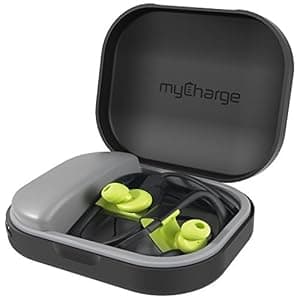 B077T39TSY Price: $8 Score: 7.752 Category: Electronics Rating: 4.1 Votes: 68 Find similar productsmyCharge PowerGear Tunes Protective Charging Case for Earbuds Headphones (1000 mAh / 1A Output). myCharge PowerGear Tunes. |
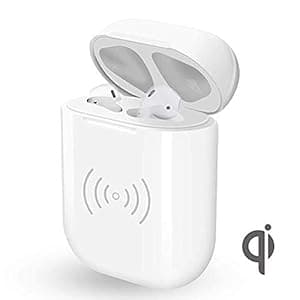 B07S2PRC5Z Availability: Currently unavailable Score: 7.463 Category: Electronics Rating: 5 Votes: 1 Find similar productsEarpods Wireless Charging Case Compatible with Charger Supply 5 Times Charge, Protect Earphones - [No Sync Button, Earpods not Included]. . |  B0995BLF97 Price: $36.99 Score: 6.944 Category: Electronics Rating: 4 Votes: 814 Find similar productsBLANDSTRS Airpods Wireless Charging Case Replacement, Wireless Charger Battery Case Compatible with AirPods 1 & 2, NO EARPODS (Black). Product Specification Battery capacity: 450 mah Charge AirPods for more than 5 times. Note: Not include Airpods, Not compatible wtih Airpod pro. *Only compatible with Airpods1&2 Input: 5V=0.3A Interface: Lightning Material: ABS Package: 1* Wireless charging case(Black) 1* Use manual Flashing Light Indicator: Red light (battery level: 0%-33% ) Blue light (battery level: 33%-66% ) Green light (battery level: 100% ) How to match steps: Put earbuds into charging case, press button until green light flash, release button and access to the pairing mode. And then choose “Connect with iCloud” to proceed connection. Tips:Don’t click Connect when the phone displays Not Your AirPods, otherwise the paring fail. Please wait for the phone to show AirPods and click Connect . When the AirPods and phone are connected successfully, press the button to pair. Common Fault and Eliminating Methods: 1.One of the earbud have no sound once paired: Put the earbuds into charging case close the lid,and then open the cover . 2.Bluetooth pairing failed several times: 1) After the charging case is fully charged, put your earbuds into case for charging and then pair again. 2)After the battery of earbuds are exhausted, put them into charging case and then you can pair successfully. 3.After a long time in the charging case, earbuds has no sound: make both charging case and earbuds in full- charge or Check the earbuds are connected to the phone whether or not. 4.The phone didn't pop up the pairing window for a long time: 1)Check whether the phone has bluetooth enabled 2)Due to some abnormal functions caused by the long running of the phone, please restart the phone. 3.) Unlock the phone after the lock screen,remove the earbuds and put them back intNote: Please use Qi-compliant adapter to charge this charging case, other adapter with different protocols may not compliant with this charging. |
 B06ZZZDRMC Availability: Currently unavailable Score: 6.944 Category: Electronics Rating: 5 Votes: 15 Find similar productsPolarPro PowerPod-Battery Integrated Headphone case for Beats Studio, Solo3, and Solo2. . | 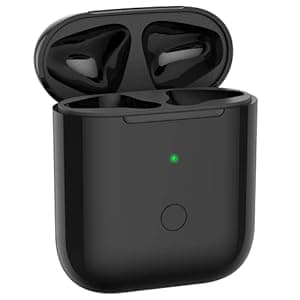 B09VB7BTJ5 Availability: Currently unavailable Score: 6.897 Category: Electronics Rating: 4 Votes: 337 Find similar productsCharging Case for Airpod 1/2, Support Cable & Wireless Charger, Wireless Case Replacement Built-in 450 mAh Battery with Sync Pairing Button, No Earbud (Black). Feature - Compatibility with AirPods 1 & AirPods 2 - 450mAh battery capacity supply over 5times full charge for your Airpods earbuds. -Quick charge Inside the case. Just 15 minutes make you 3 hours of listening time. -Compatible with all Qi standard wireless charger and cable charge. -With the sync button and sync to your Airpods automatically. -Support bluetooth pairing, connects easily. Package 1*wireless charging case Charging to case Red light flash(0%-33% battery level) Blue light flash(33%-66% battery level) Green light on is full charge(100% battery) Charging to earbuds Green light on (66%-100% battery level) Blue light on (33%-66% battery level) Red light on (10%-33% battery level) Red light flash (10% battery level) Switch cover status indicator Put earbuds into charging case the light off in 5 seconds, when turn on/off the cover of the case light off in 5 seconds. (When charging case less than 10% battery, it can’t changing to the earbuds, just support turn on/off bluethooth and bluethooth pairing) Button control Pairing: Earbuds put into charging case, press button more than 1s green light flash, release button and into the pairing 1 gen/ 2 gen mode. When your phone shows “connect through the iCloud”. During pairing if your phone is pairing sucessed, press button to cancel pairing. Pairing cancel after 120s if you don’t press button to cancel it. Warming tips: *During pairing it will be not connect success if your phone show that not your Airpods and you connect to it. Please connect to YOUR Airpods! *The power show on your phone extract within 5% and LED light display doesn’t flash during charging. |
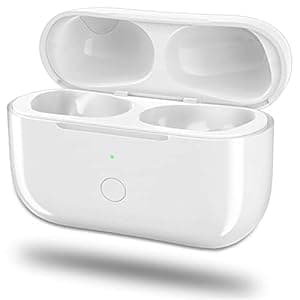 B0C6GPTCNG Price: $29.69 Score: 6.849 Category: Electronics Rating: 3.5 Votes: 64 Find similar productsWireless Charging Case Replacement for AirPods Pro - Charger Cases Only Compatible with Air pod Pro, Support Blue-Tooth Pairing Sync, 660 Mah Built-in Battery, No Earbuds. Why choose our charging case replacement? 1.Working like original charging case,Compatible Model is only for Air Pod Pro.(Note: Not for Airpods 1&2 ). 2.660mAh battery capacity supply over 5 times full charge for Airpods Pro, fast charge earbuds, just 15-20 minutes. 3.Two way charging: Compatible with cable charger and all Qi standard wireless charger, convenient for your life. 4.Support bluetooth pairing sync button, fast connects. 5.Lightweight and compact size, easy to carry it anywhere. How to Match Steps: a. Put your earbuds into the charging case, Activate the phone’s bluetooth settings. (Note: Two earbuds must be put into the charging case to ready pairing and charging). b. Open the lid, it will automatically connect for your phone when you use it again.and while you need to press the Blue-tooth pairing sync button until green light flashes if the connection is failed, release button and access to the pairing mode. c. At this time, the phone will pop up a pairing window, Choose “Connect with iCloud” to proceed connection. confirm the name of your earbuds and pair them.(Note: Please Do NOT click Connect when your phone displays Not Your Air pods, otherwise the pairing will fail.) d. Wait for the pairing to complete.When the phone is connected to the earbuds,you can open the lid to use them. Note:Only compatible with Airpods, not compatible wtih Airpod pro. Common Fault and Eliminating Methods Q: If no sound from a single earphone after pairing succeeded? a)Clean the earbuds as well as and the charging case. b)Put the earphones in the case, open and close the lid twice. Or take out the earphones to pair again. c)This earphone may out of battery. Please put it back to the case for charging 15 minutes and then try again. Q: If it failed pairing after multiple times or the headphones disconnect as soon as take them out from the charging case? a) Please make the charging case fully charged,and put earphones back for charging , try to pair again. b) Please let the earphones stand still on 15h to run out of electricity, turn off the lid after be put in charging case, then charge. c.Make sure your phone already been upgraded to IOS12.2 or above. Q: There' s one earbud no sound after long time leaving unused. a) Please fully charge the charging case and the earbuds again for they are exhausted of battery in a long time unused. b) Please check the earphones is connected to the phone. Q: If the pairing window doesn't be popped up for a long time. a) Please check if the Bluetooth has been enabled. b) Please reset the phone. c) Unlock the phone again after the screen locked,take out the earphones to pair once again. Q: Failed to disconnect Bluetooth Connection after close the charging case with earbuds inside. a) One of earbud is out of power,charged it take it back. b) One of the earbud poorly contacts with the charging case. Clean the charging contacts point on the earphones, put it back and try again. Package Include: 1* Charging Case - White 1* User Manual. | 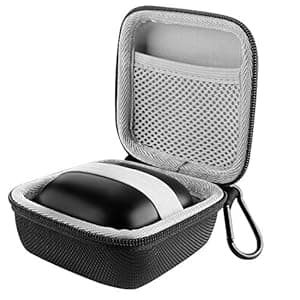 B083QFCNB7 Availability: Currently unavailable Score: 6.849 Category: Electronics Rating: 4.5 Votes: 10 Find similar productsLinkIdea Hard Case for Beats Powerbeats Pro Portable Wireless Bluetooth Earbuds, Power Beats Pro Canvas Nylon Cover Travel Bag, Earbuds Storage Case with Space for Charging Cord and Parts (Black). . |
 B07JJVC7T1 Price: $89.49 Score: 6.711 Category: Electronics Rating: 4.7 Votes: 915 Find similar productsBose Soundsport Free Wireless Charging Case (Midnight Blue). Replacement charging case for the SoundSport Free wireless headphones. The magnetized case keeps the earbuds in place and protected while they charge, and provides two additional full charges—or up to 10 hours of battery life. Plus, a quick 15-minute charge will give you 45 minutes of battery. | 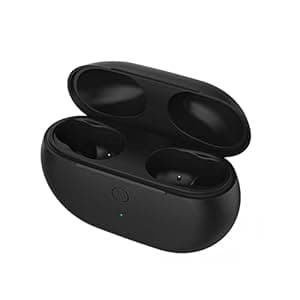 B09VPJ8G45 Price: $34.99 Score: 6.623 Category: Electronics Rating: 3.7 Votes: 127 Find similar productsCharging Case Replacement Compatible for Beats Studio Buds with Bluetooth Pairing Sync Button & 660mAh Built-in Battery Charger(Not Include Beats Studio Buds) Black. . |