E-commerce Search Demo
AI Assisted Filters
Parameters
Query:
Category filters: All
AI Assist: ON
Page: 1
Products
Time taken: 2 Max score: 1000.000 Total hits: 100 Full time: 0.0 s
Showing 1-10 of 100 products
 B07K1B4GSJ Availability: Currently unavailable Score: 1000.000 Category: Office Rating: 3.9 Votes: 4865 Find similar productsBest Printers Printhead Cleaning Kit - HP, Epson,Canon, Brother & Lexmark - Large High Efficiency 20ml Premium Syringe - 100ml Certified. Why are hundreds of people so happy with our product, because it works! We have save people hundreds of dollars in repair fees, ink, new printers. Our passion is to help people save money. Do it yourself! YOU DONT NEED TO BE AN EXPERT TO USE THIS PRODUCT. We give you instructions and you save BIG MONEY! Our product has been tested and proven over and over again. Join the club, fix your printer and save hundreds at an affordable price! Kit Includes: x1 Syringe 20ML x2 Nozzle Connectors X2 Small L shaped connectors X1 Needle X1 Set Of Gloves X 1 plastic tubing extension x1 Cleaning Solution Fluid/ Bottle 100ML Cleaning kit for Hp, Epson and Canon printers. Works on various printer models. Printhead Cleaning Kit Instructions: 1.Print a nozzle check pattern to identify which colors need cleaning 2. Warm up the cleaning fluid and remove ink cartridges (you can simply warm up the cleaning fluid bottle) 3. Remove print-head (if possible). 4. Connect silicone tubing from syringe to printer nozzle and inject cleaning fluid into each nozzle to be cleaned. Repeat until all the fluid is used. 5. Clean the area and MAKE SURE EVERYTHING IS DRY. Before putting everything back together. 6. Leave the printer off for 24 hours. After the 24 hour period, power the printer on. 7. IMPORTANT, After using the cleaning kit run a printhead, nozzle or power cleaning multiple times to allow the ink to be pushed back into the system. 8. Print a nozzle or print quality report to verify all colors have returned. Note: If referred from YouTube video use both these and video instructions. WARNING: PLEASE ALLOW 24 HOURS TO DRY BEFORE POWERING PRINTER BACK ON. TO AVOID DAMAGE! Disclaimer Printer cleaning is successful 95% of the time, but does require a supply of fresh ink and carries a small risk of damage to the printer. As such, we recommend using cleaning when other methods (such as the inbuilt cleaning function) have already been tried, and when the printer has no functional use unless fixed. As errors in the printer are possible in some circumstances. Safety notes Keep out of the reach of children Eye protection is recommended during use. ***IF THE PRODUCT DOESN'T WORK OR YOU NEED ADDITIONAL HELP PLEASE MESSAGE ME THE SELLER (BEST PRINTERS) DIRECTLY ON AMAZON. I WILL RESOLVE ANY PROBLEMS YOU ARE HAVING WITH THE PRODUCT. |  B07CZ3MH7D Availability: Currently unavailable Score: 11.364 Category: Office Rating: 3.8 Votes: 3 Find similar productsInkjet Printers Printhead Cleaner for WF-7610 WF-7620 WF-7110 WF-2660 WF-2630 WF-2760 WF-2750 WF-3640 WF-3620 WF-2650 XP-430 XP-330 XP-424 XP-420 XP-410 XP-220 XP-320 30ml Kit. Unblock Print Head Nozzles for EPSON PRINTERS. EasyEbuyer Printer Cleaning Kit Flush For use on: BROTHER, CANON, DELL, EPSON, HP, KODAK, LEXMARK, PITNEY BOWES, AND SHARP PRINTHEADS WORKS WITH ALL CISS SYSTEM PRINTERS AND ATTACHMENTS AS WELL!!! Safely and effectively removes clogs and debris from print heads! Have your prints been streaking? Are you seeing banding in your prints? If your prints are not as crisp as they should be... your print head may be clogged. This can happen for several reasons: If you haven't used your printer in a while or if you go awhile between printing, your print heads could have dried ink, dust or debris clogging them. This kit works on: ARCHIVAL, CLARIA, DURABRITE, DYE-SUB, PHOTO and ALL COLOR inks!!! Just a few drops dissolves dried ink in just minutes! (Deep clogs or sludge may take up to an hour to clear) It also clears the cartridge print head of other debris and dust causing poor quality printing. It's safe and simple to use! Couldn't get an easier and effective solution! Included in the Print Head Cleaning Kit *1 oz (30ML) of specially formulated printhead cleaner! *1 10ml syringe with blunt needle *Tubing if needed to get in to the print head *Gloves *DETAILED STEP BY STEP INSTRUCTIONS. |
 B00MOMIEMI Availability: Currently unavailable Score: 10.204 Category: Office Rating: 3 Votes: 13 Find similar productsPristine Fluid Cleaning kit 4oz (120ml) for Epson/Brother Printer. Clean & unblock printhead Nozzle. Pristine Fluid is a professional chemical solution developed in cooperation with PhD researchers. It is a concentrated formulation made with 3M chemicals which is designed to flush & clean printheads. Pristine Fluid should be used when poor printing quality - streaks or missing lines - is experienced, and when printer cleaning cycles do not help. It can be used to unblock & clean printheads, refill empty cleaning cartridges, moisten printer ink pads. No dismantling required! Is it good? The fluid works for more than 95% of our 9000+ customers. It will not work if the printer has a mechanical fault, or printhead nozzles are fused up (for printers used a lot with blocked printheads). We offer FREE support if you need assistance - just contact us through Amazon. What's in the Kit? 4oz of fluid (120ml), a step-by-step manual (16 pages), tubing, syringe, gloves (latex free) and blotting paper. Compatibility Compatible with Epson & Brother A4/A3 printers. Compatible with dye inks and pigment inks (a.k.a. archival). Not compatible with solvent based inks, edible inks, plotters, Epson BX600/BX700/BX800 series. Delivery US/Canada (5-7 business days), Europe (3-5), World (10-15). - Please visit our shop to check other kits -. |  B07771B1FP Availability: Currently unavailable Score: 8.850 Category: Office Rating: 2.7 Votes: 6 Find similar productsPrint Head Cleaner, Print Head Clog Buster, Professional Flush for Epson. For use on: BROTHER, CANON, DELL, EPSON, HP, KODAK, LEXMARK, PITNEY BOWES, AND SHARP PRINTHEADS WORKS WITH ALL CISS SYSTEM PRINTERS AND ATTACHMENTS AS WELL!!! Safely and effectively removes clogs and debris from print heads! Have your prints been streaking? Are you seeing banding in your prints? If your prints are not as crisp as they should be... your print head may be clogged. This can happen for several reasons: If you haven't used your printer in a while or if you go awhile between printing, your print heads could have dried ink, dust or debris clogging them. If you refill your cartridges, sometimes the ink in your print head can dry up during the process causing less than perfect prints. Occasionally, your print heads will dry up for environmental reasons, such as a dry environment. Especially during the winter months when your home or office is being heated. If you alternate cartridges, such as replacing your black with a photo cartridge. The cartridge not in use will be prone to drying due to contact with the air. Sometimes, print heads just dry up... for unknown reasons. This kit works on: ARCHIVAL, CLARIA, DURABRITE, DYE-SUB, PHOTO and ALL COLOR inks!!! Just a few drops dissolves dried ink in just minutes! (Deep clogs or sludge may take up to an hour to clear) It also clears the cartridge print head of other debris and dust causing poor quality printing. It's safe and simple to use! Couldn't get an easier and effective solution! So safe to use, it may be used for maintenance. No need to wait for a clog to ruin your print job, practice prevention! If you refill your own cartridges, make this part of the process to ensure clear flowing jets . Just calculate the savings. Imagine the possibilities! Our most precious resource! Included in the Print Head Cleaning Kit are: *1 oz (30ML) of specially formulated printhead cleaner! *1 10ml syr. |
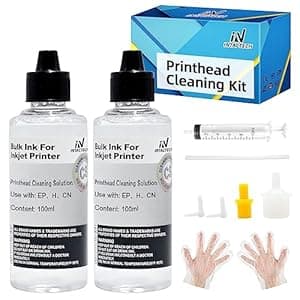 B092QTT4WW Price: $15.99 Score: 8.403 Category: Office Rating: 4.1 Votes: 79 Find similar productsPrinthead Cleaning Kit for HP Canon Epson Brother Inkjet Printer, High Efficiency Nozzle Cleaning Kit with 10ml Syringe 2 * 100ML. . | 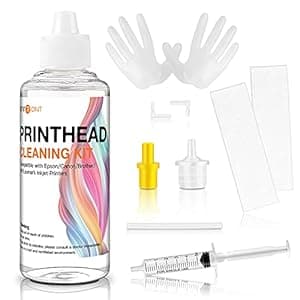 B093PNB7VK Availability: Currently unavailable Score: 8.333 Category: Office Rating: 4.1 Votes: 98 Find similar productsHTVRONT Printhead Cleaning Kit 100ML, Printer Cleaning Kit for Epson, HP, Canon, Brother & Lexmark 8600 8610 8620 8720 ET-2650 ET-2750 WF-2650 WF-2750 WF-7710 WF-7720…. . |
 B07KJ8SQBM Price: $34.99 Score: 7.042 Category: Office Rating: 4.6 Votes: 37 Find similar productsMagicard ID Printer Cleaning Kit (3633-0053). the magicard 3633-0053 cleaning kit offers an easy and inexpensive way to maintain your printer's optimal printing functionality. magicard 3633-0053 cleaning kits include a printhead cleaning pen and alcohol cleaning cards to keep your magicard printer working optimally. dust and other tiny debris can degrade your printed image quality and even damage your printhead or other critical parts of your printer. with routine cleanings, you can expect optimal image quality and a longer life for your magicard card printer. cleaning cards for color id printers ? also compatible with enduro enduro enduro duo enduro duo enduro+ enduro+ enduro+ duo enduro+ duo enduro3e le enduro3e le mc200 mc200 mc200 duo mc200 duo rio pro, rio pro, rio pro duo rio pro duo rio pro le rio pro le rio pro 360 rio pro 360. |  B0048OTHGC Availability: Currently unavailable Score: 6.623 Category: Office Rating: 3.4 Votes: 3 Find similar productsND R@ FREE Printhead cleaner 30ml+ 4X100ML refill ink for 21 22 27 28 56 57 60 61 61XL Black and Color ink refill kit with refill syringe and and refill instruction. The item with ND Logo!. . |
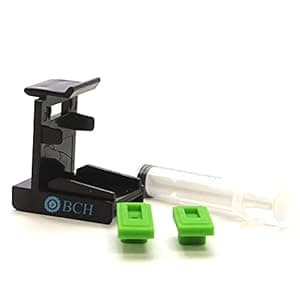 B0973JRGVZ Price: $9.47 Score: 5.848 Category: Office Rating: 4 Votes: 9 Find similar productsBCH Priming Tool Kit for Unclogging Canon PG-210 CL-211 PG-243 CL-244 PG-245 CL-246 PG-275 CL-276 (XL/Regular) Ink Cartridges. PROCEDURES ON HOW TO USE THIS: 1. Look at the bottom of the cartridge and decide if you have a long printhead slot or a short one. (Long one for black and Short for tri-color) 2. Put a correct silicone pad on the clip 3. Put the cartridge on top of the silicone pad. Align the cartridge in the middle of the clip. Now, push the cartridge down and forward until you hear a click. It would be best if you used a downward and forward push. Some customers report that they cannot do this because the clip is too small. The clip is not too small and is the correct size to gurantee a tight seal. 4. Use a syringe, and draw 1-2 ml of ink from the bottom. If you feel there is no vacuum, wiggle the cartridge a little to adjust the cartridge's position on the silicone pad. 5. Remove the cartridge, clean the bottom of it, and install it in the printer. Repeat if necessary. Tips: for older dried cartridges, you can fill a bowl with 1/2 inch of distilled water, heat the water with a microwave until boiling, put the cartridge in hot water until it cools to room temperature, and then do the priming. Important Note: For stubborn clogs, we recommend BCH cleaning solutions. | 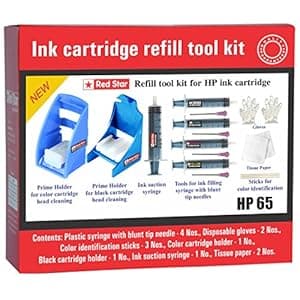 B075715B8M Availability: Currently unavailable Score: 5.814 Category: Office Rating: 4 Votes: 209 Find similar productsRed Star Ink Cartridge Refill Tool kit for hp 63 62 61 60 64 65 67 & 901 Black and Color Ink Cartridge ( Tools for Ink Filling, Nozzle Cleaning, Ink Suction Priming Holder Clip & Instructions ). Red Star ink cartridge refill tool kit is very useful for refilling the used ink cartridges. This tool kit will be able to help you to refill and reuse your printer cartridges and thereby cutting down the printing expenses. Contents of this kit are the necessary tools for refilling black and color ink cartridges. Kindly watch demo in our YouTube channel RELIABLE REDSTAR. Highlights of RED STAR refill tool kit. The blunt tip needle assures safety while filling ink. Separate syringe & needle with color label for every color make the ink filling perfect Prime holder provided for cleaning the cartridge nozzle in case the ink is not coming out properly through the cartridge nozzle after refilling the cartridge. Polythene hand gloves keep the hands clean while filling the cartridge. Color identification sticks help to identify the color of the ink in every chamber of the color cartridge. Tissue paper is useful to clean the cartridge nozzle. |