E-commerce Search Demo
AI Assisted Filters
Parameters
Query:
Category filters: All
AI Assist: ON
Page: 1
Products
Time taken: 2 Max score: 1000.000 Total hits: 100 Full time: 0.0 s
Showing 1-10 of 100 products
 B07M5WNBDP Availability: Currently unavailable Score: 1000.000 Category: Office Rating: 3.5 Votes: 13 Find similar productsTuobo 88 Printhead 2PK C9381A C9382A Remanufactured Compatible for Officejet with Pro K5400 L7550 L7580 L7590 L7650 L7680 L7750 L7780 L7790 Printer(1BY, 1MC)-US. CONTAIN: 1 x 88 Black/Yellow printhead (C9381A)with New chip 1 x 88 Cyan/Magenta printhead (C9382A)with New Chip COMPATIBLE PRINTER MODEL: Officejet Pro K5300,K5400, K5400dtn, K5400dn K5400tn,K550,K550dtn, K550dtwn, K8600, K8600dn, L7550, L7380,LC480,L7580,L7590,L7650,L7680, L7750, L7780, L7500. Bullet Point & Product Detail TYPE: Your printer will perform as usual with the remanufactured printhead. PACKAGING: You do not worry about extral leaked ink damaging package. All of printheads are protected in an individual plastic bag to prevent extra ink. STORAGE: 1. Place printheads in room temperature environment, avoid the sun, strong light and heat source. 2. Before replacing the printheads, please don't tear apart packaging. NOZZLES: Premium, long-life print. USE INSTRUCTION: 1.Take off orange covers. 2. Remove seals. 3. Install, do NOT use finger to touch chips. 4. Do printer head cleaning in printer setting. TIPS: 1. Please confirm your Printer/Printhead Model before order. 2. If the printer can't recognize printheads, please take off printheads, use eraser to clean the chips softly, install back and restart printer (We advise you wearing gloves and prevent extra ink). 3. If printer appears Non-Genuine/Defective, Expiration/Align Failure or other error messages, please click Yes/OK/Next to continue, then printer can print. 4. If prints come with fading color, steak or broken lines when installing new ink cartridges, please try to do printer head cleaning in printer setting once or twice. |  B0836D2JZ4 Availability: Currently unavailable Score: 10.753 Category: Office Rating: 2.5 Votes: 5 Find similar products2 Pack HP88 Printhead C9381A C9382A for HP Officejet Pro K5400 L7480 L7500 L7550 L7580 L7590 L7650 L7680 L7710 L7750 L7780 L7790 Printer. Package Contains (Compatible) : 1xHP 88 Black/Yellow C9381A Printhead 1xHP 88 Cyan/Magenta C9382A Printhead Printer Compatibility : Officejet Pro K5300,K5400, K5400dtn, K5400dn K5400tn,K550 K550dtn, K550dtwn, K8600, K8600dn, L7550, L7380,LC480 L7580,L7590,L7650,L7680, L7750, L7780, L7500 WhyChoose Us : 1.100% printer test for each Printhead to ensure fullworking condition and a superior print quality. 2.Premium Quality: Easy to Install. Smooth printing without clogging. Clear printing quality and vivid color 3.100% Compatibility: Adopting the lastest smart chips. 4.Competitive price, Environment friendly, Less waste. 5. Packaging Protection keeps products away from possibility ofdamage during transportation and ensure your product arrive safely. |
 B08P16NPPH Price: $35.67 Score: 10.101 Category: Office Rating: 3.2 Votes: 51 Find similar productsCompatible HP940 C4900A C4901A Printhead for HP Officejet K8000 K8500 Printer by Getu Office, 2-Pack (BK/Y+C/M). Notice: - To prevent the static affect the stability of the chip, please do not touch the chip. - Before installing the new print head, please make sure printer works properly (Otherwise the main board may burn it which causing the printer refusing to print). Then remove the cover and the protective film of the print head to install. - Use the printer automatic cleaning function to clean the print head 2 to 3 times to ensure smooth operation of the printer.- If the print head do not recognize your printer at the first time, please use eraser or cotton swab to clean the chips softly, then re-install the print head and restart the printer. - The print head must be used with a suitable ink cartridge. Dye and pigment inks cannot be mixed.- Each print head has pass tested before we send it to you. please use it in confidence. Customer Service/ How to contact us: ☛Product listing > Click Sold by Getu office> Choose the option Ask a questionLog into Your Account > Click Your Account > Your Order > Find your order and click Contact Seller. | B00JXBJWGU Availability: Currently unavailable Score: 9.346 Category: Office Rating: 3.7 Votes: 20 Find similar productsINKTONER Remanufactured Toner Cartridge Replacement for HP 88 ( 2-Pack ). CONTAIN: 1 x 88 Black/Yellow printhead (C9381A)with New chip 1 x 88 Cyan/Magenta printhead (C9382A)with New Chip COMPATIBLE PRINTER MODEL: Officejet Pro K5300,K5400, K5400dtn, K5400dn K5400tn,K550,K550dtn, K550dtwn, K8600, K8600dn, L7550, L7380,LC480,L7580,L7590,L7650,L7680, L7750, L7780, L7500. Bullet Point & Product Detail TYPE: Your printer will perform as usual with the remanufactured printhead. PACKAGING: You do not worry about extral leaked ink damaging package. All of printheads are protected in an individual plastic bag to prevent extra ink. STORAGE: 1. Place printheads in room temperature environment, avoid the sun, strong light and heat source. 2. Before replacing the printheads, please don't tear apart packaging. NOZZLES: Premium, long-life print. USE INSTRUCTION: 1.Take off orange covers. 2. Remove seals. 3. Install, do NOT use finger to touch chips. 4. Do printer head cleaning in printer setting. TIPS: 1. Please confirm your Printer/Printhead Model before order. 2. If the printer can't recognize printheads, please take off printheads, use eraser to clean the chips softly, install back and restart printer (We advise you wearing gloves and prevent extra ink). 3. If printer appears Non-Genuine/Defective, Expiration/Align Failure or other error messages, please click Yes/OK/Next to continue, then printer can print. 4. If prints come with fading color, steak or broken lines when installing new ink cartridges, please try to do printer head cleaning in printer setting once or twice. |
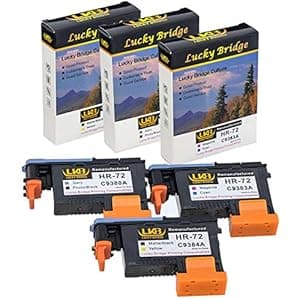 B07BZMLBLV Price: $58.99 Score: 8.333 Category: Office Rating: 2.7 Votes: 17 Find similar productsLKB Remanufactured HP72 printheads C9380A C9383A C9384A New Updated Chips Replacement for HP Designjet T610 T620 T770 T790 T1100 T1120 1200 T1300 T2300 (1MK/Y+1C/M+1PK/G)- 1 Set 3PK -US. Package Included: 1xGray/Photo Black, 1xCyan/Magenta, 1xMatte Black/Yellow (3PCS, 1 G/PK, 1 MC , 1 MK/Y) , C9380A / C9383A / C9384A, 3 pcs 100% compatible with the following printers: . HP Designjet T610 T620 T770 T790 T1100 T1120 1200 T1300 T2300 1. My printer reports The following print head has a problem or any error message, how do we process the next step? LKB Answer: Just skip the message, and press OK or Continue and go on printing. 2. My printer did not recognize the print head, how do we do? LKB Answer: ① please take off print heads, use eraser to clean the chips softly and tissue paper to clean the metal touch pot softly(can't finger touch), and then re-install the print head; Or ②You can use a knife to tear off the remanufactured print head chip, and then use the double-side tape to paste the original chip. 3. My printer hasn't printed for a long time, now the printer report shows that the print head has a problem, how do we do? LKB Answer: Your printer at least needs to print 1~2 pages twice a week. 4. If the ink in the cartridge is dye ink, can I change the dye ink to pigment ink? LKB Answer: No, can't. Warranty Card: We will send a Warranty Card to you with shipment. We stated below on the card: ◆ Money Back Rule in case any defect; ◆ Normal Printing Problem Solution. Note: 1. Our print head is remanufactured, not original one, Non OEM value-save more for you; 2. When you replace the print head, please do Printer Head Cleaning 2~3 times every time. How to contact with us (3 Months Money Back Warranty): Product listing > Click Sold by Titlebaum> Choose the option Ask a question Log into Your Account > Click Your Account > Your Order > Find your order and click Contact Seller. | 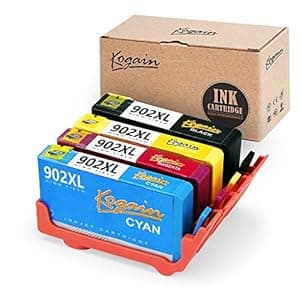 B07FVQ7WR6 Availability: Currently unavailable Score: 8.197 Category: Office Rating: 3.2 Votes: 65 Find similar productsKogain Compatible Replacement for HP 902 902XL Ink Cartridges, Works with HP OfficeJet Pro 6968 6978 6958 6962 6960 6970 6979 6950 6954 6975 Printer. (NON OEM) Compatibility printer: Officejet pro 6962 Printer Officejet pro 6958 Printer Officejet pro 6978 Printer Officejet pro 6968 Printer Officejet pro 6975 Printer Officejet pro 6960 Printer Officejet pro 6970 Printer Officejet Pro 6950 Printer Officejet pro 6954 Printer Officejet Pro 6951 Printer Officejet pro 6979 Printer The Best for you: 100% Compatibility: Kogain remanufactured HP 902XL ink cartridges are recycled from original HP 902XL. Working with your printer in 100% compatibility.Amazing quality: ink particle<20 nm, ink comes out smoothly without printhead blocked. No matter where you are, you always can get the perfect output.Quality measures: Each cartridges are tested and individually packed. No worry about any leakage on your finger and carpet. Warm hints: Keeping the cartridges upside down with some tissue for 5 mins, then remove the orange cover with tissue carefully. If the printer pops up Non-Genuine, please click Yes, OK or Proceed to go on to work. Cleaning the printhead for twice can get a better output.Prompting the “Cartridge cannot be recognized” message, please reinstall it several times.Cleaning the printhead for twice can get a better output. Contact us: If you have had any issues with the products, please do not hesitate to contact us for a replacement. Product listing - Click YELENG (under the sale price) - Ask a question. |
 B00GMMW3ZU Availability: Currently unavailable Score: 8.197 Category: Office Rating: 3.1 Votes: 450 Find similar productsKogain Remanufactured Ink Cartridge Replacement for HP 902 902L 902XL, Work with HP OfficeJet Pro 6968 6978 6958 6962 6960 6970 6979 6950 6954 6975 Printers. (NON OEM) Compatibility printer: Officejet pro 6962 Printer Officejet pro 6958 Printer Officejet pro 6978 Printer Officejet pro 6968 Printer Officejet pro 6975 Printer Officejet pro 6960 Printer Officejet pro 6970 Printer Officejet Pro 6950 Printer Officejet pro 6954 Printer Officejet Pro 6951 Printer Officejet pro 6979 Printer The Best for you: 100% Compatibility: Kogain remanufactured HP 902XL ink cartridges are recycled from original HP 902XL. Working with your printer in 100% compatibility.Amazing quality: ink particle<20 nm, ink comes out smoothly without printhead blocked. No matter where you are, you always can get the perfect output.Quality measures: Each cartridges are tested and individually packed. No worry about any leakage on your finger and carpet. Warm hints: Keeping the cartridges upside down with some tissue for 5 mins, then remove the orange cover with tissue carefully. If the printer pops up Non-Genuine, please click Yes, OK or Proceed to go on to work. Cleaning the printhead for twice can get a better output.Prompting the “Cartridge cannot be recognized” message, please reinstall it several times.Cleaning the printhead for twice can get a better output. | B07R4W7SHN Availability: Currently unavailable Score: 8.197 Category: Office Rating: 3.1 Votes: 450 Find similar productsKogain Remanufactured Ink Cartridge Replacement for HP 902 902L 902XL, Work with HP OfficeJet Pro 6968 6978 6958 6962 6960 6970 6979 6950 6954 6975 Printers. (NON OEM) Compatibility printer: Officejet pro 6962 Printer Officejet pro 6958 Printer Officejet pro 6978 Printer Officejet pro 6968 Printer Officejet pro 6975 Printer Officejet pro 6960 Printer Officejet pro 6970 Printer Officejet Pro 6950 Printer Officejet pro 6954 Printer Officejet Pro 6951 Printer Officejet pro 6979 Printer The Best for you: 100% Compatibility: Kogain remanufactured HP 902XL ink cartridges are recycled from original HP 902XL. Working with your printer in 100% compatibility.Amazing quality: ink particle<20 nm, ink comes out smoothly without printhead blocked. No matter where you are, you always can get the perfect output.Quality measures: Each cartridges are tested and individually packed. No worry about any leakage on your finger and carpet. Warm hints: Keeping the cartridges upside down with some tissue for 5 mins, then remove the orange cover with tissue carefully. If the printer pops up Non-Genuine, please click Yes, OK or Proceed to go on to work. Cleaning the printhead for twice can get a better output.Prompting the “Cartridge cannot be recognized” message, please reinstall it several times.Cleaning the printhead for twice can get a better output. |
 B07HRBTW9Z Availability: Currently unavailable Score: 8.065 Category: Office Rating: 4.7 Votes: 7 Find similar productsAntonglian Compatible Ink Cartridge Replacement for HP 920XL 920XL High Yield Work with Officejet 6500 6500A 7500 7500A 7000 6000 E709 E710 Printer. (6BK, 3C, 3M, 3Y). 100% Compatible with the following printers HP Officejet 6000 - E609a HP Officejet 6000 Wireless - E609n HP Officejet 6500 - E709a HP Officejet 6500 Wireless - E709n HP Officejet 6500A - E710a HP Officejet 6500A Plus - E710n HP Officejet 7000 Wide Format - E809a HP Officejet 7500A Wide Format - E910a Product Main Features: High quality Chips: Updated chips allows full compatibility with all printers that take HP920XL 920XL ink cartridges. show ink level accurately. well recognization, stable printing performance . Exceptional Ink Quality: Premium quality ink delivers crisp text and graphics, produce clear, consistent and colorful printing. No jam ,no leak and no harm to your printer. Professional Packaging: Each ink cartridge is individual sealed packed with multilayer shockproof standards to ensure the security of your cartridges during transit. Strict Quality Control Every ink cartridge is methodically tested to ensure full functional with its compatible printer models before shipped. Easy to install Please tear off the pull sign tapes when using it. Insert the ink cartridge to the correct slot. Warm Notes: 1.Don’t touch the chip. 2.Do n’t tear off the clear plastic seal. 3.Please click Yes or Continue if you receive a You have not installed genuine cartridges message 4.If appear Replace cartridge, please wipe the chip with the rubber eraser, or re-install it several times. 5.To improve the printing quality, it is better to run the printhead cleaning in printer properties before printing with a new cartridge. Service and support If you have any question, please feel free to contact us, we sure will do our best to help you out. Please remember we are always here for you. | 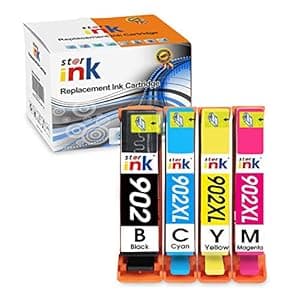 B07S46FC6P Availability: Currently unavailable Score: 8.000 Category: Office Rating: 2.7 Votes: 32 Find similar productsstarink Remanufactured Ink Cartridge Replacement for HP 902XL 902 for OfficeJet Pro 6968 6978 6958 6962 6960 6970 6971 6974 6975 6976 6979 OfficeJet 6950 6951 6954 6956 6961 Printer, 4 Pack. Features: 1. Premium Prints: Colorful, clear & consistent, delivering outstanding results.2. High quality Chip:Provide consistent and stable performance. Compatible Printers: HP OfficeJet Pro 6958 6960 6961 6962 6963 6964 6966 6968HP OfficeJet Pro 6970 6971 6974 6975 6976 6978 6979HP OfficeJet 6950 6951 6954 Package List & Page Yield: 1* 902 Black ink cartridge: 900 Pages per ink cartridge1* 902 XL Cyan ink cartridge : 825 Pages per ink cartridge1* 902XL Magenta ink cartridge :825 Pages per ink cartridge1*902XL Yellow ink cartridge :825 Pages per ink cartridge Using Steps: 1. Tear off the color tape before install. (Please with some tissue in your hand in case of leakiness)2. Install the ink cartridge into the correct printer slot. *Note: 1.Please click OK when the printer displays words such as NO INK or Non-Original to use.2. Please take ink cartridges off and install again if your printer do not recognize them at the first time. Warm Tips :1. Please wear disposable gloves to avoid staining your hands.2.If prints come with color fading, streak or broken lines, please try to clean the printer head and nozzle for a few times.3. It would be better to keep the printer opening if frequent use, as most printers will start printhead cleaning automatically when reset, which will waste the ink.4. If the printer isn’t used frequently, you can turn it off. Just need to switch on the power weekly, which will protect the printer heads from clogging. |