E-commerce Search Demo
AI Assisted Filters
Parameters
Query:
Category filters: All
AI Assist: ON
Page: 1
Products
Time taken: 3 Max score: 1000.000 Total hits: 100 Full time: 0.0 s
Showing 1-10 of 100 products
 B002SEUX7Q Availability: Currently unavailable Score: 1000.000 Category: Electronics Rating: 4.2 Votes: 87 Find similar productsWestcott Green Screen Digital Photography Kit (Discontinued by Manufacturer). Green Screen is now beyond easy! Using the included SIMPLE software and just one click, import your photo and watch as the green screen is automatically removed! Then, place your subject anywhere by choosing one of the included 100 digital-photo quality backgrounds or your own! Background Categories include: Holiday, Sports, Music, Birthday, Whimsical, Baby, Retro, Futuristic and more! Perfect your images using the included software editing tools such as adjusting brightness, contrast, saturation and blur. Size to perfection utilizing the crop, flip and position tools. Control your subject and background independently for maximum results. | 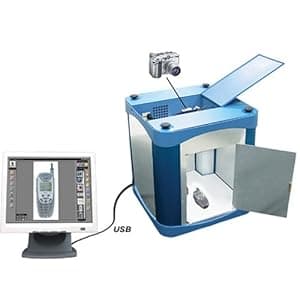 B000ALEW1W Availability: Currently unavailable Score: 6.667 Category: Electronics Rating: 5 Votes: 3 Find similar productsPhotosimile 100 - PC-controlled Digital Photography Studio - Take Professional Quality Images In-house in Just Seconds with Photosimile!. . |
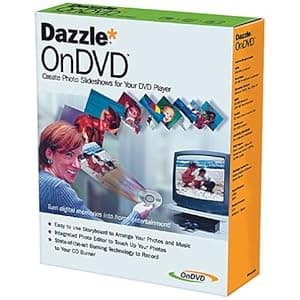 B000068D9G Availability: Currently unavailable Score: 5.435 Category: Electronics Rating: 2.3 Votes: 7 Find similar productsDAZZLE DM11000 OnDVD Software. Amazon.com With OnDVD you can take digital pictures and turn them into photo albums on CDs that play in your DVD player. Simply select and arrange your photos like an old-fashioned slide show and burn them to a CD. With OnDVD, you can arrange up to 200 digital pictures in simple storyboard format, then add an audio track. Should some of your photos require cropping, rotation, or even red-eye removal, you can use Dazzle Photo Editor to perfect them. Advanced algorithms tackle tough but common problems such as bad lighting and color imbalance. When you're done, preview the slide show in OnDVD to see how it will look and sound on your TV. OnDVD's state-of-the-art burning engine works with your CD-R or CD-RW burner to create Video CDs (VCDs) that play on DVD players. And just like saving the original negatives of your photographic prints, OnDVD keeps a copy of each original, high-quality digital photograph on the CD itself. Favorite photos can easily be turned into photographic prints ready to be framed. | 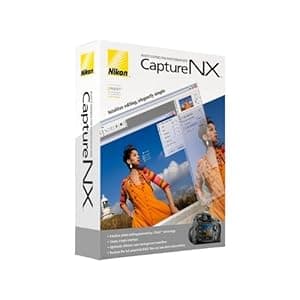 B000GEQ0HW Availability: Currently unavailable Score: 5.376 Category: Electronics Rating: 3.2 Votes: 64 Find similar productsNikon Capture NX Software for Windows and Mac. From the Manufacturer Supercharge your workflow with the next generation of high-quality image editing and processing. Utilizing U Point technology, Advanced Nikon Capture 4 delivers you powerful tools to help you fully realize the potential of your photographic imagination. The new Capture NX software releases not only the power of Nikon's Electronic Format (NEF) files; for the first time it makes JPEG and TIFF processing and editing elegant and easy enough for any photographer to implement. There are no complicated procedures - Nikon's new interface provides intuitive access to all of the tools you need. Make you photographic possibilities endless and realize the power of your imagination with Capture NX. U Point technology Capture NX image editing utilizes Nik Software's patented U Point technology. This new innovation in photo image processing and editing can be applied to Nikon's NEF files, as well as any camera's JPEG and TIFF files (some Capture NX functions apply to NEF files only). Capture NX features powerful tools that enhance images without complicated processes. Simply select a control point and adjust it's slider until you see the image as you like it. It's a highly visual, intuitive technique. Color Control Points Color Control Points let you directly select and isolate an entire image or an area within it for enhancement quickly. Within moments, you can choose and use any Color Control Point to modify any aspect of a selected area including: Size, Hue, Brightness, Saturation, Contrast, Red, Green, Blue, and Warmth. Capture NX also learns to distinguish multiple control points. This feature eliminates complexity and saves you time when you are making a series of enhancements to your photograph. This lets you create your professional quality image in a matter of seconds! Show Selection for accurate control Use the show selection feature for each Color Control Point to see which area of the image is affected by the Color Control Point. This process reverses the image into a black and white view and clearly shows the image areas under adjustment. Black, White, Neutral Control Points Black, White and Neutral Control Points can be used to set the dynamic range and correct color casts in your images. Neutral Control Points can also be used to set color balance in an image. Each Control Point appears on the image and can be easily dragged from point to point, for precise movement and positioning to achieve the desired effect. The Control Points' sliders let you adjust their effect for the respective Control Point areas. Neutral Control Points can be used to set a targeted color to any color available within the color picker. This is useful for removing color casts and toning, even without a neutral object in the scene. Use of multiple Neutral Control Points helps reduce multiple color casts and enhance selected colors in images. The drag, point and slider control is very easy to use, yet very powerful and creative in its effect! Red-eye reduction Thanks to U Point technology, red-eye can be easily removed. Just place a Red-Eye Reduction Control Point on each of the offending eyes, and away it goes! With just a few slider adjustments, you can use a color Control Point to make blue (or any other eye color) eyes brighter, darker or more radiant. With a mere Ctrl-D click, you can duplicate your Color Control Point, so you can rest assured that the effect to each eye will be the same. Photo Quality Non-destructive image editing Capture NX applies non-destructive image processing to NEF files, which means that you'll never compromise your original image. Every enhancement made is saved in an edit list with the original data and thumbnail. When changes are made to a JPEG or TIFF, however, it will affect the quality of the original image. To avoid compromising the quality of your images, Capture NX allows you to save the image under a different file name, or simply covert the file into Nikon's NEF format. No modifications made to NEF files Parameters set on any Nikon camera-produced NEF file (White Balance, Sharpening, Color Mode, Saturation, etc.) are applied to the image you transfer to Capture NX for editing. So your creative photographic decisions are preserved, and there's less to do later when you're finishing the photo on your computer. Versatility Enjoy the sheer power and convenience of intuitive photo editing. Selective tools With Capture NX, you get additional tools that allow you to apply over 25 enhancement styles. Batching By automatically applying one or more enhancements to a series of images, the new, improved batch processing of Capture NX is simple, and saves photographer's time. Edit List For easier, more intuitive photo editing, the Capture NX Edit List helps you to track, cancel or add new modifications. Browser The completely redesigned Capture NX Browser lets you sort, organize, compare, tag and improve images. Use it to select an image to enhance, rename a series of photographs, or quickly and easily apply a batch process to a group of images. |
 B000VEPC4O Price: $54 Score: 5.319 Category: Electronics Rating: 3.3 Votes: 43 Find similar productsPhilips 5.6-Inch Digital Photo Frame (White). Product Description The 5FFCMI photo frame with 5.6 high resolution digital image. Display your digital photos with the same rich color and quality of professional prints. The high pixel density give you sharp detailed photo display in a 4:3 aspect ration for optimal icture viewing. The Auto Fit feature will automatically size your digtal photo to fill the display screen. The photo manager will allow you play slide shows, display single photos or show thumbnails of a group fo pictures. Easily create photo albums, cut and size your photos, rotate or mask to customize the image. Fast and easy photo transfers from you PC via USB 2.0 connection. Memory card slots will allow you to transer, copy or use as additional memory for the photo frame. Has a built in memory of 32 MB and displays images up to 640 x 480 resolution for sharp clear pictures. AC power cord. From the Manufacturer Every picture tells your story. Display your digital photos with the same quality and rich color of professional prints! The easiest way to display digital photos without a PC, the Philips 5FF2CMI PhotoFrame complements your home decor with its sleek and stylish design. High pixel density for sharp and detailed photo display The very best high density screen in the industry displays 88 percent more pixels per square inch than even a high-end 17-inch LCD monitor--showing off your treasured photos with the same 'real life' rich detail and vibrant colors as high quality prints. Perfect digital colors for rich and stunning photo display Full color display brings out the best in your photos with vibrant, real life colors by displaying the same full range of colors found in professionally printed photos. 4:3 aspect ratio for optimal distortion-free display Philips digital PhotoFrame ensures your photo to be displayed in 4:3 ratio for the best viewing experience. Auto photo orientation to fit portrait or landscape modes Automatic landscape/portrait recognition employs a sensor that recognizes PhotoFrame orientation and displays each photo in its proper mode. Play slideshows, single photo, thumbnails, or show clock Flexible display modes give you the freedom to display your photos one image at a time, in thumbnail mode for quick, easy searches, or to create a slideshow of your most treasured photos. Create albums, slideshows, and manage your photos Smart Album allows you to create and manage albums, as well as to set up and adjust transition effects to your photo slideshows. Rotate, zoom, crop, mask, and add effects to your photos The PhotoEffect Wizard is an easy-to-use feature that allows you to rotate, zoom in, crop, and even adjust photo color tones to black and white or sepia right within PhotoFrame. Collage effect for random multiple-photo display in one view It's a slideshow effect to show photos in collage form that automatically and randomly compiles different photos together to avoid unattractive borders that may result from photos which are smaller than screen size. Copy photos among memory cards for extra storage Philips PhotoFrame can read two memory cards at the same time via its internal memory card readers, and SmartCopy software helps you to copy your digital pictures from one memory card to the other one. The software automatically resizes and compresses the copied photos to maximize the amount of photos you can store internally or externally. Fast and easy photo transfers from your PC via USB 2.0 The USB 2.0 connector is built into the device for quick and easy transfer of photos from PC to PhotoFrame. Display and manage photos on memory cards or internal memory Memory-Card Manager is a set of two built-in memory card readers and featured software for displaying, editing, storing, and organizing your memory card photos directly in one, hassle-free step--all without a PC. It accepts two memory card slots: The first slot accepts Compact Flash 1 (CF), while the second slot accepts Secure Digital Card (SD), SDHC Card, Multimedia Card (MMC), xD card, Memory Stick (MS), MS pro, MS Duo, and MS Pro Duo (via adapter), Micro SD card and Mini SD Card (via adapter). They all work as extended memory space--just like PhotoFrame's internal memory. What's in the Box: Philips 5-Inch Digital Photo Frame, AC-DC adapter, quick start guide, stand, USB cable, PC/Mac software CD, user manual. | 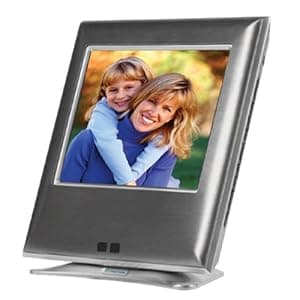 B0000TQEEM Availability: Currently unavailable Score: 5.263 Category: Electronics Rating: 2.9 Votes: 10 Find similar productsVialta VistaFrame Digital Picture Frame (Grey). Amazon.com The Vialta VistaFrame offers a great way to display all your favorite memories directly from a digital media card, without the need for a computer, camera, or USB reader. Compatibile with five popular memory-card formats--CompactFlash Type 1, SmartMedia, SecureDigital, MultiMedia Card, and Memory Stick--the VistaFrame lets you view images directly from the cards or from internal memory. The VistaFrame manages up to 500 images per card directory and lets you save eight favorite images to an internal memory (My Album) for later viewing. Setup is easy--all that's required is an AC power adapter (included). The VistaFrame goes into power-saver mode after an hour of inactivty; a built-in motion sensor awakens the display, or you can just press a button or insert a memory card to resume viewing images. What's in the Box VistaFrame, AC power adapter, user guide, warranty card From the Manufacturer VistaFrame lets you view your digital pictures directly from your camera's memory cards. Create your own slideshow or display one digital picture continuously. No computer, camera or Internet connection required. |
 B001FMXWA2 Price: $168 Score: 5.263 Category: Electronics Rating: 3.7 Votes: 31 Find similar productsKodak Easyshare M1020 Digital Picture Frame with Home Decor Kit. Product Description Easy share M1020 PIC frame W/ DEC KIT From the Manufacturer The sleek and stylish Kodak EasyShare M1020 10-Inch Digital Frame hosts a suite of features including the innovative Quick Touch Border, as well as accessories for enhancing your home. With the M1020 control of the frame has never been easier with Quick Touch Border that allows for simple operation with a touch or slide of your finger, while leaving the screen fingerprint and smudge-free. Transferring pictures from your PC to your M1020 is quick and easy. In addition to organizing and editing your pictures, this software makes it simple to move your favorite pictures and slide shows from a computer directly onto the frame. The Kodak EasyShare M1020 displays images in HD format (16:9 aspect ratio). The screens are color tuned to Kodak's standards and use Kodak Color Science for vibrant colors and pleasing skin tones-displaying pictures in brilliant color and crisp detail. To customize the frame to match your home's decor, two decorative mattes are included, in Cranberry Red and Silver colors. In addition, optional Kodak Digital Frame Faceplates are available in Mahogany with a gold matte, Silver with a blue matte, Black Shadowbox with a champagne matte, and Espresso Shadowbox with a black matte. Easy to change, the faceplates snap onto the frame and update the look to suit your own personal style. Kodak EasyShare M1020 Highlights Simple to use Be in charge with Kodak's Quick Touch Border with back lighting--the unique touch border keeps fingerprints off of your viewing screen so your images stay beautiful. The touch panel features yellow lights that illuminate to tell you exactly where to touch. Be in charge with Kodak's Quick Touch Border with back lighting --the unique touch border keeps fingerprints off of your viewing screen so your images stay beautiful. The touch panel features yellow lights that illuminate to tell you exactly where to touch. Create, edit and view slide shows--at the touch of your fingertips Smart, intuitive media--done your wayStart viewing your pictures right away--just insert a memory card or USB flash drive and enjoy A frame full of features: slide shows your way, thumbnails, copy, delete, and print Easily access and transfer picturesKodak Easyshare Software, Digital Frame Edition, makes it easy to access all of your pictures and transfer them from your computer to your frame Create multimedia slide shows on your desktop using pictures, videos, and music and easily transfer them to your frame Easily browse and edit your albums The convenient drag-and-drop feature is perfect for transferring pictures for slide shows Store more pictures Store up to 300 pictures directly on your frames 128 MB of internal memory and use the two available SD card slots to view and enjoy even more of your pictures. Set the mood with music Listen to your favorite MP3s with built-in speakers Selectable viewing hours featuring automatic on/off settings. Viewing excellence View your pictures on the 10-inch. (25.4 cm) 16:9 wide screen featuring Kodak Color Science for vibrant color and crisp detail. Accessorize your picturesNew sleek design makes any living room more exciting Display your frame on a tabletop or on a wall--vertically or horizontally Add style to any decor with accessory faceplates (optional) Your frame comes with two decorative mattes in silver and red that allow you to personalize your look and compliment your home decor Discreet cord design--barely visible Create, edit and view slide shows --at the touch of your fingertips Smart, intuitive media--done your way Start viewing your pictures right away--just insert a memory card or USB flash drive and enjoy Start viewing your pictures right away --just insert a memory card or USB flash drive and enjoy A frame full of features: slide shows your way, thumbnails, copy, delete, and print Easily access and transfer picturesKodak Easyshare Software, Digital Frame Edition, makes it easy to access all of your pictures and transfer them from your computer to your frame Create multimedia slide shows on your desktop using pictures, videos, and music and easily transfer them to your frame Easily browse and edit your albums The convenient drag-and-drop feature is perfect for transferring pictures for slide shows Store more pictures Store up to 300 pictures directly on your frames 128 MB of internal memory and use the two available SD card slots to view and enjoy even more of your pictures. Set the mood with music Listen to your favorite MP3s with built-in speakers Selectable viewing hours featuring automatic on/off settings. Viewing excellence View your pictures on the 10-inch. (25.4 cm) 16:9 wide screen featuring Kodak Color Science for vibrant color and crisp detail. Accessorize your picturesNew sleek design makes any living room more exciting Display your frame on a tabletop or on a wall--vertically or horizontally Add style to any decor with accessory faceplates (optional) Your frame comes with two decorative mattes in silver and red that allow you to personalize your look and compliment your home decor Discreet cord design--barely visible A frame full of features: slide shows your way, thumbnails, copy, delete, and print Easily access and transfer pictures Kodak Easyshare Software, Digital Frame Edition, makes it easy to access all of your pictures and transfer them from your computer to your frame Kodak Easyshare Software, Digital Frame Edition, makes it easy to access all of your pictures and transfer them from your computer to your frame Create multimedia slide shows on your desktop using pictures, videos, and music and easily transfer them to your frame Create multimedia slide shows on your desktop using pictures, videos, and music and easily transfer them to your frame Easily browse and edit your albums Easily browse and edit your albums The convenient drag-and-drop feature is perfect for transferring pictures for slide shows Store more pictures Store up to 300 pictures directly on your frames 128 MB of internal memory and use the two available SD card slots to view and enjoy even more of your pictures. Set the mood with music Listen to your favorite MP3s with built-in speakers Selectable viewing hours featuring automatic on/off settings. Viewing excellence View your pictures on the 10-inch. (25.4 cm) 16:9 wide screen featuring Kodak Color Science for vibrant color and crisp detail. Accessorize your picturesNew sleek design makes any living room more exciting Display your frame on a tabletop or on a wall--vertically or horizontally Add style to any decor with accessory faceplates (optional) Your frame comes with two decorative mattes in silver and red that allow you to personalize your look and compliment your home decor Discreet cord design--barely visible The convenient drag-and-drop feature is perfect for transferring pictures for slide shows Store more pictures Store up to 300 pictures directly on your frames 128 MB of internal memory and use the two available SD card slots to view and enjoy even more of your pictures. Set the mood with music Listen to your favorite MP3s with built-in speakers Selectable viewing hours featuring automatic on/off settings. Viewing excellence View your pictures on the 10-inch. (25.4 cm) 16:9 wide screen featuring Kodak Color Science for vibrant color and crisp detail. Accessorize your pictures New sleek design makes any living room more exciting New sleek design makes any living room more exciting Display your frame on a tabletop or on a wall--vertically or horizontally Display your frame on a tabletop or on a wall--vertically or horizontally Add style to any decor with accessory faceplates (optional) Add style to any decor with accessory faceplates (optional) Your frame comes with two decorative mattes in silver and red that allow you to personalize your look and compliment your home decor Your frame comes with two decorative mattes in silver and red that allow you to personalize your look and compliment your home decor Discreet cord design--barely visible Discreet cord design--barely visible. |  B00332HFAA Availability: Currently unavailable Score: 5.208 Category: Electronics Rating: 3.5 Votes: 48 Find similar productsWingscapes WSCA04 Timelapse Outdoor PlantCam (Discontinued by Manufacturer). Product Description Watch Your Garden Growing in Fast-Forward! The Timelapse PlantCam automatically creates movies of your plants in fast-forward! This weatherproof, digital camera takes photos or videos at set time intervals. It automatically stitches together still photos to create a seamless movie of an event that is normally too slow to see with the naked eye. Also great for parties, weather or construction! Amazon.com Watch your plants grow in fast-forward with the Timelapse PlantCam. The PlantCam is rugged and weatherproof, and automatically takes photos and videos at set time intervals. It then stitches the photos together to create a video showing in minutes or seconds what usually can't be seen with the naked eye. The result is a seamless movie of your plants growing. Key Features Easy to use right out of the box Easy to use right out of the box Rugged, weatherproof construction can be left unattended Rugged, weatherproof construction can be left unattended Takes still photos or videos, close-up or landscape Takes still photos or videos, close-up or landscape Lets you see what is normally too slow to view Lets you see what is normally too slow to view Connects easily to your computer or television Connects easily to your computer or television Makes it easy to share your movies through e-mail or post online Makes it easy to share your movies through e-mail or post online Records data to internal memory (16MB) or a memory card (not included) The Timelapse PlantCam can also be used to create movies of parties, construction, weather or other events. The PlantCam makes it possible to see a fast-forward view of processes that are normally too slow to see. Timelapse Photography Made Easy Whether you're interested in garden photography or creating your own movies, timelapse technology offers an innovative view of any sequential event. To create a timelapse movie, simply set the camera to take still photos at the desired time interval—immediately, 30 seconds, 1 minute, 5 minutes, 10 minutes, 15 minutes, 30 minutes, 1 hour, 3 hours, 6 hours, or once a day. It will automatically turn on after each interval countdown, take a photo, then return to battery conservation mode. After you are finished taking photos in timelapse mode, simply set the camera to Convert to Movie and it does the work for you! High-Quality Garden Photos and Videos With 4.0 megapixels, the Timelapse PlantCam takes crisp, clear still photos and video clips. The sturdy, weatherproof construction doesn't interfere with the camera's operation or picture quality. Plus, the photos are high enough resolution to create beautiful prints! View, Save, or Share In Seconds! The PlantCam doesn't require any special software for viewing photos. It can connect directly to your television or computer, or you can simply transfer from the optional memory card. Photos and videos download in standard formats for viewing, printing, e-mailing or posting online. Requires: Four AA batteries (not included) Records data to internal memory (16MB) or a memory card (not included) The Timelapse PlantCam can also be used to create movies of parties, construction, weather or other events. The PlantCam makes it possible to see a fast-forward view of processes that are normally too slow to see. Timelapse Photography Made Easy Whether you're interested in garden photography or creating your own movies, timelapse technology offers an innovative view of any sequential event. To create a timelapse movie, simply set the camera to take still photos at the desired time interval—immediately, 30 seconds, 1 minute, 5 minutes, 10 minutes, 15 minutes, 30 minutes, 1 hour, 3 hours, 6 hours, or once a day. It will automatically turn on after each interval countdown, take a photo, then return to battery conservation mode. After you are finished taking photos in timelapse mode, simply set the camera to Convert to Movie and it does the work for you! High-Quality Garden Photos and Videos With 4.0 megapixels, the Timelapse PlantCam takes crisp, clear still photos and video clips. The sturdy, weatherproof construction doesn't interfere with the camera's operation or picture quality. Plus, the photos are high enough resolution to create beautiful prints! View, Save, or Share In Seconds! The PlantCam doesn't require any special software for viewing photos. It can connect directly to your television or computer, or you can simply transfer from the optional memory card. Photos and videos download in standard formats for viewing, printing, e-mailing or posting online. Requires: Four AA batteries (not included). |
 B0000632H8 Price: $29.99 Score: 5.181 Category: Electronics Rating: 3 Votes: 5 Find similar productsSony EZEDITOR MiniDV Home Video Editing Kit for PC (Windows 98 and Higher). From the Manufacturer Sony presents an easy way to make home videos more entertaining and fun. Buy the EZEDITORDV EZ Editor Kit for use with your Mini DV camcorder and your PC, and you can start editing your home videos to look like they were done by a professional. This affordable, easy-to-use solution comes complete with everything you need to create great home videos. Even Tech TV 's review says the product packs quite a punch with a small price tag. You can shoot your home video on the supplied Sony media and connect to your PC with the supplied IEEE 1394 PCI board and cable (i.LINK/FireWire compatible). Edit your home video on your PC with point-and-click drag-and-drop simplicity. Enhance your video with titles, narration, background music, and transition effects. Share your creations by adding them to your website, sending video e-mails, or by recording finished movies back onto Sony media. You can even copy onto VHS tape for friends and family. | 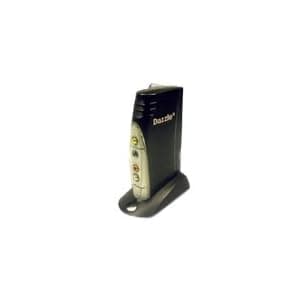 B0002A9SK6 Availability: Currently unavailable Score: 5.051 Category: Electronics Rating: 1 Votes: 5 Find similar productsDazzle DVC120 Digital Video Capture and Authoring Device. Product Description Dazzle Digital Video Creator 120 (DVC120) is a complete home video editing solution and contains all the hardware and software you'll need to make amazing home movies with your camcorder and your PC. The Dazzle DVC120 video capture device connects easily to your PC's USB port and makes it fast and easy to begin capturing and editing DVD quality video. Simply connect your camcorder, import your video and use the included Pinnacle Studio QuickStart software to add incredible special effects, transitions, titles, background music and more. Once your movie is complete, Studio QuickStart will even let you burn your movies to Video CDs or DVD that will play in your home DVD player. Amazon.com From the Manufacturer The Dazzle DVC120 is an affordable external device that makes it fast and easy to connect any video device to any PC, allowing you to capture full-quality video from analog and digital camcorders or VCRs to almost any PC, even those that don't have the latest configuration. It comes with Pinnacle's Studio QuickStart software, which helps you quickly and easily edit videos and burn them to CDs and DVDs. Connects easily to your PC and external video device to pipe video directly to your PC. The Dazzle DVC120 is an easy-to-use external device that encodes DVD-quality video and transfers it to almost any PC through its standard USB port. Any camcorder, VCR, or DVD player equipped with analog outputs can be hooked to the DVC120 with ordinary video cables. Import DVD-Quality Videos via the Standard USB Port Thanks to low system requirements, the DVC120 works with almost any PC bought in the last few years preceding 2004. Works with Any Video Device All digital and analog camcorders and VCRs have audio and video output to connect to TV sets; just use the same connectors and cables to connect them to your DVC120. Store Hours of Video on Your Hard Disk The DVC120 has a real-time DVD encoder chip that automatically converts video into the MPEG-2 format. This shrinks the video file to a quarter of its original size, saving hard disk space. Key Features Import DVD-quality video from almost any video source via the standard USB port Import DVD-quality video from almost any video source via the standard USB port Store hours of high-quality video on your hard disk, thanks to MPEG-2 video compression Store hours of high-quality video on your hard disk, thanks to MPEG-2 video compression Works with any video device with analog outputs Works with any video device with analog outputs Restore damaged videos or edit them automatically in a few minutes with Pinnacle's Studio QuickStart Restore damaged videos or edit them automatically in a few minutes with Pinnacle's Studio QuickStart Preserve and share your movies on CDs and DVDs Preserve and share your movies on CDs and DVDs Share your videos over the Internet (in e-mails, on Web pages, etc.) Share your videos over the Internet (in e-mails, on Web pages, etc.) Input Formats Composite video input (RCA connector) S-Video input (mini-DIN connector) Stereo audio input (two RCA connectors) Import Formats Video: MPEG-1, MPEG-2, AVI Audio: WAV, MP3 Graphics: BMP, JPG, PCT, TGA, TIF, WMF Output Formats Video CD (VCD) or Super Video CD (SVCD) with optional CD-R or CD-RW drive DVD with optional DVD-R, DVD-RW, or DVD+RW drive MPEG-1, MPEG-2, AVI, RealVideo 8 Windows Media format, including Windows Media 9 Transfer videos to your PC from any camcorder, VCR, or DVD player with analog outputs Comes with Pinnacle's Studio QuickStart The Dazzle DVC150 comes with Pinnacle's Studio QuickStart moviemaking software, whose intuitive interface makes it the ideal application to create movies on your PC or laptop. The included Studio QuickStart software allows you to cut, edit, restore, and re-create new videos from your existing home movies. Enhance and Restore Your Old Videotapes Studio QuickStart lets you strenghten washed-out colours, restore old analog tapes, or stabilize shaky movies. Create Movies in Seconds Simply choose both a video and a music track, pick a preset movie style, and let Studio QuickStart instantly create an amazing movie that matches the beat of your favorite song. Preserve and Share Your Movies on CDs and DVDs With Studio QuickStart you can easily compile your best moments in one unique project, which can be burnt on CDs or DVDs, complete with custom menus and chapters for convenient and fast on-screen navigation. Discs burnt with Studio QuickStart can be watched on your PC or almost any home DVD player. Send Your Videos over the Internet Create short video clips that you can attach to your e-mails. See more. |