E-commerce Search Demo
AI Assisted Filters
Parameters
Query:
Category filters: All
AI Assist: ON
Page: 1
Products
Time taken: 3 Max score: 1000.000 Total hits: 100 Full time: 0.0 s
Showing 1-10 of 100 products
 B004JRA6UE Availability: Currently unavailable Score: 1000.000 Category: Office Rating: 2 Votes: 1 Find similar productsNew Encore Software Printmaster Greeting Cards Deluxe 2 Choose From Over 2,600 Fabulous Fonts. . | 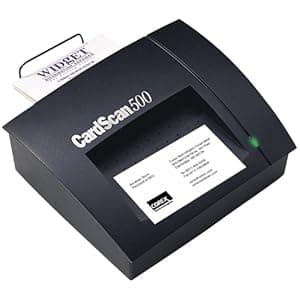 B00003Q090 Availability: Currently unavailable Score: 5.051 Category: Office Rating: 3.3 Votes: 9 Find similar productsCorex CardScan Executive with Version 5.0 Software. Amazon.com The Corex CardScan Executive 500 is an ingenious device designed to help you organize all the business cards you acquire into an easy-to-use contact database. Simply stick a business card into the scanner, and the CardScan 500's OCR technology extracts such information as names, e-mail addresses, and company, placing them into your contact manager for easy reference. The CardScan 500 integrates nicely with ACT, GoldMine, Groupwise, Lotus Notes, Lotus Organizer, Microsoft Outlook, Microsoft Schedule, Sidekick, and other popular programs, while also providing one-touch synchronization with Windows CE and Palm handheld devices. A PC-only device, the CardScan connects to your computer via USB or parallel ports, and can even connect to your digital phone with separately sold Fonesync software and cable. The CardScan 500 comes backed with a one-year manufacturer's warranty. Review Users have long known that Corex Technologies' CardScan Executive is an ace at turning a pile of business cards into a PC database of contact information. Version 5 adds powerful connectivity and information management features. The CardScan 500 scanner, slightly smaller (and quieter) than the previous version, scans business cards slightly more slowly but more accurately. A new USB port will simplify making connections if you can't use your PC's parallel port or if your printer doesn't work on the scanner's pass-through parallel port. I liked the handy catcher: scanned cards don't fall off my desk. A scanner setup wizard simplifies configuring your CardScan or third-party scanners and helping you get the best scans possible with your equipment. CardScan 5's OCR software has gone international: besides being able to recognize information on USA and Canadian business cards, it can now handle cards for Australia, Belgium, Germany, France, Sweden, Switzerland, and the UK. (Note that all of these countries use alphabets identical with, or similar to, English.) Occasionally CardScan sticks a tricky company name (like Widgets USA) into an address field, but you can (and should) manually verify every card. The improved international support hasn't slowed down the scanning or OCR processing. In an informal test, 25 American business cards took only 130 seconds to scan and 95 seconds to process, with five errors for the 25 cards. To make life difficult, I tried feeding the cards in sideways. The same 25 cards took 195 seconds to scan and 150 seconds to process, with fourteen errors for the 25 cards. I also tried altering one card by circling a phone number on it before scanning. This caused many errors in the information near the area that I circled, but the rest of the card scanned perfectly. Moral: you can deliberately make your accuracy worse if you want, but if you leave CardScan alone it makes less errors than I do typing. One nice feature is that you can even scan the back of a card now. This is useful if, like me, you jot down notes about people, businesses, or products. CardScan can retain the notes I scrawled on the back. CardScan now syncs automatically with Psion palmtops, in addition to Windows CE and Palm-based handhelds. I found it easy to make the connection with a Psion, even though you have to use Psion's own somewhat quirky PsiWin software. The prospect of being able to instantly populate a new-out-of-the-box handheld with your complete CardScan contacts database will be popular with many. I never knew what to do with those vCard email attachments before, but CardScan 5 lets me drag and drop them into my contacts database. The Print Wizard is the simplest and most logical way to select data, page layout, and output format that I have ever seen in any product, period. CardScan Update lets you peruse Corex's web site for updated software or scanner firmware. Although I doubt I would use this frequently, it is very straightforward, and automatically gets you the most up-to-date versions available. If you handle business cards, contacts, or handhelds, you need to check out CardScan Executive version 5: for $299, it's an amazing deal. -- From Winmag®. |
 B0043FVV7E Availability: Currently unavailable Score: 4.950 Category: Office Rating: 5 Votes: 2 Find similar productsZebra Technologies 13831-002 Zebra Technologies Designer PRO V2 Software. Zebra manufactures barcode, receipt, kiosk, and radio-frequency identification (RFID) printers and accessories. The company, founded in 1969, is headquartered in Lincolnshire, IL. |  B007W5RG8K Availability: Currently unavailable Score: 4.950 Category: Office Rating: 4 Votes: 3 Find similar productsZebra ZebraDesigner v.2.0 Pro - License - 1 User. Zebra Zebradesigner V.2.0 Pro - License - 1 User - Standard - Pc - Retail. |
 B000VKZFVS Availability: Currently unavailable Score: 4.926 Category: Office Rating: 2.3 Votes: 12 Find similar productsLexmark X2500 Color Copier Scanner All-in-One Multifunction Printer. Do it all with the Lexmark X2500 Multifunction Printer. Users can create one-touch borderless copying in popular photo sizes, and the flatbed scanner easily handles thick books, reports, and more. Lexmark Imaging Studio Software makes it simple to crop, rotate and resize photos, and you can also scan hard copy text documents into a soft copy format. Features Fast! Up to 22 ppm black and 16 ppm color printing Fast! Up to 22 ppm black and 16 ppm color printing Printing up to 4800x1200 dpi print resolution in photo mode on glossy media Printing up to 4800x1200 dpi print resolution in photo mode on glossy media 1-Touch PC-free copying (color or black) 1-Touch PC-free copying (color or black) Reduction/enlargement capacity from 25% - 400% Reduction/enlargement capacity from 25% - 400% One touch borderless copying in popular photo sizes (4x6, 10x15cm) One touch borderless copying in popular photo sizes (4x6, 10x15cm) Flatbed scanner easily handles thick books, reports, and more Flatbed scanner easily handles thick books, reports, and more Specifications Device Type: Printer / copier / scanner Device Type: Printer / copier / scanner Copier Type: Digital Copier Type: Digital Max Printing Resolution: Up to 1200 x 1200 dpi (mono) / up to 4800 x 1200 dpi (color) Max Printing Resolution: Up to 1200 x 1200 dpi (mono) / up to 4800 x 1200 dpi (color) Max Printing Speed: Up to 22 ppm (mono) / up to 16 ppm (color) Max Printing Speed: Up to 22 ppm (mono) / up to 16 ppm (color) Inkjet Technology: Lexmark Thermal Inkjet Inkjet Technology: Lexmark Thermal Inkjet Supported Media Type: Transparencies, envelopes, plain paper, cards, labels, iron-on transfers, photo paper, banner Supported Media Type: Transparencies, envelopes, plain paper, cards, labels, iron-on transfers, photo paper, banner PC Connection Availability: Yes PC Connection Availability: Yes PC Connection: USB PC Connection: USB Operating System Support: MS Windows XP, MS Windows 2000, Apple Mac OS X 10.3.x, MS Windows XP Professional x64 Edition, MS Windows Vista, Apple Mac OS X 10.4.4 or later Operating System Support: MS Windows XP, MS Windows 2000, Apple Mac OS X 10.3.x, MS Windows XP Professional x64 Edition, MS Windows Vista, Apple Mac OS X 10.4.4 or later Cartridge Compatibility:Black: 28(3), 28A, 34 High YieldColor: 29(3), 29A, 35 High Yield Photo: 31 Cartridge Compatibility: Black: 28(3), 28A, 34 High Yield Black: 28(3), 28A, 34 High Yield Color: 29(3), 29A, 35 High Yield Color: 29(3), 29A, 35 High Yield Photo: 31 Photo: 31 Product (L x W x H): 11.5 x 16.9 x Product (L x W x H): 11.5 x 16.9 x. | 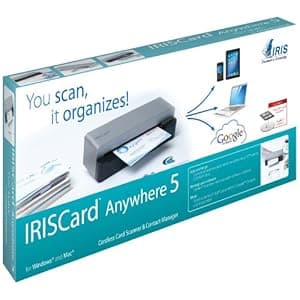 B00753G7KW Availability: Currently unavailable Score: 4.902 Category: Office Rating: 3.3 Votes: 54 Find similar productsIRISCard Anywhere 5 Portable Business Card Recognition Scanner. Scan your business cards, manage your contacts! The IRISCard Anywhere 5 enables on-the-go users to easily extract all the relevant information from business cards and make them available to use, store or share. Since the scanner runs on batteries, you can scan all your cards wherever you are. No need to be tied to a computer. Ideal for today’s mobile lifestyle, it turns contact management into a child’s play. IRISCard Anywhere 5 View larger View larger Here is how it works. Turn your scanner on. Zip your business cards through the cordless, battery-powered scanner. The scanned business cards are now stored in the built-in memory or an SD card. Once back in the office, insert the SD card into your computer, and all the scanned business cards are automatically imported into the Cardiris Pro software for processing and syncing with your contact manager. Export your contacts Export to Outlook, Address Book , Act!, Google Contacts, Microsoft Dynamics CRM, Sales Force and many more! In other words, whatever the contact manager you use, your contacts can be synced. A powerful scanner Whether you are in the office or travelling, a cordless scanner is ideal to capture all your business cards at up to 800 cards per hour. When storing images, the scanner has three possible memory types: USB flash drive, SD card, 512 MB Built-in memory(5000 cards capacity). Hardware specifications Resolution: 400 dpi. Output format: Jpeg. Max doc size: 4X6. Technology you can trust IRIS, maker of the IRISCard Anywhere 5 is now part of the Canon family and offers world class technologies. Worth knowing! iPad compatible with SD card adapter for iPad (not included in the box). iPad compatible with SD card adapter for iPad (not included in the box). Scanner compatible with Windows, Mac, Unix and Linux. Scanner compatible with Windows, Mac, Unix and Linux. Cardiris Pro business card manager included. Cardiris Pro business card manager included. Business cards from 218 different countries are recognized. Business cards from 218 different countries are recognized. Cardiris Pro comes with 19 user interface languages. Cardiris Pro comes with 19 user interface languages. |
 B00B2AORC4 Availability: Currently unavailable Score: 4.831 Category: Office Rating: 1 Votes: 1 Find similar productsAdobe Illustrator CS6 v.16.0 - Complete Product - 1 User. ILLUSTRATOR CS6 16 WIN. Graphics/Designing - Standard Retail - DVD-ROM - PC - Universal English. . | 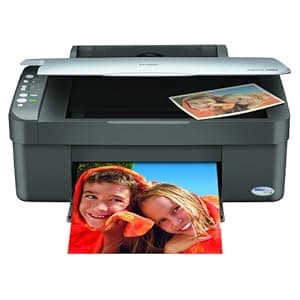 B000ALCJTY Price: $399.99 Score: 4.808 Category: Office Rating: 3.6 Votes: 59 Find similar productsEpson Stylus CX3810 All In One. Product Description Stylus CX3810 All In One From the Manufacturer Printer. Copier. Scanner. Great results made easy. Enjoy amazing quality and durability with DURABrite Ultra Ink Enjoy amazing quality and durability with DURABrite Ultra Ink Get great looking copies - PC-free Get great looking copies - PC-free Easily scan in photos and documents Easily scan in photos and documents Enjoy fast, everyday printing Enjoy fast, everyday printing Take control of ink usage with Individual Ink Cartrdiges Take control of ink usage with Individual Ink Cartrdiges Restore old faded color photos with Epson Easy Photo Fix Restore old faded color photos with Epson Easy Photo Fix Share frame-ready photos in popular borderfree sizes Share frame-ready photos in popular borderfree sizes Create more with your photos Get great looking projects every time with easy scanning and printing, plus PC-free color copying. It's a snap with the Epson Stylus CX3810! Best of all, whether you use plain or glossy photo paper, you'll get amazing quality and durability thanks to revolutionary DURABrite Ultra pigment ink. And, with convenient individual ink cartridges, you take control of ink usage, replacing only the ink that runs out. The Epson Stylus CX3810 is perfect for all your everyday projects. Make quick color copies, or even black-and-white, without ever turning on your computer. You get great results every time, whether you're copying the team newsletter or directions to the game. And, the copies are ready when you are with quick-drying, smudge proof inks. But what about those vacation photos you've been wanting to display? Print your favorite snapshots in popular borderless sizes. It's fast, and it's easy! Just print and they're ready to frame. There's even a great way to handle those old faded color photos already in your album. Scan them and use Epson Easy Photo Fix color restoration and with just one click, make the color as good as new. Then, share the memories all over again with beautiful fade-resistant prints that stand up to water and smudging! Whether you're scanning in recipes, or creating a photo greeting card, the Epson Stylus CX3810 offers the easy, affordable solution for all your everyday projects. Create more with your photos Get great looking projects every time with easy scanning and printing, plus PC-free color copying. It's a snap with the Epson Stylus CX3810! Best of all, whether you use plain or glossy photo paper, you'll get amazing quality and durability thanks to revolutionary DURABrite Ultra pigment ink. And, with convenient individual ink cartridges, you take control of ink usage, replacing only the ink that runs out. The Epson Stylus CX3810 is perfect for all your everyday projects. Make quick color copies, or even black-and-white, without ever turning on your computer. You get great results every time, whether you're copying the team newsletter or directions to the game. And, the copies are ready when you are with quick-drying, smudge proof inks. But what about those vacation photos you've been wanting to display? Print your favorite snapshots in popular borderless sizes. It's fast, and it's easy! Just print and they're ready to frame. There's even a great way to handle those old faded color photos already in your album. Scan them and use Epson Easy Photo Fix color restoration and with just one click, make the color as good as new. Then, share the memories all over again with beautiful fade-resistant prints that stand up to water and smudging! Whether you're scanning in recipes, or creating a photo greeting card, the Epson Stylus CX3810 offers the easy, affordable solution for all your everyday projects. |
 B00000JFNF Availability: Currently unavailable Score: 4.762 Category: Office Rating: 3.5 Votes: 2 Find similar productsAvery Ink Jet Business Cards 2in x 3.5in (Gray). Product Description It's easy to Just Click & Create™ professional looking business cards with Avery® Templates in over 100 popular software programs 2 x 3-1/2 card size on 8-1/2 x 11 sheets High-quality, heavyweight card stock Printable on both sides—front and back. Ultra-fine perforations for clean separation. Ten cards per sheet. Amazon.com Print bright colorful photographic images on glossy stock. Special glossy premium heavyweight stock enhances color, contrast, text and graphics. The unique page layout allows for full bleed (print-to-the-edge) designs. Perfect for business cards, membership cards, identification cards, wallet-size photos, and more! Create professional-looking standard size business cards instantly. Unique micro-fine perforations separate easily, leaving smooth, clean edges. UltraEdge design delivers reliable ink jet printer feeding every time. From the Manufacturer 8377 Avery gray ink-jet business cards; 2 by 3-1/2 inches; 10 cards per sheet;25 sheets per box; 250 cards per box See more. | 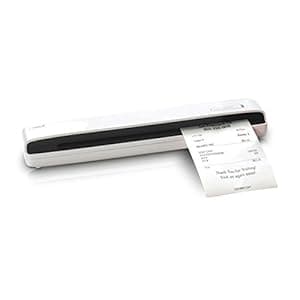 B00V8YIO7I Availability: Currently unavailable Score: 4.762 Category: Office Rating: 3.9 Votes: 71 Find similar productsNeatReceipts Mobile Document Scanner and Digital Filing System for PC and Mac (Renewed). NeatReceipts works where you work - weighing in at less than a pound and powered by USB, NeatReceipts is the perfect tool at work, at home or on the go. NeatReceipts helps you free the information that's trapped in your documents, so you can organize, store, secure and activate it. Scan receipts for expense reports, digitize business cards, prep for taxes (IRS accepts NR scans in lieu of actual receipts!), manage documents. You can even export data, scan to PDF, use Smart Sorting to help organize your files, and convert your scans to editable text. NeatReceipts is a mobile scanner and digital filing system that enables you to scan receipts, business cards and documents so you can organize, store and secure all your important information. NeatReceipts includes the Neat software suite that identifies and extracts the important information--and automatically organizes it for you. Transform receipts into expense reports, business cards into address book contacts and create searchable PDF files from any document. Export information to PDF, Excel, Quicken, QuickBooks, TurboTax and more. Patented software identifies and activates information trapped in paper so you can edit, add notes, run reports and more. Create a digital filing cabinet to organize and secure all your important information. Export to PDF, Excel, Quicken, QuickBooks, Turbo Tax, Outlook, vCard, Plaxo and more. The Neat solution helps you manage receipts, business cards, and documents. NeatReceipts is powered by the Neat software suite for scanning receipts, business cards, documents, and creating tax reports. Think of it as a digital filing cabinet for your documents, business cards and receipts. Except unlike the old paper monster in the corner, you can search for any item in this system simply by entering a keyword or date, place, project or any other information you choose. |